Justin Smith’s engineering business had reached an awkward point: it could build things more confidently than it could price them. At Construc in Queensland, expenses escaped the records, estimates disappointed, and clients had to be asked for more money. His business partner sometimes wrote on the desk. “It was every man for himself,” Smith recalled in a customer account published by ProjectManager.
- Detailed schedules and flexible task views share one project record.
- Hours, costs and workloads help managers compare intention with reality.
- Its customer stories make adoption the test: will people actually update the plan?
Smith had tried alternatives. One failed the test of daily use; another felt overwhelming. What changed his mind about ProjectManager was something smaller than a grand transformation: timesheets became easier. He wanted a calendar. He found a way to make the next quote less of a wager.
The estimate was wrong before the work began
There is a useful distinction here between keeping busy and knowing what the busyness costs. A team can complete its assignments while a business quietly loses money. If hours and expenses live elsewhere, the schedule tells only part of the story. ProjectManager’s proposition is to put those records within reach of the people making decisions.
Five views, fewer competing truths
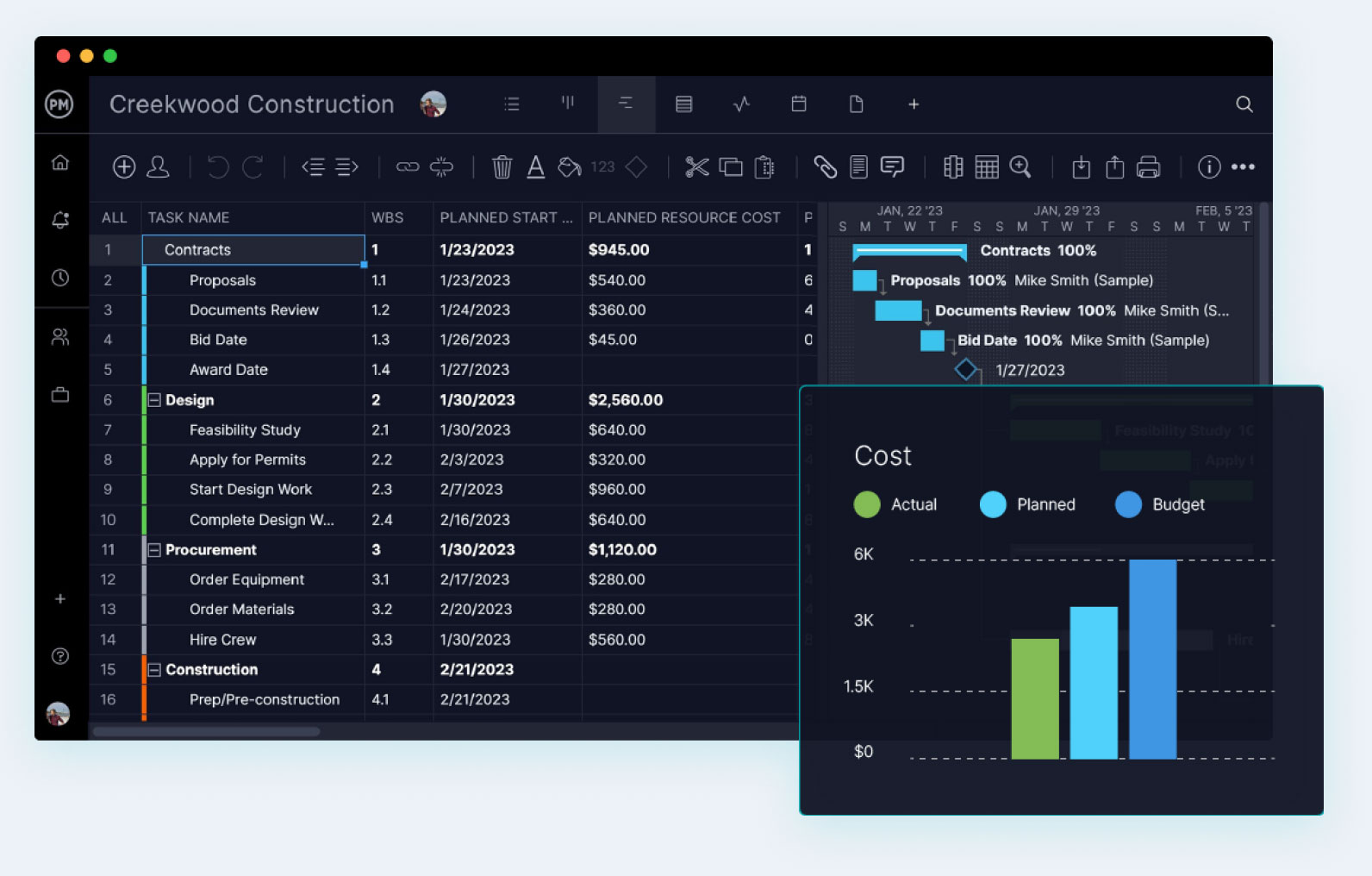
The platform combines Gantt charts, lists, sheets, kanban boards and calendars. That assortment matters because a planner and a contributor often want different things from software. One needs to inspect the sequence of work. The other needs to know what to do next. Giving them different views of shared data reduces the temptation to maintain separate versions.
Its scheduling tools include four dependency types, critical-path filtering and baselines. Dependencies connect work that must happen in a particular relationship; baselines preserve a planned position for comparison with actual progress. Users can import Microsoft Project plans, Excel files and CSVs. The migration pitch is practical: bring the existing plan, then make it accessible to colleagues.
A shared record connects the steps. Conceptual diagram.
Resource tools add another question: who is available? Workload planning, working days and labor rates help connect a schedule to actual capacity. Portfolio dashboards and roadmaps extend the view across projects. For a manager responsible for several commitments, that is a different job from checking whether individual cards have moved into a completed column.
A bank discovers the cost of separate plans
Ephrata National Bank’s problem was organizational. Individual business units had operated separately, leaving implementation needs such as hardware and server space insufficiently considered. As its project management office took shape, the Pennsylvania bank wanted structure that departments could share.
“Microsoft Project was not collaborative enough.”
Michael J. Sosnowski / Ephrata National Bank
In ProjectManager’s published customer account
That statement describes the bank’s experience with the product it evaluated, rather than a verdict on every Microsoft offering. ProjectManager gave the bank Gantt, sheet and list views, alerts and dashboards. Its story includes a wire-transfer-system upgrade - the sort of project where overlooked dependencies are unlikely to become charming anecdotes.
The Hawai‘i Space Flight Laboratory describes a related difficulty: project work and software development had occupied different platforms, making resource tracking harder. Multiple views offered a way to bring those teams together. These are vendor-published accounts, but the recurring need is concrete: colleagues need access to the same work without sharing the same working habits.
The American customer was already there
Jason Westland founded ProjectManager in New Zealand in 2008. By the time of its reported $3.5 million Series A in 2014, roughly 80 percent of its users were in the United States. Zeus Management led the round. The planned use of the money included expanding American sales and marketing and developing the enterprise platform.
It is an instructive reversal of the usual expansion story. The customers had crossed the ocean before the sales operation caught up. Software could travel instantly; customer relationships required investment. Today the company identifies Austin as its headquarters and maintains a presence in Auckland.
The current leadership page names Stephanie Ray as CEO. Its careers page describes a culture of autonomy, experimentation and work-life balance, including no weekend work. Those are the employer’s stated practices. They give the software company a pleasingly specific ambition: organize work well enough to leave it at work.
The bill has more than one line
ProjectManager sells per-user subscriptions with monthly or annual billing. Team covers basic planning and collaboration, with up to ten users and twenty projects. Business adds resource management, timesheets, budgeting and portfolio tools, with up to one hundred projects. Enterprise offers custom pricing and additional security, permissions and support.
Buyers should match the edition to the job. A team buying chiefly for workload balancing and costs needs to examine Business, rather than assume every feature accompanies the entry plan. The Teams integration guide also lists a $5-per-user monthly Integration Bundle for Business or Enterprise customers. For twenty licensed users, that quoted add-on alone would be $100 monthly, before the platform subscription.
Illustrative Teams Integration Bundle cost. Platform subscription additional; confirm purchase terms.
AI joins the meeting; the records still matter
Recent releases push shared records into other tools. On June 29, 2026, QuickBooks Online syncing arrived for approved timesheets, rates and actual task costs. Users select the projects and accounting destinations, then schedule updates. The attraction is straightforward: enter a number once and send it where it is needed.
A phased rollout beginning August 18 introduced an MCP connection for supported ChatGPT and Claude assistants. Its documented actions include finding tasks, creating projects and updating priorities or status. That changes how someone reaches the plan. It does not remove the need to record what happened.
The lesson a reader can copy is modest: test one real project, assign responsibility for updates, then inspect whether recorded hours, costs and dependencies help the next decision. A simple personal checklist may not need this machinery. A team that avoids updating records will give its dashboards little to say. Smith’s desk was an extreme example of the problem. The more ordinary version is a beautifully arranged plan nobody opens.
Open the plan
Explore the software, plans, blog and product demos. Watch a YouTube product walkthrough, or visit the video channel.