A task can be perfectly documented and still be practically invisible. Its deadline lives on a board. Its explanation sits in a document. The decision that changed everything is halfway up a chat thread. Someone has to assemble the pieces. ClickUp’s business begins with that someone.
- Put the work together: tasks, documents, conversations, and reporting share a workspace.
- Keep the context: AI can draw on the records around a task.
- Count the trade-off: consolidation still needs training, ownership, and dependable software.
Founded in 2017 by Zeb Evans and Alex Yurkowski, ClickUp started as an internal tool. In a 2020 interview, Evans described a team unable to see what people were doing or where important tasks belonged. That is an unglamorous founding problem. It is also wonderfully portable. Almost any office can recognize it.
01 / First, find the missing work
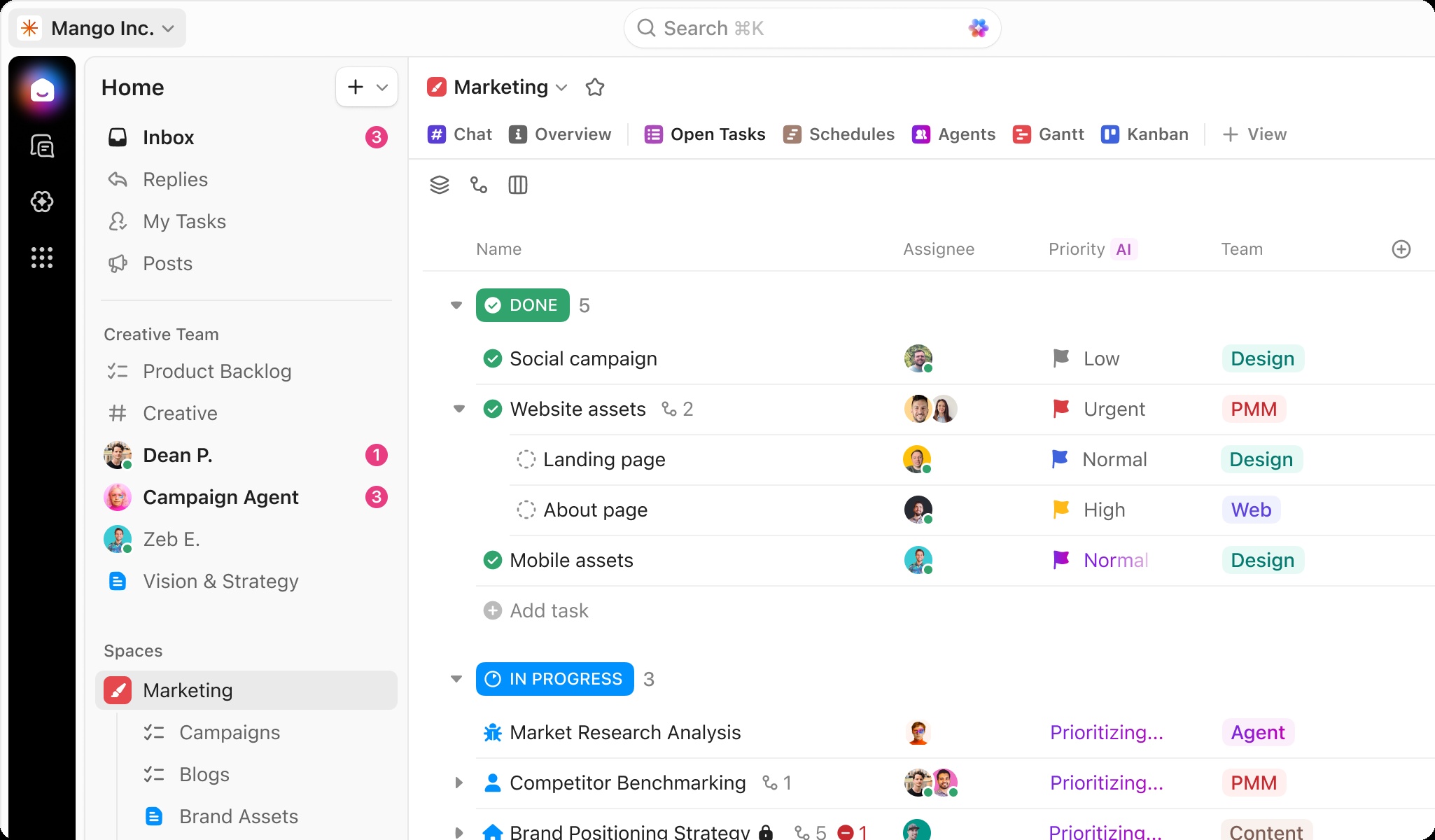
Project software usually asks a team to describe its work. ClickUp also asks why describing it requires so many separate places. Its answer combines tasks, Docs, Chat, Whiteboards, calendars, dashboards, and time tracking. A list, a board, and a Gantt chart offer different ways to inspect work without rebuilding the underlying task each time.
That flexibility places ClickUp among Asana, monday.com, Jira, Notion, and other overlapping work platforms. Its distinction is the breadth of the consolidation pitch. An engineering team can track sprints while a marketing team manages approvals. Both can work inside the same system. Whether that feels tidy or crowded depends heavily on how the workspace is arranged.
02 / One request, fewer journeys
Consider Hawke Media’s recruiting intake. In a published customer interview, its chief of staff explained that hiring managers submit a ClickUp Form before a role reaches the applicant-tracking system. The request arrives in a structured form, where the recruiting team can see what is needed. The software has caught the work at its entrance.
Hawke also described using ClickUp for client projects, internal marketing, and acquisition integration. The useful detail is not the number of features. It is the repeated act of making a request visible. A form feeds a task; a task can have an owner; an owner can move it toward a decision. Fewer people need to reconstruct the story.
Illustrative process. The advantage is a handoff you can follow.
ClickUp’s customer gallery ranges from agency work to departments at companies such as Finastra and Siemens. It advertises more than five million teams. Treat that as the company’s adoption claim, rather than a count of paying organizations or proof that every employee at a customer uses the product.
03 / The repair bill arrives
Evans initially preferred independence. His 2020 Series A announcement explained the change: the product was ready for wider use, competitors were pressing, and international expansion needed resources. ClickUp raised $35 million that June, $100 million that December, and $400 million in October 2021. The last round valued it at $4 billion.
Announced financing, not revenue. The $4B valuation belongs to the 2021 round.
Growth created an awkward test for a product selling time back. In a 2022 reliability disclosure, ClickUp traced interruptions to increased database load, peak processing demands, and bursts of API calls. It said it had hired more than 150 engineers since the Series C announcement. The 2023 architecture account described a rebuilt database and a move to services that could operate more independently.
Here is the uncomfortable arithmetic: putting more work in one place makes that place more consequential when it slows down. Consolidation concentrates responsibility. ClickUp’s repair effort is part of its product story, because reliability determines whether the promised convenience survives an ordinary Tuesday.
“Save one day, Every week.”
ClickUp’s company motto
04 / From organizing work to doing it
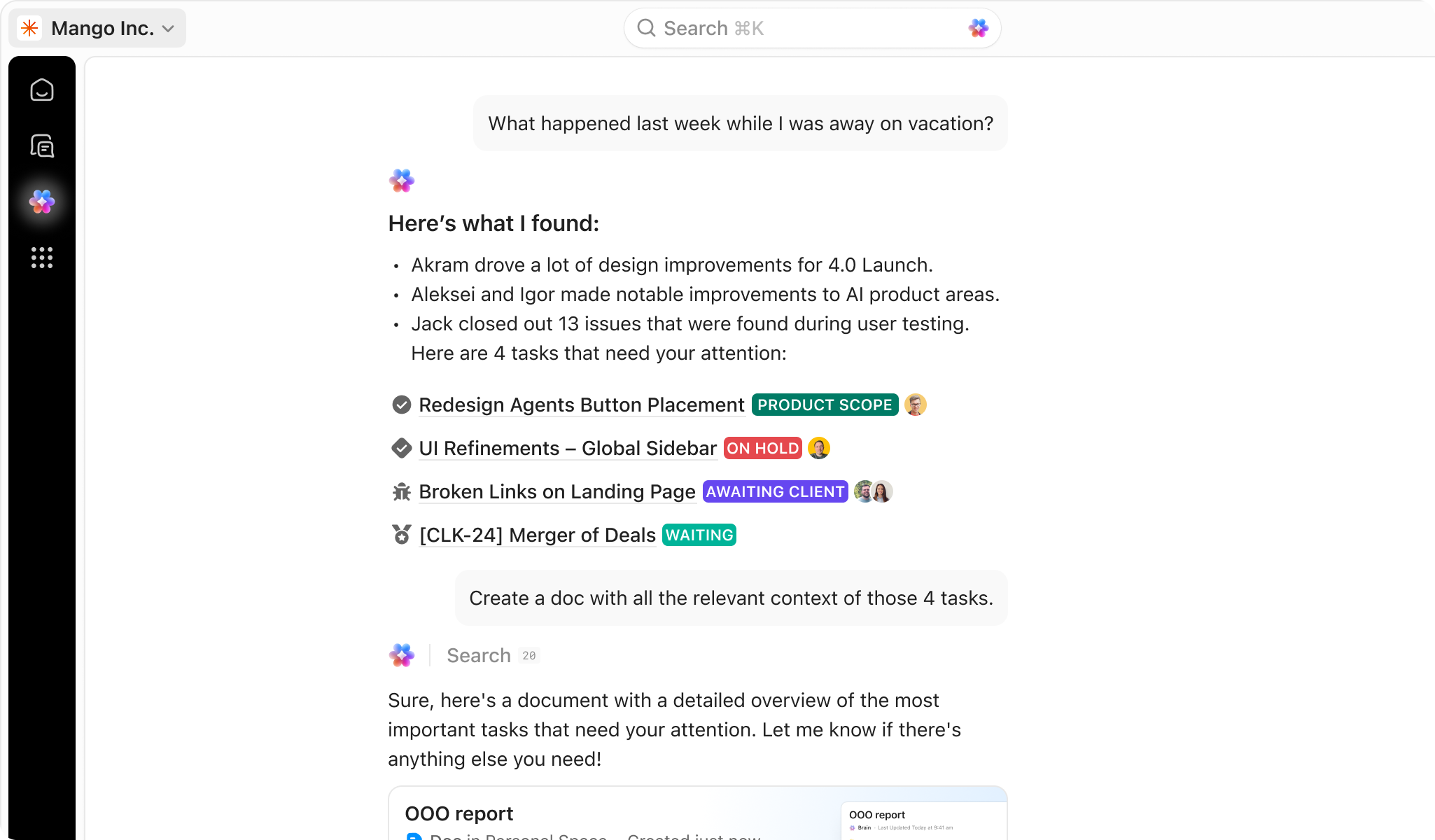
ClickUp Brain arrived in January 2024 with tools for retrieving knowledge, preparing project updates, and writing. The bet was that AI becomes more useful when it knows the task, document, and conversation surrounding a question. Context became another reason to keep work together.
In December 2025, ClickUp announced its Codegen acquisition, bringing AI coding technology into that ambition. July 2026 release notes described Brain² generating slides, dashboards, sites, and apps. September brought a searchable Meetings Hub and reusable Super Agent templates. These are vendor-described capabilities; the sensible test is a real assignment with a result someone can check.
The shift has affected employees, too. In May 2026, Evans announced a 22% workforce reduction and framed the reorganization around AI. The company’s published culture prizes urgency, directness, and continuous improvement. That restructuring shows the human stakes behind the productivity language.
05 / Buy fewer handoffs
The commercial model starts free and charges for paid seats. At the time of research, annual-billing prices listed Unlimited at $7 per user monthly and Business at $12, with Enterprise priced by quotation. AI adds another bill, and some agent actions consume credits. A subscription price is only part of an implementation budget.
A useful pilot starts with one recurring request. Define its owner, required information, and completion rule. Measure how long it takes and how often someone has to chase context. Then try the workflow in ClickUp. Expand when the evidence earns it.
If colleagues keep decisions elsewhere, the workspace becomes another place to update. If a specialist tool already handles a simple process well, migration may add effort. ClickUp’s opportunity is largest where work repeatedly crosses boundaries. The thing to buy is a shorter journey from request to result.

Open a few useful tabs
Try the product, inspect the changes, or watch the people building it.