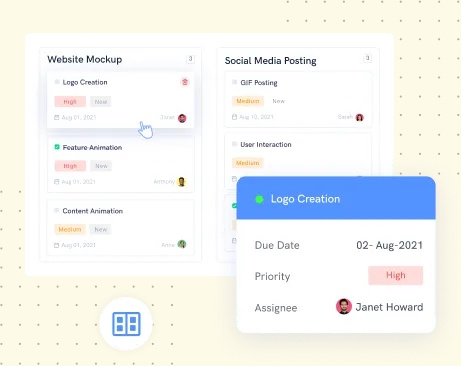
A task card is a small thing to hang a business on. In Projectsly’s product illustration, “Logo Creation” has a due date, a priority and an assignee named Janet Howard. Nearby sit website and social-media jobs. The scene is wonderfully ordinary: somebody needs a logo, somebody must make it, and somebody will eventually ask where it is. Around this modest transaction, 500apps built a much larger proposition.
- The tool: tasks, timelines, discussions and workflow automation.
- The offer: dozens of business apps at a historical $14.99 per user per month.
- The turn: the parent now points customers toward 500agents and an announced suite wind-down.
Projectsly was the project-management offering inside the 500apps Infinity suite. It addressed a familiar workplace nuisance: the assignment lives in one place, the conversation in another, and the deadline in someone’s memory. Its tools gathered those pieces around projects. The commercial idea went further. Once a company needed help organizing work, perhaps it would buy software for the rest of the business in the same transaction.
01 The $14.99 proposition
The historical pitch was unusually easy to repeat: pay $14.99 per user per month and receive a suite marketed as 50 apps. Sales, marketing, support, HR, collaboration and productivity all appeared in the catalog. Projectsly sat beside tools such as Clockly for time tracking, Forms.io for forms and Schedule.cc for appointments. A project-management purchase could become a decision about the company’s software cupboard.
For a ten-person team, that advertised rate works out to $149.90 monthly, before any applicable taxes or other charges. This is an illustrative calculation using the old price, rather than a current quote. The proposition depended on use: replacing several subscriptions could make the bundle attractive; opening only one application would change the arithmetic. Fifty tools have little value to someone who needs three.
At the advertised historical rate. Taxes and other charges excluded. Current availability has changed.
That placed Projectsly in a crowded market alongside Asana, Trello, monday.com and ClickUp. Boards and deadlines were familiar territory. The broader subscription supplied its clearest purchasing distinction. A small business could evaluate a collection of operational tools together, with advertised onboarding and 24/5 support. The attraction was understandable: fewer separate buying decisions, and more room to try another application without beginning another procurement conversation.
02 One task, four ways of seeing it
Inside the product, the organizing principle was choice of view. A list helps someone scan assignments. A Kanban board exposes work moving through stages. A calendar puts dates in the foreground. A Gantt chart stretches tasks across time. These are different questions asked of a project: what needs doing, where is it, when is it due, and how does its timing fit the rest?
The Gantt documentation added an especially useful detail: dependencies. Knowing that a task is late is different from knowing another task cannot begin until it finishes. Projectsly also described task and user views, letting a manager inspect the schedule through work items or individual assignments. This was practical project-management territory, useful to teams whose deliverables depend on one another rather than arriving as isolated checklist entries.
Its activity feed supplied another perspective. Teams could inspect task changes and discussions, filter activity by member, and follow files shared in a task conversation. The purpose was to make progress inspectable between meetings. For a marketing team or a distributed project group, that could mean opening the record before sending another message asking for an update. The usefulness still depended on people recording the work.
03 The handoff hiding inside the workflow
Projectsly’s visual automation builder made the mechanics explicit. Its published illustration includes status and priority checks, assignment, email and notification nodes, with success and failure branches. There is something pleasingly candid about that picture. Work does not simply flow because somebody has drawn an arrow. A condition has to be checked; a person has to receive the next step; the exception needs somewhere to go.
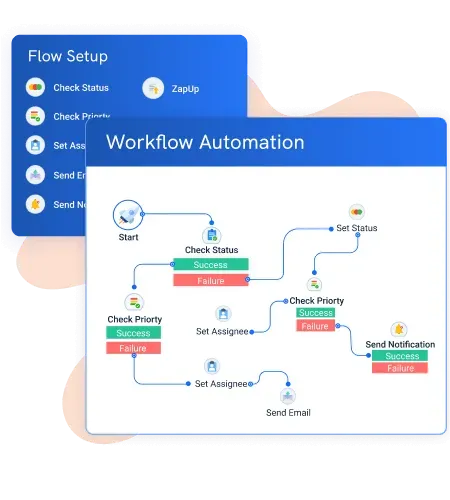
A team could use that approach to reduce repeated coordination around task changes. It first had to decide the rules. Who owns the assignment? Which status matters? Who needs the notification? Those decisions are useful even before automation enters the picture. Turning an unclear process into a faster unclear process is an expensive way to distribute confusion. The visual builder made the sequence available for inspection.
- 01CheckWhat changed?
- 02AssignWho goes next?
- 03NotifyWhat must they know?
The Gmail extension addressed the beginning of that sequence. Requests often arrive as email, so Projectsly offered project management inside the inbox. Clockly integration addressed a separate question: how much working time was going into the tasks? Together, these features describe the company’s expertise more clearly than a long catalog does. It was trying to connect the places where work arrives, gets assigned and consumes somebody’s day.
04 A bundle meets its own limits
The parent’s current customer notice changes the context. It announces a 90-day wind-down and a move toward 500agents, described as a conversational AI platform. The team attributes its rethink to customer feedback and the strain of maintaining so many products. It offers export assistance. The notice gives relative milestones without a dated starting point, so those intervals should not be converted into a calendar deadline.
“stop spreading thin across 50 products”
500apps customer notice · Manohar & the team
For readers, the useful distinction is between simplifying the purchase and simplifying the job. Projectsly’s bundle addressed the first; its task views and workflow rules addressed the second. They require different tests. A subscription can be inexpensive while a process remains awkward. A long feature list can coexist with a very short list of features that people actually use.
05 What to take from the toolbox
Copy the smallest useful idea. Follow one real task from incoming request through assignment, discussion and completion. Count the places where someone must re-enter information or ask what happens next. A shared board and clear ownership may be enough. More complex work may need dependencies, reporting or specialist integrations. A bundle makes sense when those actual needs line up with the tools inside it.
The logo card offers a good final test. Janet needs to know the brief, the deadline and who approves the result. Her manager needs to see the blockage. Any software purchase should make that exchange easier, and keep its records accessible when the system changes. The number of applications on the invoice comes a distant second.