The airport screen has one immediate request: enter your name. Beneath it sits a keyboard rendered in glossy blue, each letter waiting for a finger. It is an ordinary moment in an extraordinary setting, where a computer interface meets a traveler trying to get somewhere. In Woodshed’s archived portfolio, that moment earns the same attention as a business website or a corporate identity. Someone has a task. The design has to help.
The San Francisco studio described its assignment as creating intuitive, engaging experiences for websites and applications. Its early work gives that familiar promise some texture. The portfolio preserved in February 2009 includes a web-based document manager, a content-management system and a touchscreen security system for airport passengers. Elsewhere are school reporting templates, an ecommerce site, technical illustrations and sales presentations. The common subject is the encounter between information and the person expected to use it.
Woodshed’s stated philosophy supplies a useful way to read those assignments: complicated work behind the scenes should resolve into something clear at the point of use. That is an ambition worth examining at the scale of a single screen. A digital filing cabinet offers one test. An airport keyboard offers another.
A filing cabinet meets an airport queue
For All Documents, Woodshed credited itself with user interface design and production for a web-based document-management solution. The archived image is a small tour of office life inside a browser. File cabinets occupy the left rail. The main area offers scanning, uploads and the creation of new folders. Quick tips explain common activities; a storage meter makes capacity visible. The software has plenty to say, and the screen gives its different kinds of information separate places.
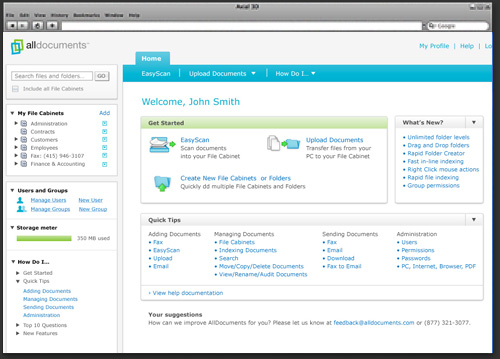
The resemblance to a filing cabinet matters. It gives a person an existing idea to work with while learning a digital system. At the same time, the screen has to accommodate activities that a metal drawer cannot perform. Its challenge is to organize a working environment, with several possible next steps, without making every option compete for first place.
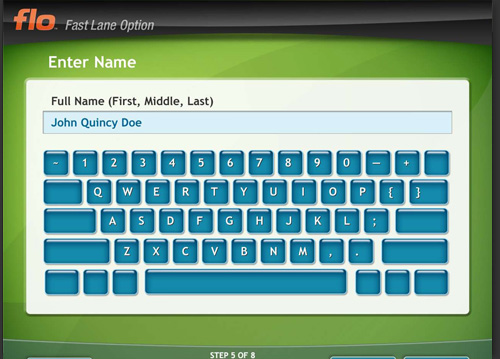
The Saflink assignment changes the terms. Woodshed described design and production for a kiosk-based touchscreen security system serving airport passengers. The pictured screen, branded “flo,” concentrates on name entry. A progress indicator places the interaction at step five of eight. The visible keyboard takes up much of the space. Compared with the document manager, the screen is organized around a narrower immediate action.
These images make the studio’s range legible without requiring a grand claim about either project. One interface supports repeated work among files, tools and settings. The other presents a step in a sequence. They invite different judgments: can the office user find the right function, and can the passenger understand what to do now?
The website was only part of the job
Woodshed’s website work extended into the parts a visitor might never think to ask about. For NNAAPC, its portfolio listed XHTML and CSS template creation for integration with a content-management system, alongside Flash animation, coding and design. For Issaquah School District, it described website templates for an online education reporting system, with template development and a style guide. These were assignments with a life beyond a polished opening page.
A template turns a design decision into something that can recur. A style guide gives future work a reference. Read together, the school project’s deliverables suggest attention to consistency across a system. That is an interpretation of the documented scope, rather than a claim about how the district subsequently used it. The distinction keeps the interesting point intact: Woodshed was selling usable design materials as well as finished-looking screens.
The list also included website design for Newsiasm, described as a social-networking news website; design, production and theme development for Island Dog’s ecommerce site; and a website for validation consultancy Veracord. Piziali & Associates received strategy, design and production, including XHTML/CSS and Flash development. The technologies place the portfolio in its period. The variety of assignments explains the studio’s broader category: interactive design with hands-on production attached.
Microsoft, a festival and the humble sales deck
Some of the portfolio’s most revealing work appears outside the interface section. Woodshed credited illustration and icon development for a Microsoft technical manual. For Tumbleweed Communications, it listed illustrations and icons for a product family. For Captaris, it described illustrations for website information-architecture guidelines. Each assignment puts visual design close to explanation: helping technical material acquire a readable shape.
Then comes the Mountain View Art & Wine Festival, for which the portfolio lists artwork and branding for its 34th annual event. It is a pleasing change of scenery. A technical manual and a festival have different audiences and moods, yet both need images to carry meaning. The juxtaposition makes Woodshed’s multidisciplinary claim more concrete than a list of abstract capabilities would.
Presentations formed another service. CBIZ’s project included corporate presentation design, layout and production for live and online viewing. Clean Power Finance’s assignment covered a corporate overview and sales presentation, including a theme, information graphics and illustration. These are business communication jobs with a specific audience in mind. The deck has to work when someone presents it and, in the CBIZ description, when it is viewed online.
Six services, one demanding promise
The archived homepage advertised six areas: user interfaces, websites, branding, search engine optimization, illustration and icons, and presentations. The portfolio makes sense as a client-service business built around those skills. Customers commissioned defined design and production work; the showcased applications belonged to named client projects. For someone considering that kind of practice, the useful unit of comparison is the assignment and its deliverables.
The branding description linked identity to a company’s beliefs, objectives, values and services. Woodshed said it sought to express those through a branding system and strategy. Its historical SEO offering likewise reached beyond appearance, covering keyword development, code and content optimization, and search-engine submission. Those descriptions widen the brief from making a page look coherent to helping it communicate and be found.
Commercially, the combination sits between several familiar alternatives: an independent interface specialist, a website production agency, a branding studio and an internal design team. Woodshed’s documented proposition brought elements of those disciplines together. Its distinction lies in the particular mix demonstrated by the portfolio, including kiosk interaction and technical illustration. A buyer would still need to match that mix to the actual work required.
“only simple and clear solutions deliver on the promise of technology to improve our lives”
Woodshed / Archived company statement
The expensive-looking part is not always the difficult part
For a design buyer, the portfolio suggests a better starting point for a cost conversation than the number of attractive screens. Compare the school reporting job with the airport interface. A reusable template and accompanying guide create one set of deliverables. A touchscreen sequence creates another. Scoping those differences means identifying what must be designed, what must be produced and who will maintain the result.
That is a practical reading of Woodshed’s service mix, not a reconstruction of its invoices. A useful brief would specify the application or website, the people using it, the key tasks, the production requirements and the handoff. The archive’s vocabulary is refreshingly concrete on this point: templates, icons, illustrations, style guides, presentation layouts. Those nouns give a commissioning conversation somewhere to begin.
They also expose the limits of treating simplicity as a visual style. A screen can look spare while leaving an important decision unexplained. A busier working view can earn its density if each element helps someone complete a task. Woodshed’s two interface examples make that tension visible. The test belongs to the user’s situation, rather than to a preference for more or less decoration.
Borrow the question before the look
The most useful thing to copy from this portfolio is a question: what is this person trying to finish? Apply it to the All Documents screen and attention moves toward finding, scanning and uploading. Apply it to the Saflink image and the immediate concern becomes entering a name and continuing. Apply it to the school project and the concern expands to consistency across reporting templates.
As an exercise, write down the task before discussing color, type or animation. Then ask what information the person needs, what action follows and how the design communicates progress. This is an editorial takeaway from the work, rather than a claim that Woodshed followed a prescribed checklist. It makes the studio’s stated commitment to user needs available as something a reader can actually try.
The approach asks something of the client, too. If the underlying process is unsettled, the interface brief will inherit that uncertainty. If nobody can explain the intended task, removing buttons will not settle it. Woodshed’s early portfolio rewards a close look because it keeps returning to recognizable activities: a file to manage, a name to enter, a report to produce. The case for the obvious starts with understanding what should become obvious.