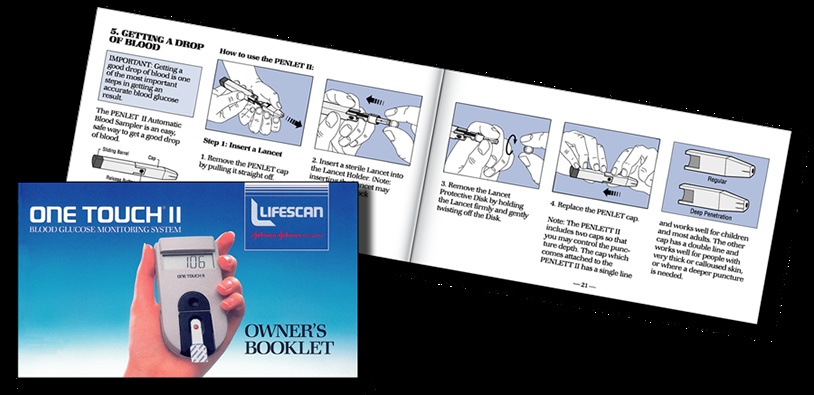
Open the OneTouch II owner’s booklet in David Healy’s portfolio and the glamour gives way to hands. A hand holds the meter on the cover. Inside, drawn hands perform a sequence of small tasks. The illustrations are orderly, the steps numbered, the page busy with purpose. Nobody bought the product to admire its booklet. The booklet still has a job to do.
That is a useful place to begin with FIRST IMAGE, the graphic design business associated with Healy. Its website now carries the name David Healy Design. Beneath that name sits a body of work in which packaging, instructions and technical pictures belong to the same conversation. The interesting question is what happens to an identity once it leaves the presentation room and lands on a carton, a label or page 47.
Healy’s LifeScan account provides the clearest answer. His portfolio describes work beginning with the OneTouch II launch and extending across 15 product lines. Some items appeared in 12 languages. Deliverables included packaging, labels, inserts, manuals, sales sheets and shipping containers. He recalls sometimes working with three additional production people. LifeScan was a Johnson & Johnson division during the work described.
Those numbers describe breadth, rather than a measured business outcome. They also change how the assignment looks. A single handsome package can be judged in isolation. A family of related materials has to hold together when the format changes, the available space shrinks and the reader switches languages. The designer’s canvas becomes a collection of connected decisions.
A design business with ink on its hands
There is a historical reason this portfolio cares about production. An Aldus newsletter preserved by the Computer History Museum identifies Healy as a designer and First Image’s owner in 1987. He was among the judges evaluating 16 finalists in a PageMaker competition. The panel also included designers from TechArt and Apple Creative Services, alongside typography and design practitioners.
The detail is more revealing than a vague claim of decades of experience. This was a designer participating in the early culture of desktop publishing, when making pages on a personal computer was itself an event. The newsletter discusses production procedures alongside finished work. How a page was assembled belonged in the conversation about whether it was good.
On his LinkedIn profile, Healy recalls organizing a desktop-publishing conference at Fort Mason on February 15, 1986. By his account, it attracted nearly 300 people and 23 speakers; Apple lent computers and printers valued at $65,000. That figure describes borrowed equipment, not a project fee, investment round or company valuation. It is a wonderfully physical reminder of what bringing publishing technology into a room once involved.
His account also supplies a smaller, more personal detail: a college teacher encouraged sketchbooks in 1973, and Healy kept the habit, eventually describing himself as working in number 87. The connection between those notebooks and production software is appealing. One gathers observations. The other makes decisions repeatable. Both reward someone willing to keep looking after the first idea arrives.
“I use hierarchies of Style Sheets to comprehensively control the document.”David Healy, portfolio
The quiet muscle of a style sheet
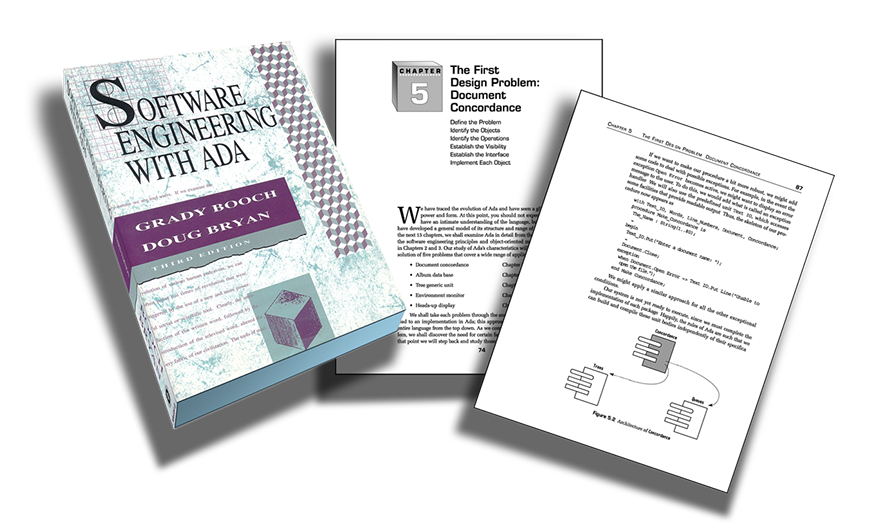
The portfolio’s book-production description emphasizes hierarchical style sheets for text, objects and tables, and their role in preparing electronic editions. Its examples include the 560-page Software Engineering with ADA and six manuals for Marilyn Burns & Associates. These are assignments with enough internal structure to make consistency a substantial part of the work.
Consider the practical distinction between a heading that merely looks right and one assigned a defined role. The first is an appearance. The second is a decision another person can recognize, reuse and revise. A long document benefits from decisions that survive beyond the page where they were first made. Otherwise, each correction becomes another little search expedition.
That observation suggests the company’s place in the market: commissioned design and production for organizations with information to organize. Its portfolio supports a service-business reading, with the deliverable shaped around a client’s material. A publisher needs a coherent book; a manufacturer needs a usable family of product documents. The work is specific to those needs.
For a buyer, the useful comparison is therefore broader than visual taste. An internal production department, a freelance publication designer and a specialist technical-communication studio are all plausible alternatives. Ask how each handles revisions, linked references and handover. Ask to see an interior spread. A beautiful cover answers only one of the questions a substantial publication raises.
Sixty-six pages, with more than one entrance
The OneTouch DataLink training guide offers another concrete example: 66 pages, six sections, and navigation through contents, buttons and cross-references. The portfolio also includes technical animations. Together, these show attention to how a reader moves through material, as well as what a finished page looks like.
A training document has a peculiar audience. Someone encountering a system for the first time may need a sequence. Someone returning with one question may need a shortcut. Giving both readers a way in changes the design problem. The contents page is no longer simply a ceremonial list at the front of the book.
This is where the word “interactive” earns its keep. A button should take the reader somewhere useful. A cross-reference should repay the interruption it causes. An animation should reveal a relationship or movement that is difficult to understand in a still image. Those are editorial judgments before they are visual effects.
The lesson to borrow is modest and practical: draw the reader’s route before decorating it. Which question brings a person here? What must they understand before the next step? Where might they need to return? Those questions make a better brief than asking for a document to feel more modern. They also give a client something concrete to review.
A portfolio that gets around
The illustrated OneTouch booklet and the dimensional ADA book image make an instructive pair. One presents a consumer device alongside a carefully staged sequence of actions. The other turns a substantial technical text into a recognizable physical object. In both, the cover invites attention while the interior carries the heavier burden of explanation.
Other portfolio captions name a Visa trade-show poster, Bridgeway Cellars wine labeling, Magic Theatre’s Fool for Love poster and San Francisco Reporting Service identity materials. The range matters because it keeps the medical-device work in perspective. This is a graphic-design practice with a substantial technical-production strand, rather than a medical-device manufacturer.
Read together, these examples suggest an advantage worth examining in any agency search: familiarity with more than one kind of output. Packaging, editorial pages and promotional graphics ask different things of an image. Moving among them can make a designer attentive to where an idea will actually be used. The evidence here is the variety of artifacts, not a claim of superior commercial performance.
It also makes the work relevant to several kinds of client. A product team may need instructions and launch materials. A publisher may need a long manuscript brought into a stable visual system. An organization with an established identity may need the everyday pieces that make it usable. The common requirement is someone who can carry a decision across formats.
Borrow the discipline, budget for the detail
The practical takeaway from this portfolio is to brief the whole family of materials. Put the carton, instruction sheet, sales piece and digital edition on the same list before treating them as separate assignments. Identify which names, images and explanations they share. Give a designer a view of the dependencies, not just a folder of individual requests.
A useful review meeting could put one repeated instruction beside every place it appears. Read the wording, compare the illustration and check the product name. This is an editorial exercise any team can copy without buying new software. It makes inconsistencies discussable before they become a stack of separate corrections. The point is to review relationships as well as individual pages.
That same exercise helps explain why production belongs in an early conversation about design. If a project must become a printed booklet and a navigable digital document, the two destinations should inform the brief. Waiting until the finished layout exists leaves fewer opportunities to organize the material around both readers.
Then specify what a successful handover includes. Editable files, agreed styles, image assets and a clear revision process can matter as much as the initial layouts. These are suggested buying questions, not a description of First Image’s contract terms. They follow from the sort of coordinated production visible in the work.
The relevant cost question is what the scope contains. How many deliverables need attention? How many language editions require layout? Who reviews the text, and how many revision stages are planned? A quote becomes meaningful when those boundaries are explicit. A large page count and a large number of versions are different sources of work; collapsing them into “a brochure project” obscures both.
There are limits to what this approach can accomplish. A consistent page cannot resolve contradictory product information. A carefully drawn diagram cannot choose the correct instruction on its own. The client still needs people who understand the subject and can approve the substance. Design gives that substance a readable form; the accuracy of the underlying material remains a separate responsibility.
For a one-off piece with little repetition, an elaborate document system may be more effort than the assignment warrants. The case becomes stronger when information recurs, formats multiply or updates are expected. That is the enduring interest of FIRST IMAGE’s portfolio: it makes the ordinary work visible. The label, the contents page and the last corrected table each deserve a designer’s attention.