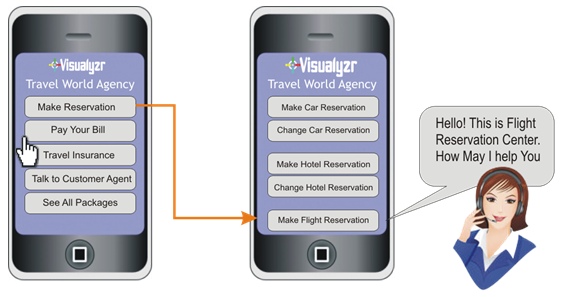
The little travel agency on the phone screen has a surprisingly sensible idea. It offers reservations, bill payments, insurance and a button to talk to a customer agent. Tap reservations and a second screen separates cars, hotels and flights. An arrow leads to a headset-wearing representative. This is Visualyzr’s product illustration from 2014: a modest drawing of something callers have spent years wishing customer service would do.
- Put service choices on the smartphone screen.
- Let customers complete routine tasks themselves.
- Keep a route to an agent when they need help.
Visualyzr called the approach visual IVR. IVR, or interactive voice response, is the familiar system that reads out options when you call a business. Visualyzr proposed giving that system a visible interface. The customer could inspect choices, select a route and move toward a useful answer. The screen already in their hand became part of the service conversation.
01 / The trouble starts before the agent
In its July 2014 writing, Visualyzr described callers abandoning calls, escaping menus by pressing zero and struggling through irrelevant options. Its diagnosis placed the trouble at the entrance to customer service. A company might have agents ready to help and still make reaching the right one unpleasant. Every menu was another small task assigned to someone who already had a problem.
There is a useful design distinction here. A spoken menu makes the caller wait while the business explains its choices. A visible menu lets the caller inspect them. Think of the difference between hearing a restaurant’s dishes read aloud and holding the menu yourself. You can look back. You can compare. You can skip the things you do not want.
“Your customers will be able to see IVR rather than just heard.”
Visualyzr product blog · July 2014
The awkward grammar in the original pitch almost helps. The proposition is plain enough to survive it. Visualyzr wanted customers to see their route through a business. In its materials, the immediate enemy was the frustrating calling experience: long choices, repeated information and the nagging possibility of arriving at a dead end.
02 / A menu that could do the work
The product’s ambition extended beyond choosing which department should answer. A July 25 post described customers paying bills and changing addresses through a graphical interface. It also described calling or chatting with an agent and exchanging files, images or videos during the interaction. The phone screen could carry information that would otherwise have to be spoken, interpreted and perhaps repeated.
Those examples explain its intended buyers. Visualyzr addressed businesses running customer-service operations, with smartphone users on one side and service agents on the other. The travel illustration was a demonstration of the workflow. It showed how a general request could become a particular reservation before an agent entered the picture.
CMSWire’s product directory identifies Visualyzr as an Innoeye Technologies offering and lists commercial SaaS deployment. It describes information viewing during calls, data entry or uploads and historical interaction data. Together, those capabilities place the product among customer engagement and contact-center tools, with particular attention to the connection between mobile self-service and assisted support.
Conceptual illustration of published capabilities. No performance figures implied.
03 / Keep the system. Change the entrance.
Visualyzr’s compatibility argument was central to its pitch. The company presented the product as an addition to an existing IVR system. For a buyer, that is a different proposition from replacing a contact center. The business had already invested in a working system; Visualyzr offered a way to change how customers encountered it.
The implementation story had a revealing detail. The original materials described flows driven by XML scripts, with changes reflected on mobile devices. They also advertised a no-coding approach. Read together, these claims suggest a workflow configuration pitch: adapt the service journey through the platform’s tools. They should be read as the product’s advertised approach, rather than a guarantee that every enterprise integration would require no engineering.
The same distinction matters for money. The sales argument emphasized avoiding replacement costs and reducing the burden on agents. For anyone evaluating that proposition, the sensible calculation would include configuration, integration and ongoing operation alongside the software fee. Fewer calls would be useful only if customers were actually completing the work they came to do.
04 / The human stays in the picture
The people building the software appear briefly in its public history. In July 2015, an InnoEye engineer writing as Prince described being assigned to Visualyzr. He praised direct product experience and colleagues while criticizing late hours. A separate Android developer’s public project record dates Visualyzr work to June 2016 through June 2017 and describes live chat in the mobile app.
That chat detail returns us to the travel screen. The agent button was there from the beginning of the illustration. Visualyzr’s version of self-service allowed a customer to ask for help. A useful test of any such system is what happens at that moment: does the next person understand the task, or does the customer begin the explanation again?
05 / The part worth borrowing
For service designers, the transferable idea is practical: make the choices visible, let the customer act, and make escalation easy to find. It depends on having choices people understand and workflows connected to the business behind them. A screen full of confusing departments can reproduce the original frustration. A customer without usable mobile access still needs another route.
A team borrowing this idea could begin with one routine request, such as the address change described in the product materials. Watch whether a customer can identify the task, supply the information and finish it. Then follow the same request into an agent conversation. The important question is whether the route stays intelligible from beginning to end. This is a proposed way to evaluate the design, rather than a claim about Visualyzr’s results. It also keeps the focus on the customer’s original purpose instead of the number of menu screens the software can display.
Look again at that small travel agency. Its appeal comes from the order of events. The customer chooses what they need. The system narrows the task. A person remains available. Visualyzr put those steps into a picture, giving an everyday annoyance a form that a product team could examine, redraw and test.