The diamond was meant for a different app. Pieter Omvlee and Emanuel Sá were building a utility that could resize images in batches and add borders. After a few weeks, they decided it was unnecessary. The software was abandoned. Its icon, however, was rather good.
A year later, working on Sketch, they needed a new icon. An early attempt looked like a hand grenade and pleased neither founder. Sá remembered the diamond. It had nothing obvious to do with interface design, but it caught the eye. Sometimes the souvenir is more useful than the holiday.
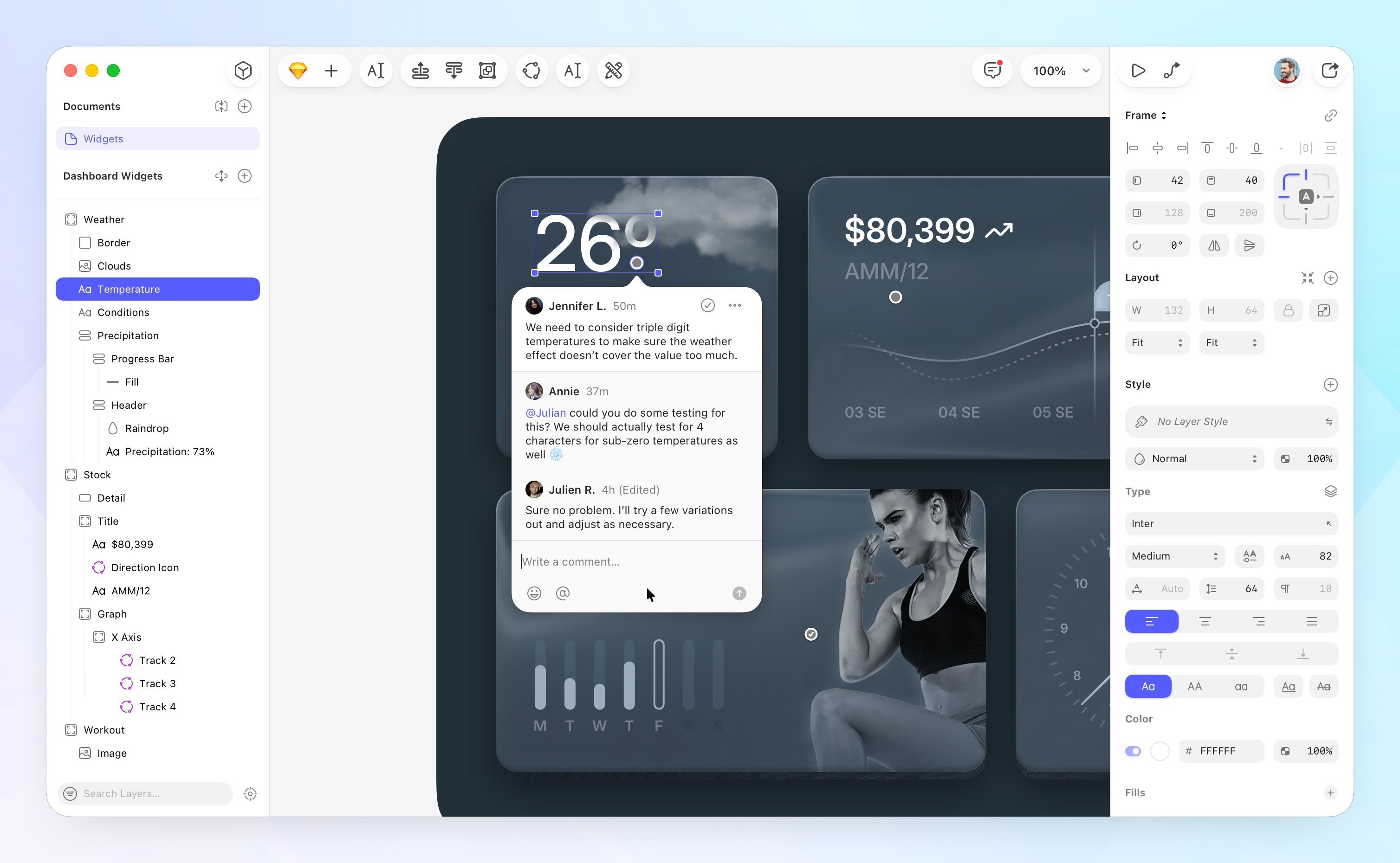
- Design on a Mac. Draw interfaces, reuse components and test interactive prototypes.
- Bring everyone else by browser. Clients review; developers inspect and export without paid seats.
- Choose how to work. Keep local files or collaborate through a shared Workspace.
- Know the trade-off. The editor needs macOS; browser access does not turn it into a Windows editor.
The diamond survived. The app did not.
Sketch’s origin is unusually close to its customer. Sá was a designer with a background in photography, iconography and Mac customization. Omvlee supplied the development expertise. They were making a tool for work they understood personally. In a 2020 retrospective, Omvlee put it plainly:
“We built Sketch because Emanuel needed it”Pieter Omvlee, co-founder · 2020
The product arrived in 2010, when designing an interface often meant borrowing tools built for other kinds of visual work. Sketch made the interface itself the subject: screens, buttons, type, icons and the repeated elements that give a product a recognizable grammar. Its expertise lies in those details, rather than in being a general-purpose photo editor.
That distinction matters because a screen is rarely a solitary picture. It belongs to a family. Change one button and its cousins should know about it. Stretch a panel and its contents should remain polite. Designers need room to experiment, but they also need the experiment to survive its next revision.
A million customers, then a different problem
Sketch won an Apple Design Award in 2012. A community grew around it, contributing plugins, icons and interface resources. By March 2019, the company reported more than one million paying users. That is a historical milestone, not a count of people using the app today.
Then came its first outside funding: $20 million from Benchmark. The founders’ announcement identified collaboration as an area needing more attention. A tool could make an individual designer productive and still leave the surrounding team waiting for a file, a comment or the latest version.
First outside funding, March 2019.
The stated priority: better collaboration.
The company’s eventual answer divided the work. Designers use a native Mac editor, including real-time co-editing. Other participants can use a browser to see designs, leave feedback, test prototypes and collect implementation details. A project manager does not have to learn the vector editor merely to ask why a checkout screen has three buttons.
In January 2023, the founders described a smaller team and a renewed focus on these two experiences. They explicitly rejected the idea that winning required a browser editor. This was a choice about users: the person shaping the work and the person judging it need different controls.
Reuse · co-edit
Test · review
Values · tokens
There is an organizational parallel. Sketch was remote from the beginning because its founders lived in different countries. Its 2021 account of working life describes written interviews and asynchronous meetings. Even the social calendar included virtual murder mysteries. A company can apparently debate a corner radius and investigate a fictional homicide without assembling in an office.
The button that became a lesson
Consider an ordinary button. It says “Buy.” Now it says “Continue to payment.” Translate it, add an icon, change the type size. Each alteration can send a designer back to moving edges and adjusting gaps. Multiply that task across an interface and the little button becomes an administrative department.
Sketch tried to address this with Smart Layout in 2019. In its account of introducing Stacks in May 2025, design lead Chris Downer acknowledged that the earlier approach had sacrificed needed control in pursuit of simplicity. The result could be unpredictable. Requests for better layout tools helped push the team toward a new foundation.
Stacks make the rules explicit: direction, spacing, padding, alignment and sizing. Frames provide flexible containers. Instead of repeatedly nudging a rectangle, a designer can tell it how to behave when its contents change. Simplicity is useful until it starts concealing the decision you need to make.
The August 26, 2026 Florence release extended that control with minimum and maximum sizes, percentage sizing, negative gaps and ordering for overlapping items. These are modest-sounding capabilities. They become consequential when the same component must accommodate a longer label or a row of overlapping avatars.
A practical experiment follows from this: build one component, then deliberately inconvenience it. Add a longer label and another item. Resize its container. Watch what holds and what needs a rule. The exercise is more revealing than a perfectly arranged demo.
The pleasure of a file you can keep
Sketch’s Mac app includes vector editing, reusable Symbols, shared Libraries, colors and styles. Its prototyping tools connect screens with interactions, overlays, scrolling and animated transitions. You can test a flow before committing it to production code. A convincing prototype still needs a developer to become a working product.
The web app carries the handoff. Developers can measure distances, copy values and CSS, download assets and export design tokens for colors and styles. A shared design thus becomes something more useful than a screenshot with a hopeful email attached.
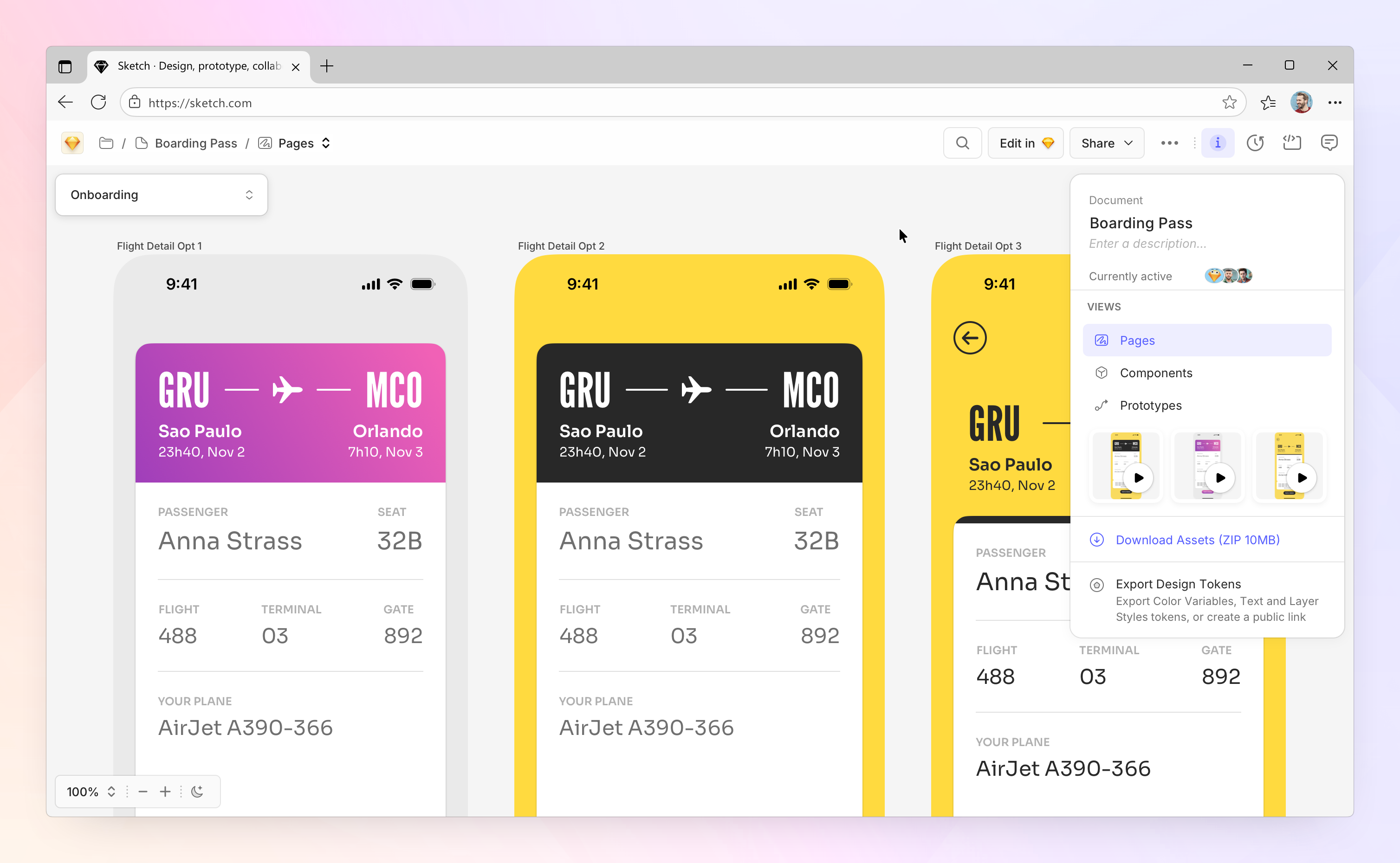
Sketch also permits local, offline work and uses an open file format. Its website says it collects minimal analytics and does not monitor activity inside documents. For a designer who wants the file on their own disk, those choices are tangible parts of the product.
As checked in September 2026, a Mac-only perpetual license costs $120 per seat, with one year of updates. Standard costs $12 per editor per month when billed annually; Professional is $24 and Enterprise $44 on the same basis. Private Cloud has quoted pricing. Free browser viewers and developer tools let a team involve people without buying everyone an editing seat.
Sketch has previously reconsidered how it sells software. In 2015 it left the Mac App Store, citing week-long review delays, technical restrictions and missing upgrade pricing. In 2016 it moved away from paid major-version upgrades toward a year of updates tied to purchase. Distribution and billing, it turns out, also have user interfaces.
AI gets a door, not the keys
Sketch’s AI connection follows a similar preference for choice. Its local MCP server, introduced in October 2025, lets compatible AI clients interact with documents. The server is off by default. The user starts it and chooses access; external AI clients retain their own costs and data practices.
In February 2026, Sketch published examples from its own work: swapping light and dark components, replacing placeholder copy, organizing layers, creating color palettes and reconstructing styles from a codebase. The appealing part is the tedious work removed. The company also advises checking the result, naming the relevant layers precisely and breaking complex requests into smaller steps.
This works best when the document already has some order. Consistent component names and clear selections give the assistant something definite to act on. An untidy library does not become a coherent design system simply because someone has attached a chat window.
Who should actually choose it?
Sketch serves independent designers, agencies and product teams. One concrete example is Obscura Studio creator Ben McCarthy. In a September 2025 interview, they described designing the photo editor in Sketch and fitting controls into the small space beneath an image. That is the kind of constraint this software is meant to help someone explore.
Its ecosystem also extends the workflow. Sketch has worked with Unsplash on image insertion, offers an official Slack integration, and lists third-party tools such as Frontify. Those connections let the design file meet work already happening elsewhere.
The market choice remains straightforward. Figma offers browser-based interface editing across operating systems. Sketch suits teams whose designers work on Macs and value native editing, local files and browser access for everyone around them. A team that needs Windows users to edit the same design should account for that requirement before choosing it. Florence also requires macOS 15 or later.
The transferable idea is to match the interface to the job. Give reviewers a clear route to feedback. Give developers usable assets. Give designers enough control to make the next revision less painful. Sketch’s diamond began as the surviving piece of a discarded project. Its business still depends on making thoughtful decisions about what to keep.
Try Sketch ↗ · Plans · Company blog · Florence update · Stacks walkthrough · Obscura interview
YouTube demos & tutorials ↗ · GitHub · LinkedIn · X · Bluesky · Instagram · Facebook