The typical HyperWrite convert has 19 browser tabs open, three half-written emails, a Google Doc blinking accusingly and no appetite for another trip to a chatbot. HyperWrite puts its wager on that moment. Its Chrome extension offers the next phrase inside the box where you are already typing, while the wider web app handles drafting, revision, chat and research. When that still feels too manual, its Personal Assistant can attempt the clicking too.
This makes HyperWrite less interesting as a blank-page word machine than as a layer over office life. It can help a student outline a paper, a marketer reshape a campaign note, a founder answer investors, or a support rep turn blunt bullets into a civil reply. The common thread is not literary ambition. It is momentum: getting from “I need to say this” to a usable draft without breaking concentration.
The right reader has tabs to tame
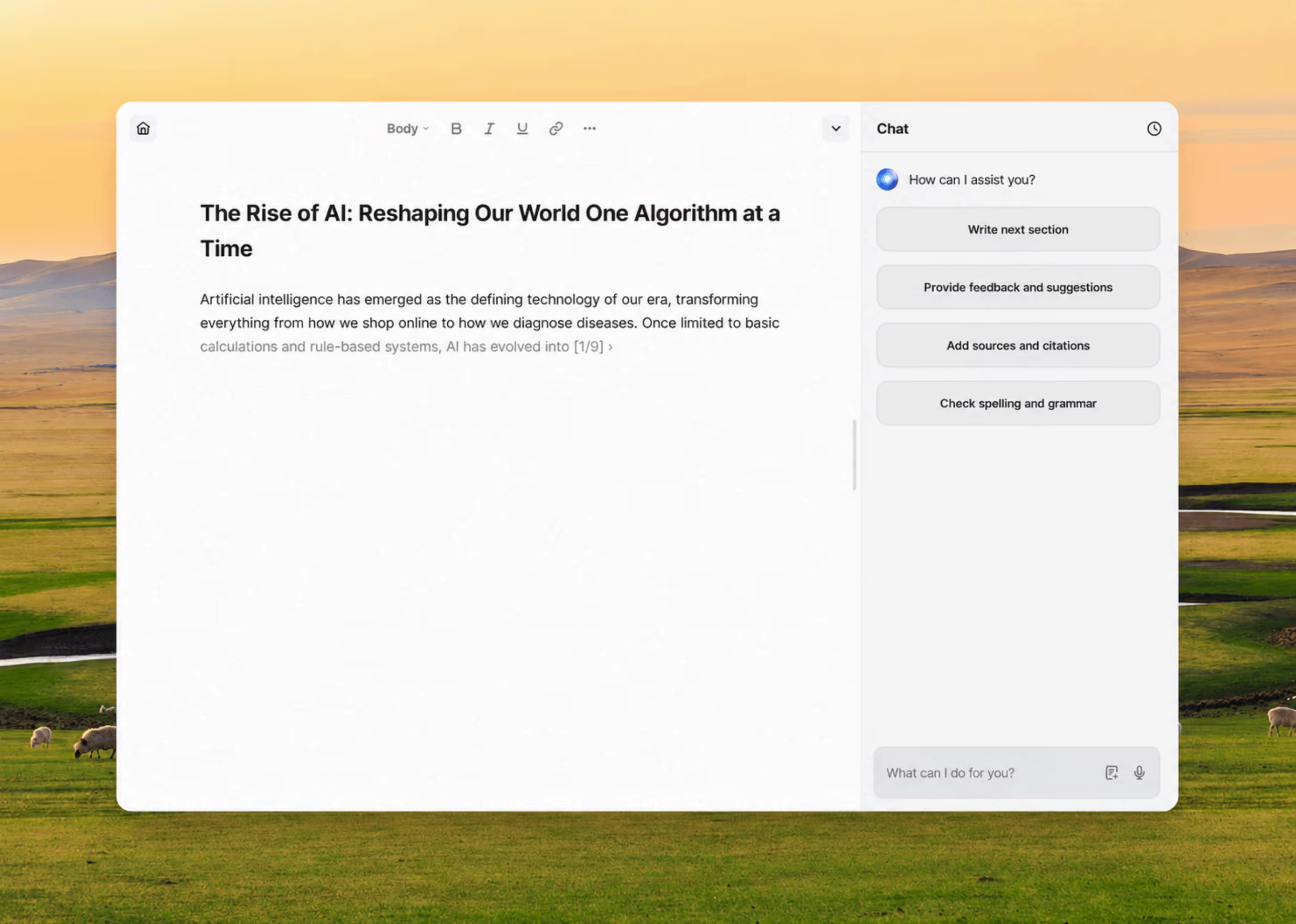
Start with the practical divide. If much of your writing happens in Gmail, Google Docs, Slack, LinkedIn, a CRM, or browser forms, TypeAhead is HyperWrite's core reason to exist. It reads nearby context and proposes words or a sentence in faint text. Tap Tab to accept; keep typing to ignore it. The interaction is tiny, which is precisely the point. A separate chatbot demands a prompt, a wait, a copy and a paste. Inline completion can disappear into the rhythm of work.
People who primarily want deep reasoning, coding, data analysis, or a native phone assistant will probably find a general model more useful. Fiction writers may prefer a tool with story bibles and genre controls. Teams that need approval chains, brand governance and enterprise administration should investigate products built around those controls. HyperWrite works especially well for an individual who spends the day writing small and medium pieces across the web.
From cold email to roaming intern
HyperWrite's family tree begins with inbox fatigue. Matt Shumer, then building a medical virtual-reality startup, wanted help turning bullet points into cold emails. He joined Jason Kuperberg and Miles Feldstein to create OthersideAI in 2020. The early product used GPT-3 to expand short notes into personalized messages, an idea that attracted a $2.6 million seed round led by Madrona Venture Group before ChatGPT made generated prose ordinary.
HyperWrite itself appeared in early 2021. The version recognizable today, centered on a personalized Chrome extension, launched in early 2022. Its makers took TypeAhead to Reddit, Medium and Wattpad communities, describing gray suggestions that could supply an idea rather than merely finish a common phrase. Replies contained both the thrill and the permanent argument: useful cure for writer's block, or machine trespassing on authorship?
The company kept widening the job description. In April 2023 it demonstrated Personal Assistant navigating Domino's website to start a pizza order. The stunt was funny enough to travel and serious enough for MIT's AI Agent Index to record the deployment. Later came tools for teaching repeatable browser workflows and an open-source “self-operating computer” project from engineer Josh Bickett. In 2026, Shumer and Kuperberg said they had stepped away and Bickett had become CEO. HyperWrite had moved from writing emails to exploring what happens when software can operate the interface around them.
The practical magic here is a half-second suggestion, not a robot wandering through checkout.YesPress verdict
The four-beat workflow
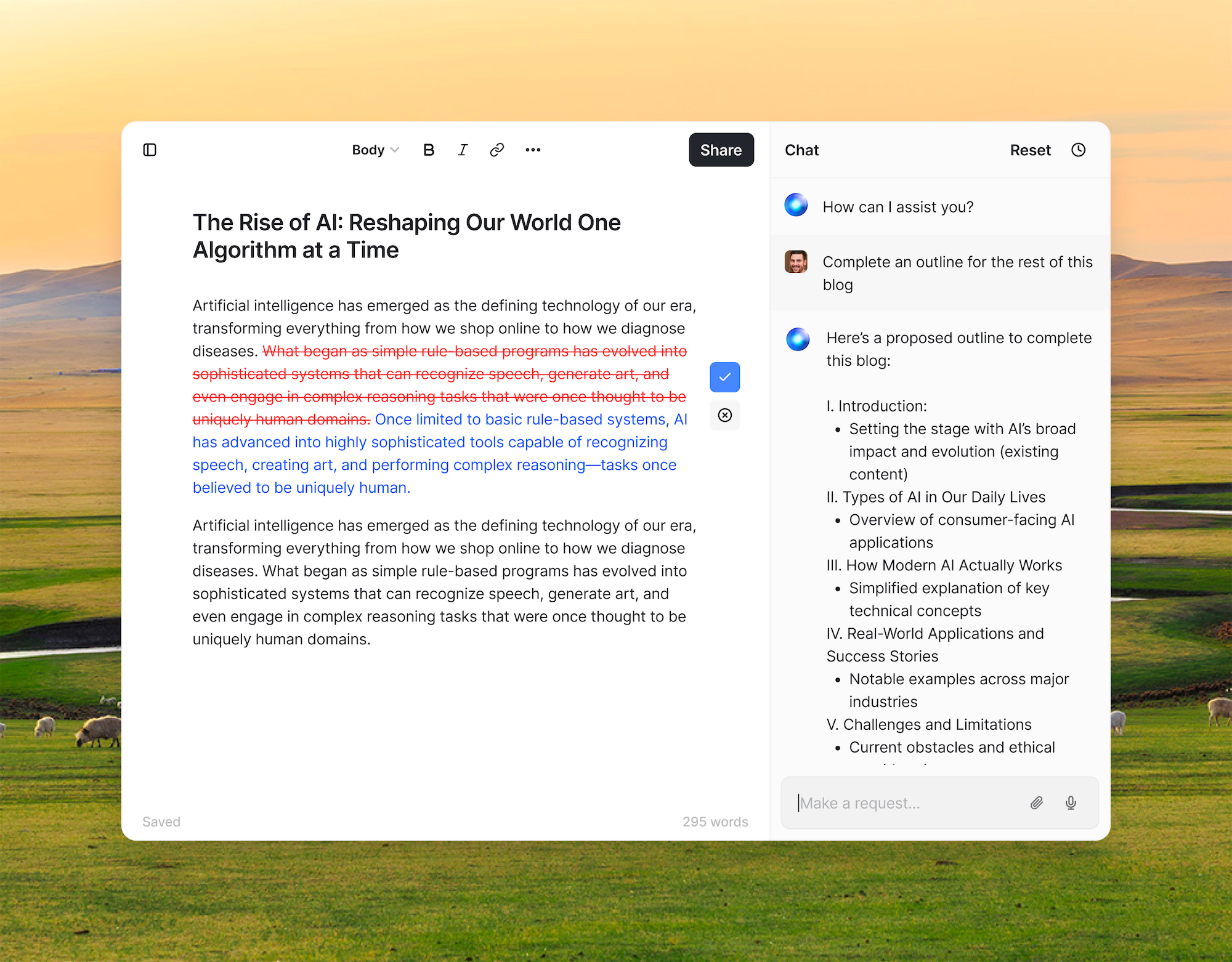
The web app divides the work sensibly. The document editor gives long-form projects a home. HyperChat handles questions and brainstorming. The tools library offers focused prompts for jobs such as improving text, generating outlines, preparing job materials, writing speeches and summarizing material. Custom tools preserve prompts you repeat. None of these categories is unusual in 2026, but collecting them beside browser autocomplete reduces the small tax of switching products.
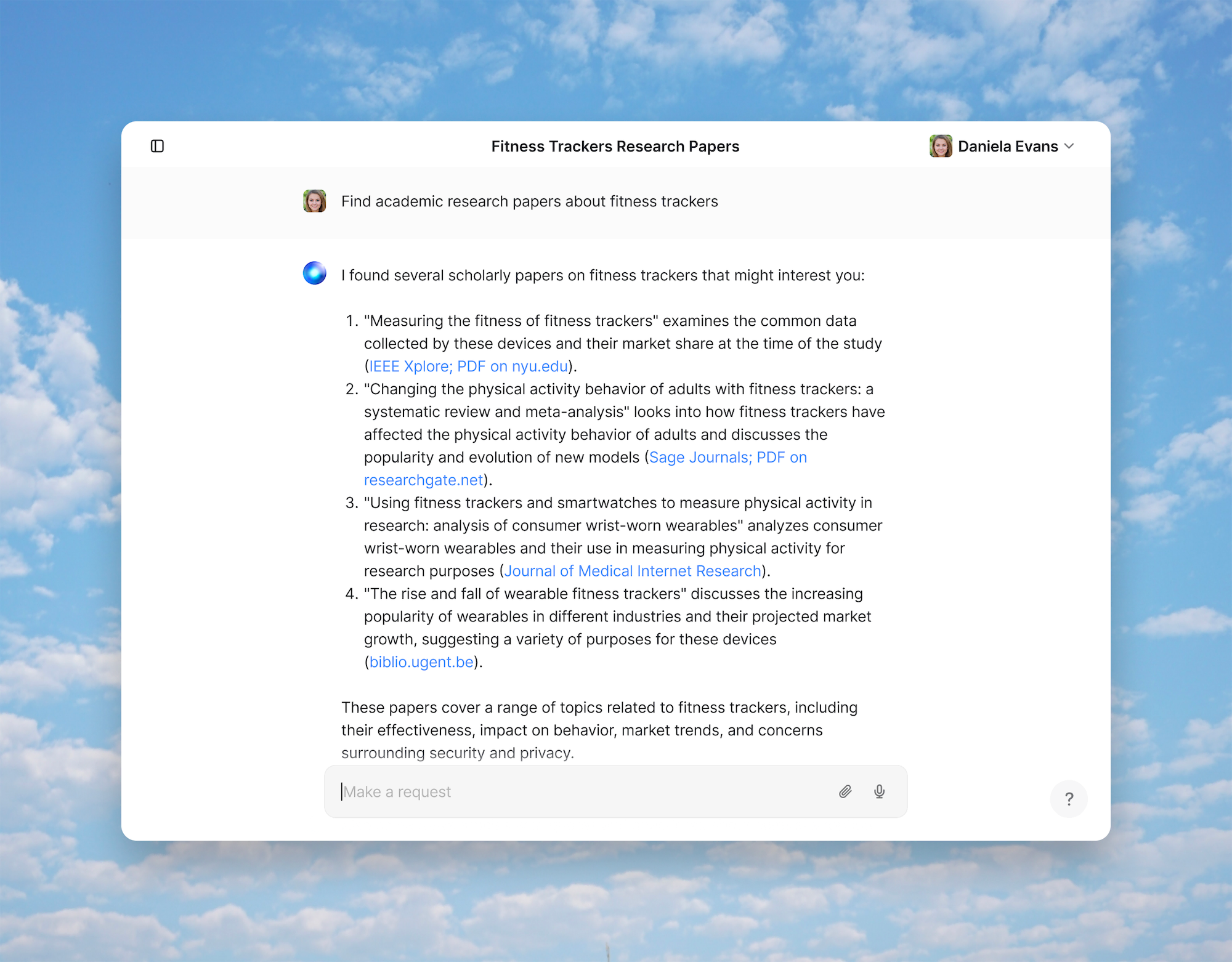
Research is the feature to approach with disciplined optimism. HyperWrite advertises live web information, millions of scholarly articles and citations. That can accelerate the hunt for a source and place a promising link beside a paragraph. A citation is a trailhead, not a certificate of truth. Open it. Check that the source says what the generated sentence claims, confirm the date, and prefer the original paper or document. HyperWrite's own pricing page tells customers to fact-check and edit before publishing or sharing. Take the vendor's good advice.
Can it sound like you?
Personas are HyperWrite's answer to the beige voice of generated text. Give the system writing samples plus rules about tone, vocabulary and behavior, then reuse that profile for a client voice, academic mode, support desk, or your ordinary correspondence. Premium includes three custom Personas; Ultra includes ten. The company's own guide cheerfully suggests banning AI favorites such as “delve” and “tapestry,” evidence that even an AI-writing company recognizes the smell of unedited AI writing.
HyperWrite announced in May 2024 that Personas used its customized version of Meta's Llama 3 70B. The company said it had tuned the model for longer passages, style and real-time function calling, and reported favorable internal preference tests. Treat the benchmark claim as the company's own, not an independent result. The current FAQ also describes access to models in the GPT-4 and ChatGPT family, while earlier infrastructure included both OpenAI and Cohere. The useful conclusion is less glamorous: HyperWrite orchestrates models and context around a writing workflow rather than selling one timeless model. Buyers should judge current output with their own documents.
Price check, with the limits showing
A free starter account provides basic AI and limited monthly credits, enough to learn whether the interface suits you. Premium costs $19.99 a month, or $16 a month billed as $192 annually. It includes 250 AI messages each month, three Personas, citations and real-time information, the tools library and unlimited TypeAheads. Ultra costs $44.99 monthly, or $29 a month billed as $348 annually, with unlimited AI messages, ten Personas and earlier access to experimental writing and agent features. Eligible students can receive a 50 percent monthly discount through a .edu address.
| Choice | Choose it when | Watch for |
|---|---|---|
| HyperWrite | You write across browser tabs and value inline prediction, reusable voices and cited research. | Premium has a 250-message cap; agent tasks deserve supervision. |
| Grammarly / Wordtune | You already have a draft and mainly want correction, tone guidance or sentence rewrites. | Less oriented toward generating and researching a whole document. |
| ChatGPT / Claude | You want a broad thinking partner for analysis, coding, files and open-ended conversation. | A separate chat can add copy-paste friction while writing around the web. |
| Jasper / Copy.ai | Your marketing team needs campaigns, brand workflows and go-to-market production. | More machinery and cost than many solo writers need. |
| Sudowrite | Your main project is fiction and you want story-specific controls. | Narrower fit for everyday professional writing. |
The crucial calculation is not words per dollar. It is interruptions avoided. If TypeAhead saves several visits to a chatbot each hour, Premium can justify itself for a heavy emailer. If you open the app twice a week to generate a blog outline, the free tier or a general assistant you already pay for is probably enough. Ultra makes sense only after the message cap becomes a real constraint or the experimental features are part of your routine.
The privacy pause
A browser assistant needs context, and context can be sensitive. The Chrome Web Store disclosure lists web history among the data categories the extension may collect. HyperWrite's privacy policy describes collecting content and usage information to provide and improve the service. Its terms say data may help train general systems, with an opt-out available by contacting the company. Policies and product controls can change, so organizations should read the current documents, ask security questions and avoid feeding confidential client, health, legal, financial, or unpublished research material without approval.
The same caution applies to browser automation. Let the agent research a list or populate a low-stakes form, then inspect the result. Sending messages, buying goods, changing records and handling credentials raise the cost of a wrong click. The Domino's demo stopped before payment for a reason. Autonomy feels magical in a demo; in daily work, confirmation screens are a feature.
Who should actually subscribe?
- Try it: browser-first professionals, students who verify sources, non-native English writers, and anyone repeatedly drafting email or short documents.
- Test before paying: marketers and long-form writers who need to see whether Personas preserve their voice across real assignments.
- Look elsewhere: mobile-first users, fiction specialists, enterprise teams needing formal governance, and people seeking a general coding or analysis assistant.
A capable co-pilot, with your hands on the wheel
Public reactions capture the trade. One longtime Reddit user said HyperWrite's suggestions learned their style and soon outpaced another autocomplete tool, while also noting prompt limits and content filtering. G2 reviewers describe breaking writer's block and finishing emails, documents and client content. Product Hunt records strong ratings for Personal Assistant. These are individual experiences, and enthusiasm often follows the relief of seeing a stubborn paragraph finally move.
Our recommendation is modest and favorable. Install the extension, give it ordinary material, and run a one-week test. Count how often you accept TypeAhead. Ask research mode for sources in a field you know well. Create one Persona from clean samples. Compare the result with your existing chatbot, including the time spent moving text around. Do not begin with the pizza-ordering robot. Begin with Tuesday's inbox.
HyperWrite matters because it spotted two durable ideas early: useful AI should learn the writer's context, and it should live close to the work. The product now carries five years of additions, from hundreds of tools to an agent that can roam the web. Yet the small blue-green orb works well as a discreet desk mate - offering the missing clause, finding a paper, and getting out of the way before your voice disappears.