In a public university placement report from Indonesia, a student describes work in NexWave’s document-control division: entering the information needed to plan a telecom site into SiteFORGE. The setting is Godean, near Yogyakarta. The task concerns a base station. Before equipment can become a useful part of a network, somebody has to make its proposed location, requirements, and survey records legible to other people.
That desk is a good place to understand SiteFORGE. Telecom construction has a physical sequence and an information sequence. Engineers survey; teams plan; contractors install; someone checks and accepts. SiteFORGE connects those sequences through site records, workflows, documents, and mobile applications. Its subject is the considerable amount of coordination hiding inside the apparently simple word done.
- The job: coordinate telecom sites, projects, equipment, and evidence.
- The people: rollout teams, contractors, field engineers, and document controllers.
- The useful idea: specify the proof a handoff needs before the handoff happens.
The second life of a site
SiteFORGE’s archived site-management feature list reads like the contents of a busy project office: images, inventory, work orders, technology, leasing information, regulatory information. These sit alongside projects and documents in a unified site view. Users can work with lists or maps, import site data, and connect a location to its surrounding activity.
The interesting choice is the site itself as an organizing unit. A project ends. A location can acquire another project, another equipment change, another inspection. Keeping those records connected gives the next piece of work a starting point. That is the operational logic of the product, and it explains why a generic task list only covers part of the same territory.
Give the next person something to use
The workflow module supplies the machinery between teams. Its documented features include a graphical process modeller, templates for different work types, functional groups, contractors, handover points, milestones, and required documentation. A process can include internal staff and external service providers. Alternate workflows accommodate work that does not follow the usual path.
Consider the difference between assigning an installation and defining an installation workflow. The assignment names a job. The workflow also describes the sequence, the responsible group, the required records, and the next handover. SiteFORGE’s proposition is that these details can be configured together. The payoff depends on people agreeing what the steps should be. Those decisions remain human work throughout an implementation.
This also changes what a manager can ask. Instead of requesting another summary from every group, the manager can inspect tasks and their dependencies in a common process. The documented delayed and at-risk views are useful in that context. They help locate a blocked activity; deciding how to unblock it still requires someone with authority over the work.
The handoff is part of the work.
Reading the product’s design
The office fits in a pocket
The archived homepage describes mobility in five plain words: “Captures data at the source.” The NOW framework makes that concrete with guided work orders, equipment images, barcode capture, asset tagging, issue tracking, and approvals. It also lists both online and offline operation. That last detail acknowledges an obvious condition of field work: the office’s connection cannot be assumed.
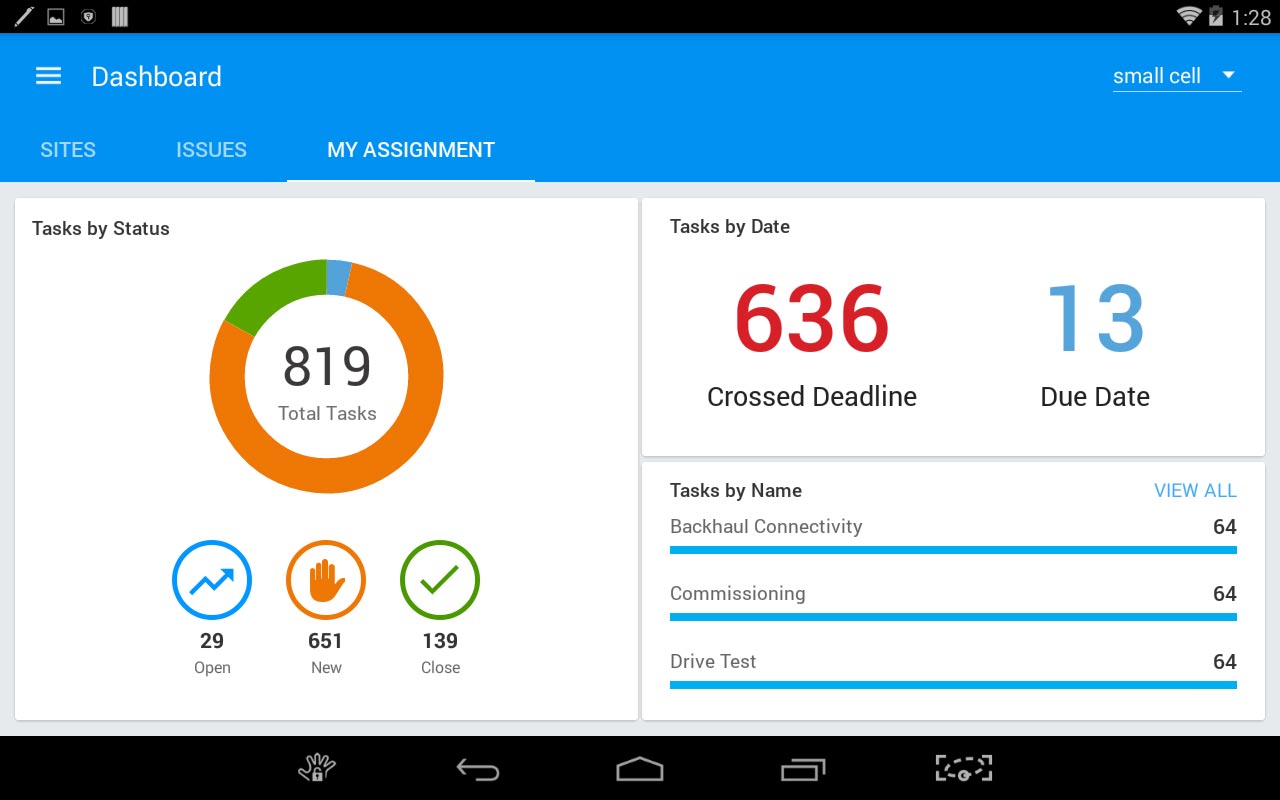
Capturing an asset identifier beside the task can reduce the ambiguity of a later update. A photograph can give a reviewer something to inspect. These are practical possibilities, rather than proof that every deployment saves a particular number of hours. The design moves the record closer to the activity that produces it.

Five steps before the handover
The close-out package is where SiteFORGE’s approach becomes easiest to see. Its published workflow starts with a customizable checklist. Then come task documents, material inventory records, and test-result documents. At the final stage, pending work can be assigned to a field engineer, with a Gantt view tracking the tasks toward acceptance.
- 01Check the scopeCreate the checklist.
- 02Attach the recordCollect task documents.
- 03Account for materialsAdd inventory documents.
- 04Bring the test resultsRecord the site’s tests.
- 05Resolve and hand overTrack pending work to acceptance.
A simplified reading of the published Close Out Package workflow.
The sequence makes completion something that can be checked. A supplier’s finished activity becomes a package another party can accept and maintain. There is a useful management lesson here: a closure checklist belongs in the project’s design. Leaving it until the final afternoon invites an archaeological expedition through messages and folders.
There is a second benefit to thinking about acceptance early. The receiving team can say what it needs while the originating team still has access to the site and its equipment. That is an inference from the workflow, rather than a measured SiteFORGE outcome, but it is a practical reason to connect documentation requirements to individual tasks.
The software behind the software story
Public practitioner accounts place SiteFORGE work inside InnoEye and identify Reliance Jio projects. A later, institutional trace appears in a 2024 TM Forum conformance mapping for Jio business assurance, which names SiteForge among interfaced asset and network systems. Together, those records put the software in an operator’s working environment.
In May 2020, Rakuten Mobile announced plans to acquire InnoEye. Rakuten said it had already deployed InnoEye’s converged operations support system for its Japan network launch. Subsequent investor materials confirm the acquisition. The strategic context is broader than one site application: Rakuten wanted operations software and engineering capability for its communications platform.
Copy the handoff, not the headache
SiteFORGE fits the enterprise end of project operations. Its archived services include integration, customization, consulting, and support. That points to an implementation shaped around a customer’s processes and existing systems. The buyer’s calculation should therefore include the work of mapping processes, preparing data, connecting systems, and training field teams alongside the software itself.
Accruent Siterra and Sitetracker occupy overlapping ground in telecom site, project, and asset management. SiteFORGE’s particular emphasis is configurable workflow connected to field capture and acceptance. That is a positioning distinction, not a performance ranking. For a small team with a few simple jobs, the configuration effort may outweigh the coordination problem.
A sensible evaluation would follow one real job through the system: import a site, assign a contractor, capture evidence offline, review an exception, and prepare the acceptance package. Watching those transitions should reveal more about fit than a polished dashboard. The question is whether the record survives each change of hands without somebody rebuilding it elsewhere.
The idea worth borrowing is smaller than an enterprise rollout. Choose one recurring handoff. Name its owner. Specify the documents or observations that make it acceptable. Then measure how long the receiving team waits. Automation can carry that agreement forward; it cannot negotiate the agreement for you. SiteFORGE’s most useful lesson begins there, before anyone opens a dashboard.