You know the file. A bird twitched just as the shutter fired. Granddad's VHS has the texture of oatmeal. The JPEG supplied for a six-foot banner is roughly the size of a postage stamp. Topaz Labs exists for the moment when an ordinary edit cannot put information back. Its software studies the damaged or undersized picture, makes an informed reconstruction, and hands you something cleaner, larger, or steadier. Sometimes the result feels like finding focus after the fact. Sometimes it gives a sleepy uncle a suspicious new eyelash. The operator remains employed.
That makes Topaz unusually easy to recommend to people with a recurring rescue problem and rather harder to recommend as a casual subscription. Working photographers who battle high-ISO noise, wildlife shooters who crop aggressively, printmakers enlarging small originals, documentary editors restoring archive, and filmmakers repairing generated footage can all recover billable work. Someone who mostly adjusts exposure and posts phone pictures will get more from the tools already in Lightroom, Photos, or their phone.
Topaz is best understood as a finishing bench, not a complete darkroom or edit suite. It does not organize a catalog like Lightroom, composite a campaign like Photoshop, or cut a film like Premiere. You send it the stubborn bit. The value appears when that bit matters more than the time and computing power required to fix it.
First, pick the right wrench
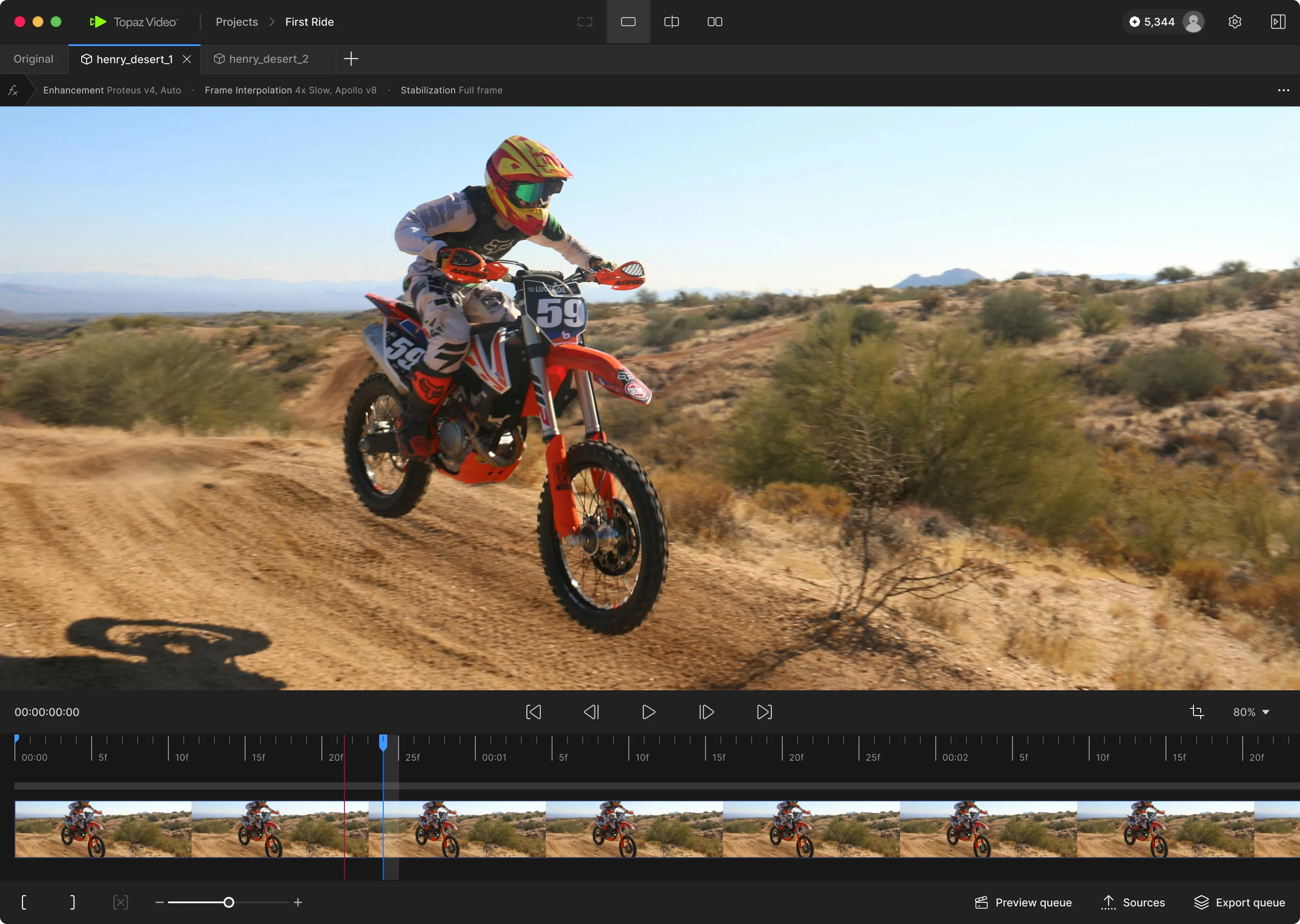
The Topaz catalog has expanded into desktop, browser, mobile, plugin, cloud, and API products. Three desktop names do most of the explaining. Topaz Photo is the broad repair shop: denoise, sharpen, recover focus and faces, remove dust and scratches, preserve text, adjust light and color, and upscale. Topaz Gigapixel is the enlargement specialist, with core and generative models for photos, illustrations, graphics, and scans. Topaz Video works frame by frame on resolution, noise, compression, interlacing, shake, motion blur, frame rate, slow motion, and HDR conversion.
| If your problem is... | Start here | Why | Watch for |
|---|---|---|---|
| A soft, noisy photograph | Topaz Photo | Several repairs can run in one workflow, with Autopilot as a first pass. | Too much sharpening on skin, feathers, or repeated texture. |
| A small scan or tiny AI image | Gigapixel | More enlargement choices and dedicated reconstruction models. | Changed lettering, invented facial detail, large files. |
| VHS, DVD, archive, or shaky clips | Topaz Video | Models are tuned for deinterlacing, compression, faces, noise, and motion. | Render time, temporal shimmer, plastic texture. |
| An underpowered computer | Topaz for Web | Cloud hardware does the heavy work. | Credits, upload time, privacy requirements. |
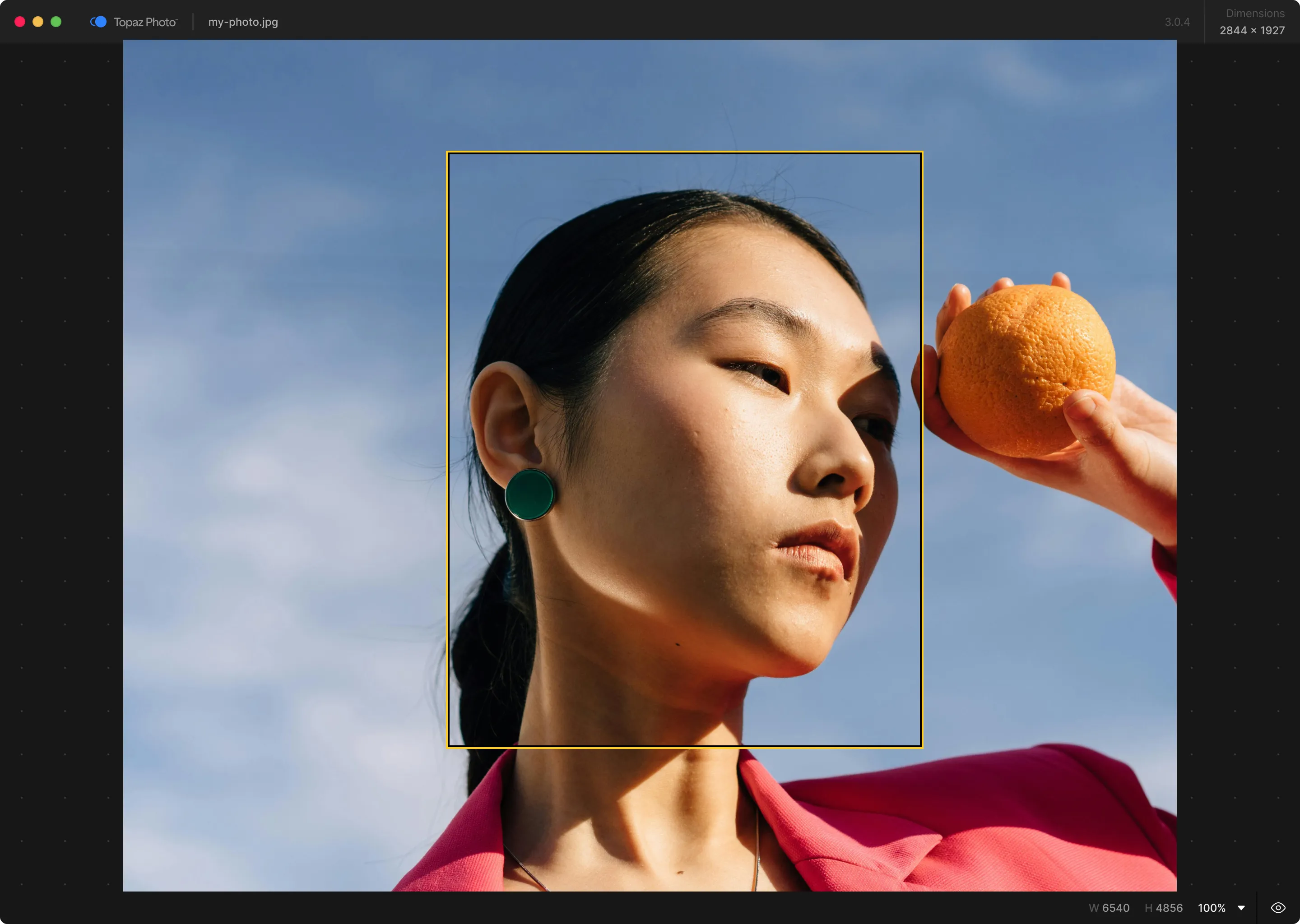
The model names are charmingly celestial and only mildly helpful. Video offers Proteus for general cleanup, Iris for faces in degraded footage, Nyx for high-resolution denoising, Rhea for 4× texture work, plus Artemis, Gaia, Theia, Apollo, Chronos, Aion, Themis, and Starlight variants. Photo and Gigapixel add names such as Wonder and Standard Max. The practical skill is not memorizing mythology. It is matching the model to the defect, then comparing a short preview against the original at the final viewing size.
The best Topaz workflow begins with the ugliest five seconds, not the entire two-hour tape.
What the software gets right
The compelling trick is defect-specific reconstruction. A conventional sharpen filter exaggerates contrast around edges, which can make both detail and noise louder. Topaz's sharpen models try to reverse causes such as camera shake, lens blur, or missed focus. Its noise-aware option separates detail from grain before sharpening. In video, one model may respect a recognizable face and logo while another has permission to re-imagine a nearly empty landscape. That distinction between precise and creative work is more useful than a generic “enhance” button.
There is evidence beyond the showroom carousel. In a detailed DPReview test, Mike Tomkins turned a 1.2-megapixel Canon PowerShot G1 file into as much as 116.5 megapixels. He found artifacts at extreme enlargement, especially around text and manufactured detail, but called lower settings usable and found 4× output credible for more forgiving subjects such as landscapes and nature. That is a sensible picture of Topaz: real utility, bounded by what the source contains.
For professionals, local rendering is another meaningful advantage. Supported models can stay on the workstation, avoiding per-render charges and cloud uploads. Topaz's NeuroStream and NeuroServer work is designed to run larger models on consumer devices; a June 2026 update made four demanding image models up to twice as fast on M1 and newer Macs. Cloud rendering remains available when the local machine is unsuitable or the model is cloud-only.
The pixels can lie
Every reconstruction tool faces the same philosophical snag: a missing detail cannot be recovered with certainty. It can be inferred. Fur, leaves, stone, and clouds hide plausible invention well. Text, logos, known faces, architecture, and evidence do not. Topaz's own web-video guide steers text and recognizable subjects toward Precise models because creative models may change them. For documentary, forensic, medical, competition, or historical work, keep the untouched original and disclose material reconstruction when context requires it.
Customer discussions repeatedly return to three complaints. First, model updates can behave differently from familiar versions. Second, video can take hours or days with demanding models, even on expensive machines. Third, subscriptions replaced the old expectation that a perpetual desktop license was the normal purchase. A recent Starlight Precise 2.6 discussion praised its ability to remove the “plastic look” while reporting face artifacts and multi-day processing on a 90-minute source. That is not a controlled benchmark, but it is exactly the kind of field report a buyer should read before promising a delivery date.
The practical Topaz tax, relative rather than benchmarked
Hardware reality: current Gigapixel guidance begins at 16 GB of RAM. Topaz recommends 24 GB or more, plus 8 GB or more of VRAM on Windows for generative work. Very large images can demand far more. Linux is not supported. Browser tools are the practical route for a modest machine.
Pricing needs its own focus check
Topaz Studio currently lists at $399 a year, $45 a month with an annual commitment, or $69 paid month to month. It bundles six apps, unlimited local and cloud image rendering, and 300 monthly video cloud credits. Individual apps are available, with lower annual-commitment rates and higher flexible monthly rates. Commercial organizations over $1 million in annual revenue are directed to Pro licensing; Studio Pro is $799 a year. Video cloud credits expire monthly.
This is defensible for a working studio that rescues several jobs a month and awkward for a hobbyist who needs Gigapixel twice a year. The product pages and bundles have changed often enough that nobody should make a purchase from an old review. Check the live pricing page, the commercial-use threshold, cloud allowances, and whether the feature you want runs locally. Legacy perpetual apps remain usable under their old terms, but they are separate from the current subscription line.
The alternatives are job-specific
| Need | Also test | Trade-off to examine |
|---|---|---|
| RAW noise and lens correction | DxO PureRAW, Lightroom | Camera profiles and a simpler RAW pipeline versus Topaz's broader rescue tools. |
| Print enlargement | ON1 Resize AI, Photoshop Super Resolution | Workflow integration, edge treatment, and repeatable output on your paper and printer. |
| Free local upscaling | Upscayl | No subscription, with fewer specialist controls and production conveniences. |
| Video post and upscaling | DaVinci Resolve Studio, Aiarty, AVCLabs | One integrated edit suite versus Topaz's deeper catalog of restoration models. |
| Creative image reconstruction | Magnific AI | How much invention is acceptable, cloud pricing, and control over fidelity. |

A family shop enters Adobe's orbit
Feng “Albert” Yang, a computer-vision researcher, founded Topaz in Dallas in 2005. The first product, Topaz Moment, borrowed information from neighboring video frames to improve one chosen still. His son Eric joined in 2008, later left, and returned as CEO in 2018. Eric has described a bootstrapped company whose core audience still produced more than half its revenue in 2025: creative professionals and serious enthusiasts, rather than the general consumer crowd.
The company earned an unusual credential in December 2025. The National Academy of Television Arts and Sciences gave Topaz Labs and MTI Film a Technology & Engineering Emmy for AI image and video enhancement used in high-quality television catalog restoration. Then, on June 25, 2026, Adobe announced a definitive agreement to acquire Topaz. Adobe said the apps would remain available as standalone products and Eric Yang would continue leading the team after closing.
Careful with the tense: the deal is proposed, not publicly completed as of this review. Adobe expected a second-half 2026 close subject to approvals and other conditions. Australian competition authorities were still assessing it in August. Existing subscriptions did not change at announcement. The strategic logic is easy to see, though. Adobe wants Topaz's restoration models and efficient local inference; Topaz gains distribution inside the creative software giant already hosting some of its partner models.
The five-file buying test
Do not judge Topaz with its polished samples or one lucky portrait. Download the trial and assemble five files from your actual workload: a noisy image, a missed-focus image, a small file with text, a familiar face, and a short clip containing motion. Use defaults first. Compare two plausible models, export at the size you truly need, and inspect both 100% crops and the final delivery size. Time the render. Record VRAM use. Confirm metadata, color, codec, and plugin behavior in the rest of your pipeline.
- Buy Photo if several different photographic defects recur every week.
- Buy Gigapixel if enlargement is the job and model-level control earns money.
- Buy Video only after timing representative clips on your own hardware.
- Choose web rendering when hardware cost or setup matters more than upload and credits.
- Keep originals, label experiments, and review every face, logo, title, and straight edge.
Topaz earns its place when “we cannot reshoot it” is the start of the assignment. It can turn an unusable crop into a publishable one, make an archive comfortable on a modern display, and recover time that manual cleanup would swallow. It is also capable of spending a night rendering a confident fiction. Give it difficult material, a narrow brief, and adult supervision. Bad pixels may confess. Read the statement before you sign it.