Douglas Waldman had a problem that a better pen could not solve. At Marshall Orthopaedics in Texas, disability forms could take 30 to 60 minutes apiece. The spaces were small, the handwriting had to be legible, and the patient still needed care. A typewriter did not rescue the process. Neither did another stack of paper. The form had become a competing claim on a surgeon’s time.
- pdfFiller puts PDF editing, forms and signing in a cloud workspace.
- Its sweet spot is repeated paperwork shared between people.
- The price depends on features and commitment: Basic starts at $96 a year.
The practice adopted pdfFiller, saved forms digitally and used templates to complete them. In the company’s published customer story, Waldman reports savings above $100 per workday in employee time and supplies. That is a customer’s estimate, not a controlled experiment. But it identifies the unit that matters: the minutes surrounding a document, repeated until they become a meaningful expense.
The form stays. The handoffs go.
pdfFiller is a cloud-based PDF editor and document management service within airSlate. Upload a file, change its contents, add fillable fields, request signatures, share it and keep the result online. It handles the unglamorous jobs too: combining pages, converting formats, annotating a passage, making a document smaller. People can work through a browser or use its apps.
Consider the attraction for a property manager or an insurance agent. The document may come from somewhere else. Its format is already decided. Rebuilding the whole transaction around a new system is a bigger project than completing this afternoon’s forms. pdfFiller gives that existing document fields, a route to another person and a place to live afterward. Familiar paperwork acquires a different operating procedure.
The company’s LinkedIn profile says more than 120,000 businesses use its services worldwide. Its published customers include medical practices and behavioral-therapy providers; its broader pitch reaches education, real estate, insurance and legal work. These customers share a practical concern: someone must turn an unfinished document into a usable record, often with another person’s help.
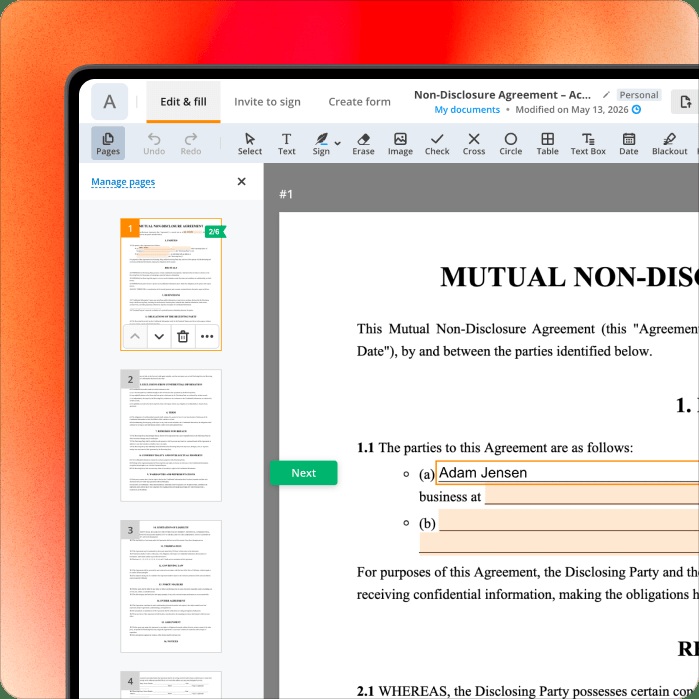
There is also a difference between sending a file and collecting information. With LinkToFill, a recipient follows a browser link to complete a form; the sender receives the finished document and can export collected data. Yet the company’s guide says this feature has no native, one-click Salesforce connection. CSV or Excel export can still be the bridge. Even inside a document platform, the last handoff deserves attention.
An editor grows a surrounding business
Vadim Yasinovsky created the original product. The company dates its first public editor release to 2008, followed by more than 3,000 users in 2009. By 2011, its timeline records a 15-person team and a Boston office. Boris Shakhnovich joined that year. An initially narrow tool was becoming a company with more jobs to do.
Expansion followed the document’s journey. The business added signNow in 2017 and launched the airSlate workflow platform in 2019. Today, pdfFiller Premium includes signNow access and a US Legal Forms library. A customer arriving to edit a file can also find the form, prepare it for someone else and arrange its signing.
That makes the competitive field unusually wide. Adobe Acrobat, Foxit and Smallpdf compete for PDF work; DocuSign and PandaDoc overlap in signing and document workflows. pdfFiller’s case rests on doing several adjacent jobs in one environment. DocHub, another familiar PDF alternative, belongs to airSlate too. The brands on a comparison list do not always represent separate owners.
“pdfFiller saves us $100 or more each workday”Douglas A. Waldman / Marshall Orthopaedics
Customer account published by pdfFiller
The price of getting the job finished
The business model is recurring subscriptions, with a substantial difference between annual and monthly buying. Basic costs $96 for a year, advertised as $8 a month, or $20 when bought month to month. Plus and Premium follow the same pattern. The inexpensive-looking monthly figure describes an annual commitment.
Individual list prices checked October 16, 2026. Monthly totals assume 12 payments at the displayed rate.
Basic covers editing and filling. Plus adds reusable templates and other document controls. Premium adds signing workflows, web-form collection and user permissions. Enterprise plans introduce minimum seat counts and more administration. The useful buying question is how many of those steps your office repeats. A subscription has a clearer economic case for recurring work than for fixing one stray PDF.
The cloud also requires a decision about where documents belong. pdfFiller publishes security information and says it maintains an annually audited SOC 2 Type II report. For an organization, that starts a review of access, permissions and internal policy. Uploading sensitive material still requires deliberate choices; a security badge cannot make those choices for the customer.
The scan finally gets a text layer
A revealing limitation appears in pdfFiller’s October 1, 2026 OCR announcement. A scanned page had been a picture: the editor could cover a fragment and let someone type over it, but could not simply grab its words. Integrated recognition now makes detected paragraphs editable within the same workflow. The company says roughly one in five documents opened in pdfFiller is scanned or image-only.
The update supports six languages, but font matching is limited and complex layouts can produce awkward text blocks. September’s Crop & Resize release tackles another everyday nuisance: badly sized pages and messy scan edges. It is desktop-only. These details describe the actual product better than a sweeping automation promise. Progress can mean making the fax less troublesome.
The AI assistant extends that approach to reading and drafting. It can summarize, translate, generate drafts and answer document questions. Its own guidance tells users to verify answers and warns that summaries can lose qualifications. For a busy office, that makes it a first pass through a document, with the original still available for checking. The time saved depends on how much review the work needs.
Start with the form everyone avoids
There is a method worth borrowing from the clinic’s experience. Choose one recurring form. Make a reusable version, test its fields and sharing, then measure the time to finish it. Expand when the result earns its place. That approach works best when the task repeats and the cloud fits the organization. The surgeon’s problem was specific. The first useful improvement could be specific too.
Open the document drawer
Explore pdfFiller, plans, the company blog and product news.
Follow on LinkedIn, X, Facebook, Instagram or GitHub.
Watch: Getting Started with pdfFiller