At Howden, the engineering company, somebody counted the PDF software. The answer was 27 different products and versions. This was a business that knew how to make complicated machinery work. Yet the humble document had acquired its own little ecosystem of incompatible tools. One-third of the installed PDF software was outdated, with old security patches and, in many cases, inadequate support or training resources.
That is an unusually good place to begin a story about Nitro. Most people encounter a PDF as a finished object: a contract, a drawing, a form. An IT department encounters something else: licenses, versions, permissions, help requests and the person who cannot open what another person has just sent. The file may be portable. The inconvenience travels beautifully, too.
- Nitro edits and converts PDFs, collects signatures and helps remove sensitive information.
- Its enterprise pitch combines software with deployment, training and visibility into usage.
- The lesson from Howden: count your tools before you buy another one.
Twenty-seven ways to do the same thing
Howden chose Nitro after evaluating functionality, usability and cost. It standardized PDF work, provided training and reduced printing requirements through electronic signing. The customer story describes simpler workflows and faster adoption. It does not need an extravagant productivity promise to make the point. Twenty-seven products create twenty-seven opportunities for an ordinary task to become somebody else’s problem.
The interesting failure here was organizational. People could work on documents, but the collection of tools had become difficult to maintain. The inventory made that fragmentation visible. Standardization offered an answer to several problems at once: compatibility, software maintenance, support and the routine journey between paper and screen.
and versions
PDF solution
For another company, the copyable move is the audit. List the products, identify who uses them, and follow a real document through its approvals. Buying software before doing that is rather like ordering a new cupboard without opening the old one.
A PDF editor with an enterprise appetite
Nitro began in Melbourne in 2005. Its founding team included Sam Chandler, Karl De Abrew and Richard Wenzel. The company grew around document productivity, a market where Adobe Acrobat was the obvious reference point. Nitro’s proposition remains recognizable: give people the PDF capabilities their work requires, with an alternative commercial and support relationship.
The enterprise turn has a useful witness. Battery Ventures, which led Nitro’s $15 million Series B in 2014, says enterprise customers were its fastest-growing cohort even while smaller businesses dominated the customer base. Battery helped develop outbound enterprise sales and supported the move from term licenses toward subscriptions. It also helped with executive recruitment and the acquisition of doxIQ to deepen analytics.
This explains why Nitro’s story cannot be reduced to an editor with a different price tag. Enterprise buyers must decide who receives a license, whether employees adopt the product and what happens when the old system is removed. A replacement that looks economical on a spreadsheet can become expensive if the workforce refuses to use it.
“Nitro rewards doing.”Mark Lambe, Engineering Manager
Nitro’s careers materials describe a hub-centric hybrid working model and call employees “Nitronauts.” The nickname is cheerful; the customer work is often quite sober. Training, deployment and support sit close to the purchase decision. The company’s own customer library includes manufacturers, banks, property businesses and insurers - organizations for which a document is frequently part of an operating process.
What happens after you open the file?
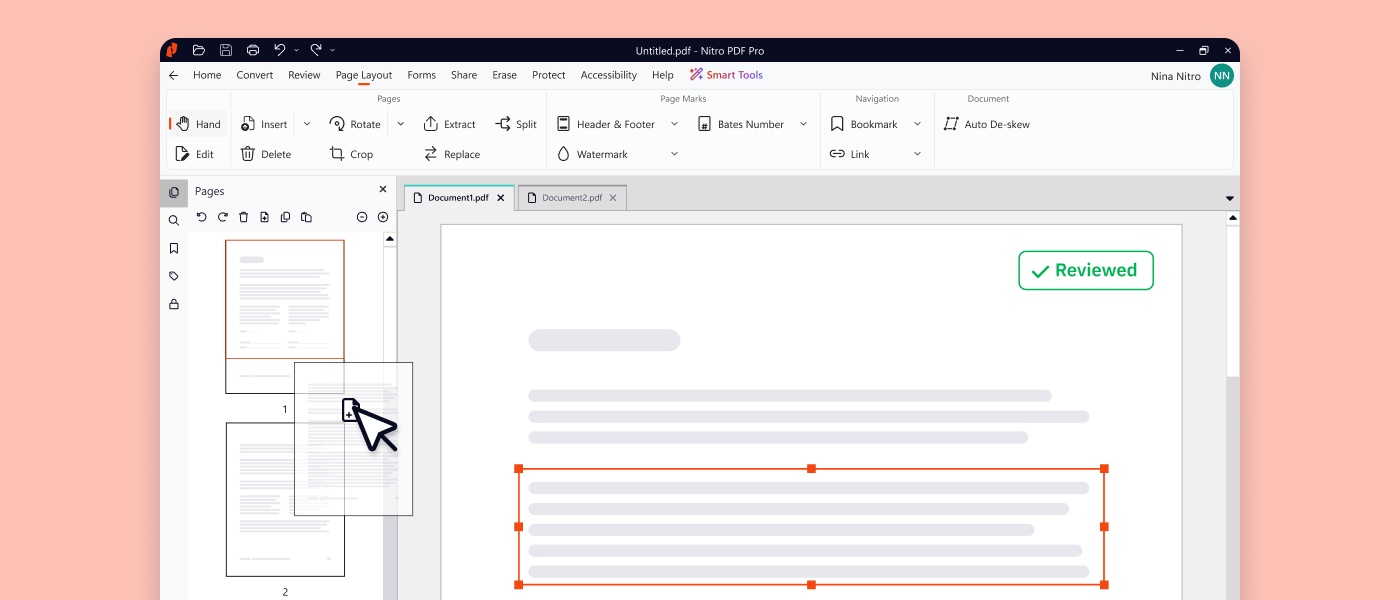
Start with the everyday job. Nitro PDF Pro can edit text and images, rearrange pages, combine files, annotate documents and convert PDFs into Office formats. OCR makes scanned documents searchable and editable. Forms let someone replace a repeated exchange of printed sheets with fields that can be filled on screen. Nitro offers PDF products for Windows, macOS and iOS, with differences across platforms.
Then comes the signature. Nitro Sign sends documents to recipients, tracks the signing process and maintains an audit trail. Standard, Plus and Enterprise plans serve different requirements. Templates, bulk sending, branding and authentication become relevant as the workload grows. Enterprise options extend into identity verification and advanced or qualified signatures, where the assurance behind a name matters as much as the mark on the page.
That breadth came partly through acquisition. In 2021, Nitro agreed to buy Belgium’s Connective for an enterprise value of €70 million, approximately $81 million at announcement. The deal added high-trust signing, electronic identity and document-workflow capabilities. The same year, Nitro paid $6 million in cash for PDFpen technology from Smile, extending native PDF productivity to Apple devices. Two purchases answered two different questions: who is signing, and what device are they using?
- 01 / EditMake the file useful.
- 02 / ReviewResolve changes and approvals.
- 03 / SignIdentify, route and complete.
- 04 / MeasureSee adoption and activity.
The bill depends on what you count
Nitro sells subscriptions, enterprise contracts and a Windows PDF Classic license paid once for a three-year term. That last detail matters: three years is a duration, not a promise of ownership forever. Larger deployments move into volume pricing and a sales conversation. A serious cost comparison should therefore include the license term, the required features and the effort of migration.
For signatures, there is a more distinctive detail. Nitro says only completed envelopes count toward the allowance, and additional envelopes are charged at the plan rate. An envelope may contain one or several documents. If every recipient must sign before it counts as completed, stalled requests have a different economic consequence from successful transactions.
That accounting deserves attention from a buyer comparing vendors. Ask what consumes the allowance, what happens above it and which identity features are included. A low headline price is not terribly informative until the unit underneath it has been named.
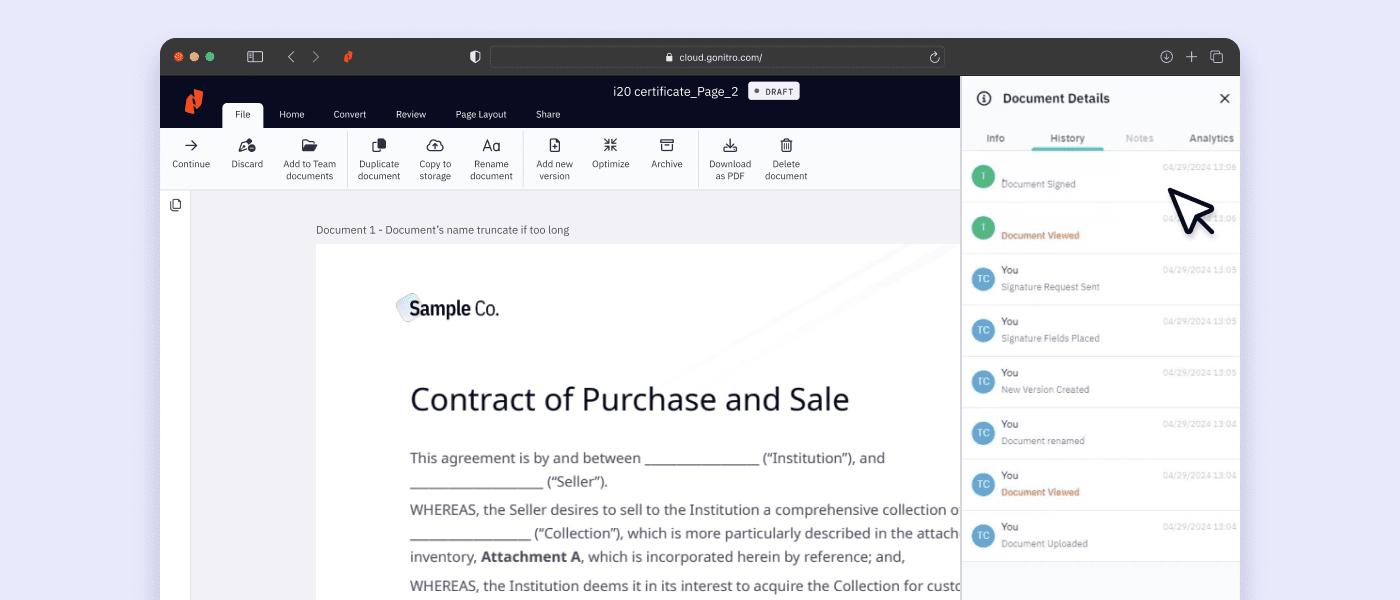
Nitro Analytics adds another measurement layer: adoption, PDF and signing activity, ROI and sustainability indicators. It is included with PDF Plus. The sensible use is to see whether a rollout is being used and where habits are changing. Calculated savings still depend on assumptions; a dashboard is a helpful witness, not an accountant’s pardon.
AI joins the paperwork queue
By 2026, Nitro was adding AI tools to a much older document engine. Smart Redact commercially launched in February. It identifies more than 30 categories of sensitive information, including material in scanned files, and lets users review suggestions or mark content manually before applying permanent redactions. The important verb is review. A plausible suggestion and an approved disclosure decision are different stages of the work.
The Windows PDF Pro v26 release brought a dedicated Smart Tools tab alongside interface, OCR and conversion improvements. Administrators can control access to AI capabilities. September’s Workspace release added reasons that can be printed within the redacted areas, making the removal intelligible to the reader of the final document.
Nitro also announced early access to an MCP connector for Claude, connecting its document engine to an AI environment. The announcement described Nitro Automate as a forthcoming expansion into developer APIs and low-code or no-code workflows. The direction is clear: document operations should happen inside the systems where people already work. The distinction between available early access and a promised expansion is worth keeping.
The document still gets a vote
Nitro went public on Australia’s stock exchange in December 2019. In 2023, a contested takeover ended with KKR-backed Alludo acquiring it at a final A$2.20 per share. In September 2026, Nitro announced Leader placement in IDC’s assessment of integrated signing workflow software. These milestones show a company moving well beyond its desktop origins.
For the buyer, however, the decisive evidence is smaller. Can the replacement handle the actual scanned invoice, complicated form and approval chain? Does the required identity method exist in the chosen plan? Will the Mac team have the functions it needs? Organizations tied to a particular integration or specialized PDF feature should settle those questions in a pilot before changing the fleet.
Nitro offers a 14-day trial. Use it on awkward documents, not just immaculate samples. The company’s appeal is strongest where editing, signing and administration have accumulated separate costs and separate handoffs. If those problems are absent, a full platform may be more than the task requires. Howden’s useful discovery was a number. The next company’s may be a journey: one file, followed patiently, until all the hidden work comes into view.
Open the tools
Explore Nitro, plans, the trial and the resource library. Watch the PDF Pro introduction or visit Nitro’s YouTube channel.
Follow Nitro on LinkedIn, X, Instagram and Facebook. Read company news and product release notes.