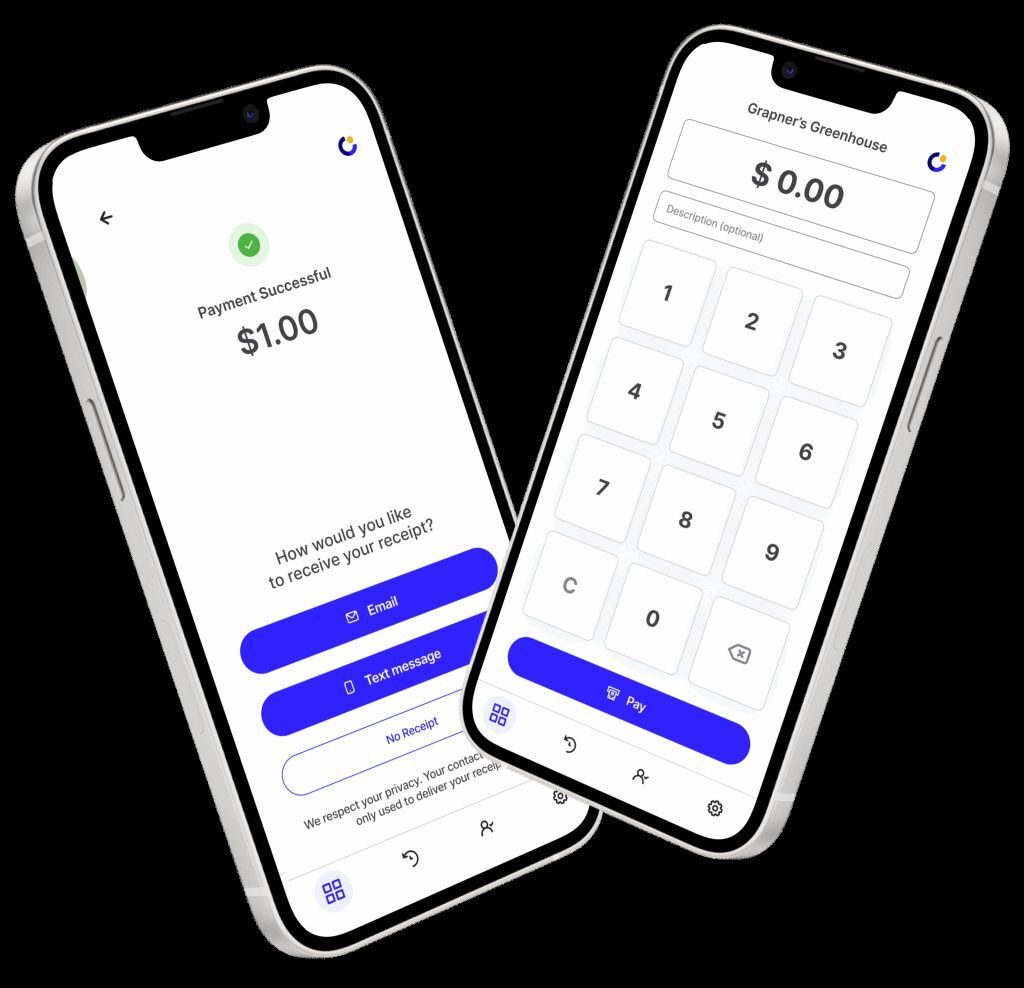
A card reader is an oddly specific thing to carry when the job itself happens everywhere. It sits in a plumber's van, rattles around a market seller's tote and runs out of charge precisely when somebody says, "Can I tap?" CPOS has built its newest pitch around that small annoyance. Open the CPOS Pay app on a compatible phone, type the amount, and the customer taps a card or digital wallet against the device. The receipt can leave by text or email. The merchant leaves with one less object to remember.
That is the plainest version of what this Ottawa company does. Founded in 2014 by Max Braden, CPOS spent its first decade in the familiar territory of merchant services: payment terminals, online ordering, invoicing and the software required to make sales technology talk to itself. The current front door is more pointed. It is for trades, mobile services, pop-ups and solo sellers - businesses that need to get paid in person but may never stand behind a counter.
A checkout counter that follows the work
The best way to understand CPOS is to ignore the phrase "mobile point of sale" and picture a driveway. A contractor finishes a repair. The invoice is $680. The customer wants to use a card. With CPOS Pay, the contractor enters the total, the customer taps the contractor's phone, and both get closure before the van pulls away. There is no payment link waiting in an inbox and no terminal paired over Bluetooth. For service businesses, moving checkout to the exact point where the work ends can shorten the distance between revenue earned and revenue collected.
Inside the app, CPOS bundles the chores that orbit a sale: taxes, tips, invoices, transaction history, payouts, digital receipts and full or partial refunds. Multiple staff can take payments on their own phones under one business account. The Free plan caps a transaction at $1,000; Pro advertises up to $10,000, although the customer's bank may impose a lower contactless limit on a physical card. Apple Pay and Google Pay can sometimes clear larger amounts.
What it costs - and what the asterisk does
CPOS's business model follows merchants up a ladder. The Free plan has no monthly subscription and charges an advertised 2.49 percent plus 10 cents for an in-person payment. The Pro plan costs $20 a month, lowers that rate to 2.29 percent plus 10 cents, raises the transaction ceiling and adds priority payouts and Freepay. Card-not-present payments and international cards add 1 percent plus 20 cents. Large merchants get custom pricing.
Freepay is the feature with the largest asterisk. On Pro, a merchant can establish a standard listed card price and offer a lower cash price. CPOS calculates the card price so the merchant can net the intended amount after processing costs. This is a cash-discount model, not a surprise fee added at checkout. The merchant must show both prices clearly and remains responsible for local law, tax treatment and card-network rules. It is clever in the right jurisdiction and a compliance headache in the wrong one.
CPOS still sells conventional terminals. Its terminal page advertises interchange plus a 0.20 percent markup, month-to-month service and no early termination fee. A merchant can activate CPOS Pay while the device ships. This gives the company a useful bridge: the phone is enough for a mobile worker or a first sale, while a busy counter can graduate to purpose-built hardware.
“One phone replaces the whole register.”CPOS's compact promise to mobile service businesses
The hard part starts after “Payment successful”
The beautiful screen is only half a payments product. Underneath sit identity verification, fraud detection, chargebacks, account reviews and settlement. CPOS's terms say Stripe processes CPOS Pay transactions through connected accounts. CPOS supplies the software layer; it says it does not hold merchant funds, execute payouts or handle card credentials. Separately, the company identifies itself as an Elavon registered merchant-service provider for its broader terminal business.
What failed first in the newer app is visible in its own release notes. Users encountered repeated identity checks, contact details reverting, setup checklists getting stuck and verification screens that could hang or fail to save. Version 2.34.0, released in August, targeted those exact faults. An earlier August update redesigned the app around two tabs and pulled payments, payouts and invoices into a single Activity view. That is an encouraging form of product honesty: name the broken seams, then sew them.
The public reviews are less tidy. Many merchants praise quick checkout, easy invoicing and the relief of leaving a terminal at home. Others describe slow support, delayed payouts or account reviews that arrived after transactions were accepted. CPOS responds that compliance reviews and holds can apply under its terms. The lesson for buyers is not that one side must be lying. It is that payment tools have two operating modes: the ordinary day, when speed wins, and the bad day, when access to a capable human matters more than interface polish.
Where CPOS fits - and where it does not
CPOS sits between the bank terminal and the sprawling operating system. Square and Shopify POS stretch across retail, restaurants, appointments and commerce. Lightspeed goes deep on multi-location operations. Helcim and Moneris compete hard in Canadian merchant services. CPOS's clearest wedge is narrower: people who travel to the customer, sell intermittently or need several workers to accept a card without buying several readers.
Mobile work, occasional selling, small crews, fast in-person collection and a desire to avoid dedicated hardware.
High monthly volume, complex inventory, restaurant workflows, deep ecommerce needs or around-the-clock support expectations.
NFC, iOS 15.1 or Android 10+, certified software and no rooted or developer-mode Android device.
Comfort with digital onboarding, identity checks, transaction fees and the payout rules of a connected payment account.
It will not work everywhere. A rooted Android phone, an old operating system or disabled NFC can stop acceptance. A restaurant that needs kitchen routing, intricate menus and offline resilience should compare a full restaurant POS. A high-volume seller may find that tenths of a percentage point outweigh the convenience of a free plan. And a merchant who cannot tolerate a payout review should examine underwriting and reserves before processing a large job, regardless of provider.
The playbook worth stealing
The most copyable part of CPOS is not payments. It is subtraction. Find a workflow designed around a costly object, ask whether the customer's existing hardware can absorb it, and aim the resulting product at people the old object excluded. The phone already has a screen, network connection, identity layer and NFC radio. CPOS turns those sunk costs into its distribution advantage.
There is evidence the broader business found an audience before this phone-first turn. CPOS appeared on Canada's Top Growing Companies rankings in both 2022 and 2023. Today it says more than 6,000 businesses move over $1 billion a year through its systems. Google Play shows more than 10,000 downloads. These are company and platform figures, not audited accounts, but they put some scale behind the pitch.

CPOS's published culture sounds like the company it wants to be: solve problems first, get work done, level each other up. The language is blunt enough to be memorable. The sharper test is operational. Can a growing payments company preserve the speed of a tiny app while providing the judgment of a mature financial service when something goes wrong?
That question matters because the real product is not the tap. Apple and Google helped standardize that gesture; Stripe and payment networks carry much of the infrastructure beneath it. CPOS's product is the packaging: whom it invites, what it removes, how it prices the first sale, and whether it earns enough trust to be present for the thousandth. The card reader disappearing is the entertaining part. Making the worry disappear is the business.