Most prospecting software begins with a census. Give it an industry, a job title and a headcount range, and it returns a very large list of people who have done nothing except fit the description. Trigify begins with a moment. Someone asks for a recommendation on Reddit. A target account starts hiring salespeople. A VP keeps liking a competitor’s posts. A buyer changes jobs. The product watches for those small public acts, attaches them to a person or company and sends the useful ones somewhere a team can act.
That makes Trigify most interesting for B2B sales, demand generation, growth and RevOps teams that already know whom they want to reach. It is also built for the increasingly common GTM engineer who wants fresh context flowing into an agent, CRM or script. If your team cannot agree on its ideal customer, its buying signals or what should happen after an alert, Trigify will give you a more expensive view of the confusion.
The point is timing
Trigify was founded in 2023 by Max Mitcham and Hugo Millington-Drake. Mitcham came from social listening and framed the original problem as disconnected clues around target accounts. In 2024 the company announced a $1.3 million pre-seed round backed by Haatch and River Capital. The product has since widened from a social sales tool into what its current site calls a GTM signal intelligence platform for teams and AI agents.
The distinction matters. Traditional social listening is good at charts, sentiment and mention volume. A static lead database is good at telling you who a VP of Sales is. Trigify wants to notice that the VP just complained about stale enrichment data, preserve the post, enrich the person and start a workflow while the complaint still has a pulse.
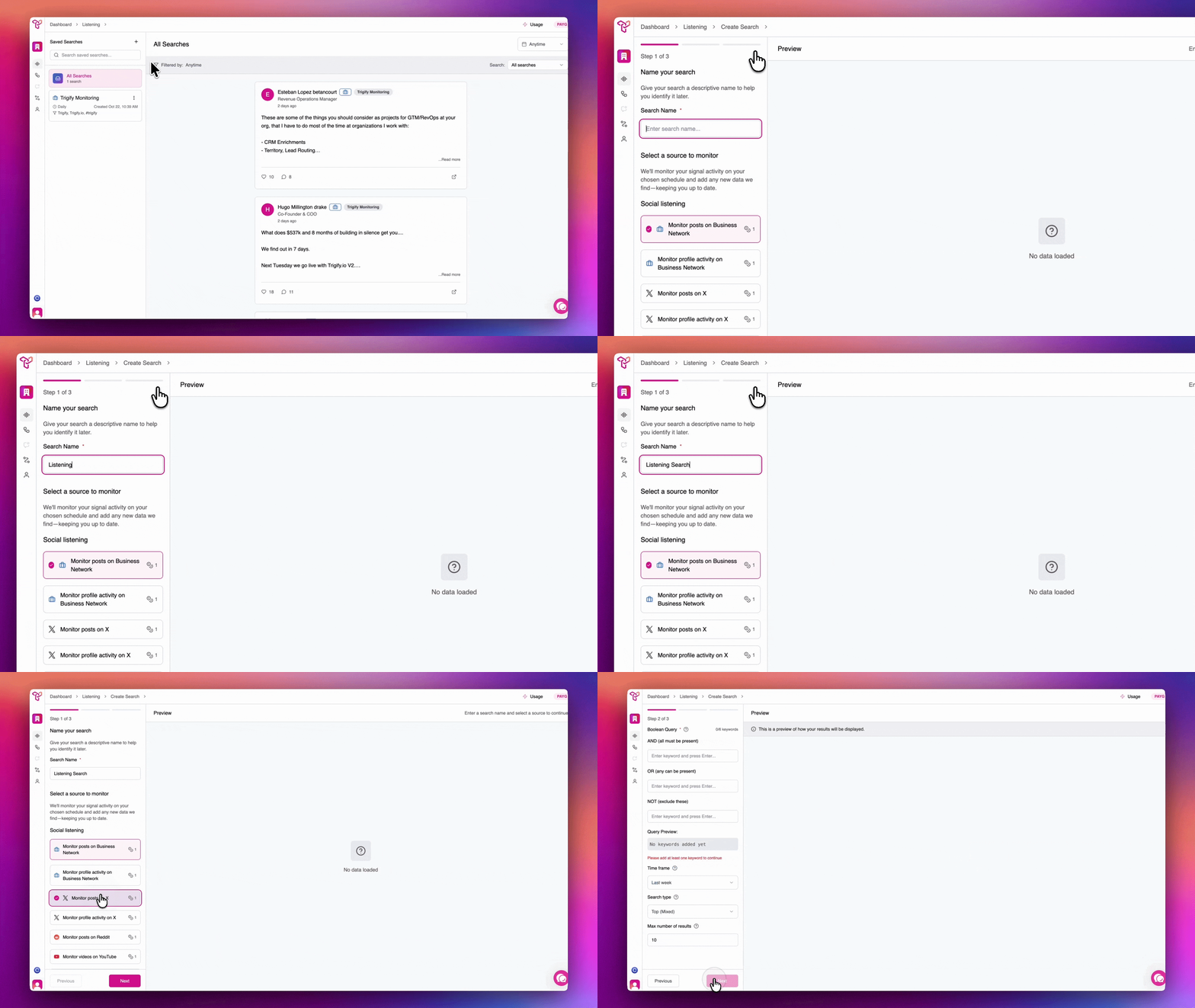
Listening, then doing
Trigify’s own help center offers the cleanest explanation: Listening is the search engine; Workflows are the assembly line. Listening runs keyword, Boolean and profile searches across business networks, Reddit, X, YouTube, podcasts and other sources. The current website says 11 or more surfaces. Results can include the post, its author and engagement context, with time windows ranging from the last day to all time.
The ABM side watches a supplied list of people or accounts. Its library includes changed role, changed company, hiring, expansion, tracked-topic posts, competitor likes, repeated competitor engagement, influence and composite buying-window signals. Daily monitoring is standard in the current product explanation, while the social-monitoring documentation also describes hourly, daily and weekly cadences depending on plan and feature status.
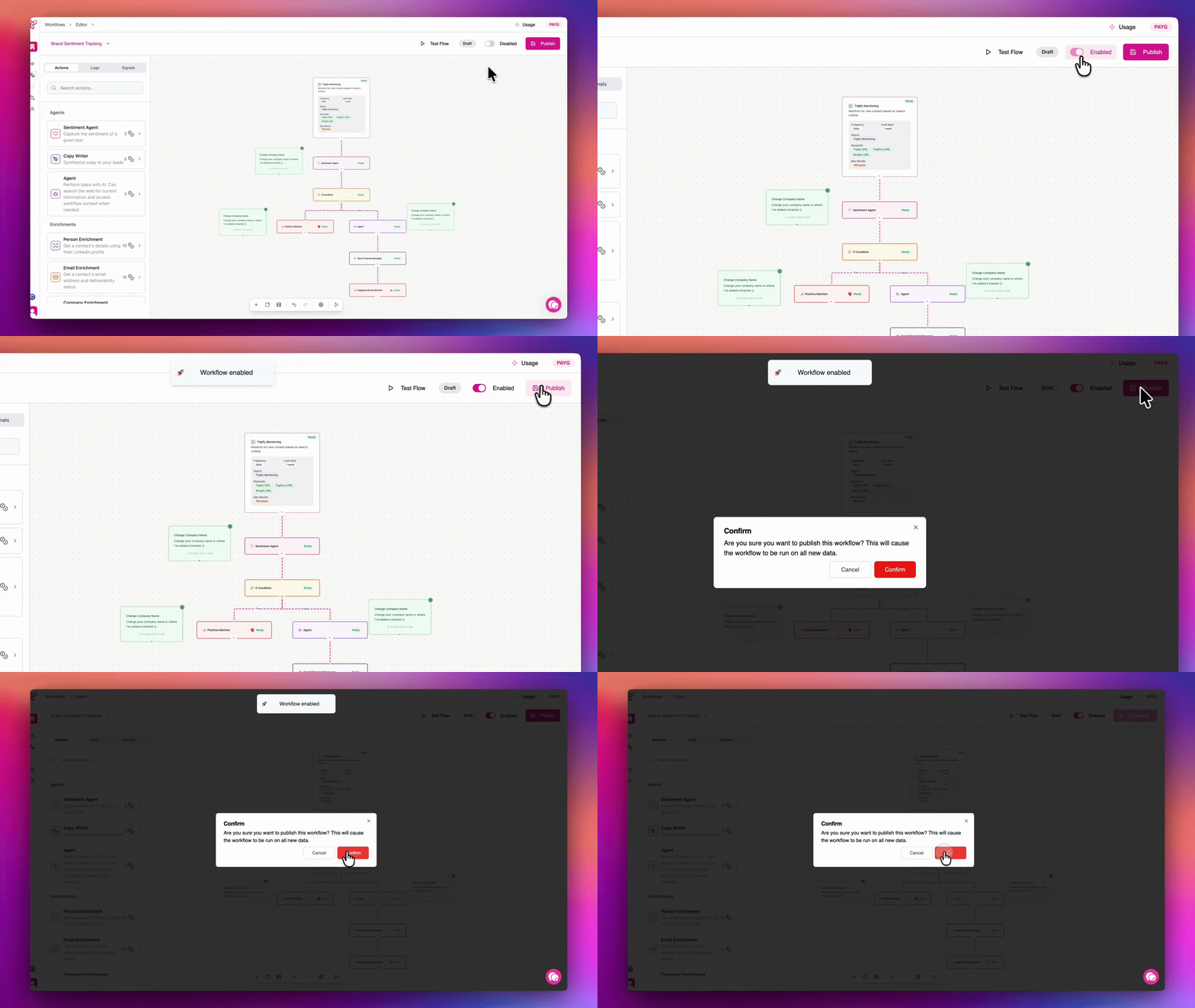
A workflow can then branch, loop, wait, enrich, write copy, judge sentiment or call an integration. One documented recipe watches for a post with more than 500 likes, collects the people who engaged, enriches them and keeps VPs or directors. Another sends positive mentions to sales and negative ones to support. These examples make the product feel less like a search box and more like a compact automation builder with social data baked in.
Jarvis has boundaries
Jarvis, Trigify’s AI co-pilot, builds and edits workflows from plain-language instructions. Ask it to trigger on a saved competitor search, enrich the author, keep senior people at companies above a chosen size, create a HubSpot contact and notify Slack. It can also help debug workflows and inspect usage data.
The refreshing bit is in the documentation: Jarvis is not customer support, it consumes credits in some configurations and it is not a complete replacement for manual checking. That caveat should shape how a buyer tests it. Ask Jarvis to draft the plumbing, then inspect every trigger, condition, destination and field mapping before publishing. A confident automation with the wrong audience is merely a faster way to annoy people.
Developers and agent builders get three other doors: a REST API, an MCP server and a CLI. Agents can create searches, read results, enrich people or companies and route signals to internal systems. This is the newer and more unusual part of Trigify. An agent preparing an account brief can pull fresh social evidence rather than repeating the same company description cached across the web.
What it costs, and what it doesn’t replace
The current self-serve plans are credit-based. Starter costs $40 a month for 4,000 monthly credits, 25 saved searches and one workspace. Max costs $199 for 40,000 credits, unlimited searches and three workspaces; it adds bring-your-own-key support and free Jarvis execution. Enterprise pricing is custom and adds unlimited workspaces, SSO/SAML and custom support. Starter and Max list overage at $0.012 per credit. A 14-day trial is offered without a credit card.
Credits are the budget line to model carefully. Searches, monitoring and workflow actions can multiply usage, particularly when a broad query feeds enrichment across many authors or engagers. Run a narrow pilot with a weekly ceiling. The product includes usage estimates and historical backtesting; use both before turning on an hourly monitor or a generous engagement-capture loop.
| Need | Trigify’s role | Look elsewhere when |
|---|---|---|
| Warm social context | Find posts, engagement and account events tied to people | You only need a static directory |
| Lead enrichment | Enrich inside a qualified workflow | You need a broad contact database first |
| Social listening | Turn selected mentions into operational steps | You need deep media analytics and executive reporting |
| Outbound execution | Route a qualified lead to an outreach tool | You expect native multichannel sequencing to be the main product |
| Agent context | Serve current signals through API, MCP or CLI | Your stack has no owner for agent reliability or data governance |
Trigify also does not remove the need for judgment. A like can mean curiosity, agreement, politeness or accidental thumb placement. A job change may create a buying window, or it may create six months of budget paralysis. The source post is therefore more than a nice detail. It lets a human or model inspect the evidence instead of treating a mysterious score as fact.
The public verdict is still forming
There are few substantial Trigify reviews on the large software-review sites. Public discussion clusters in sales communities, founder posts and vendor comparisons. One recruiter on Reddit described using Sales Navigator with intent tools including Trigify for LinkedIn posts, then handling sequences in a CRM. Another signal-based outreach discussion advised focusing on a few high-impact signals instead of every available data point. That is sound operating advice, even if it is not a controlled verdict on this product.
The company’s own numbers are more specific but should be read as self-reported snapshots. An October 2024 update cited 357 sign-ups, 99 average active users, 15,000 monitored posts, 560,000 tracked engagements and 60,000 monitored new jobs for the month. The present website displays AirOps, ByteDance, Clay, Instantly, HubSpot, Default and Intercom beneath “Powering signals for teams at.” It does not publish a current customer count.
Competitors overlap from different directions. Common Room brings community and account intelligence. Clay is a broader data-orchestration workbench. UserGems emphasizes champion and job-change signals. Octolens monitors B2B conversations. PhantomBuster gives technical teams scraping and automation primitives. Meltwater and Brandwatch sit on the heavier social-listening end. Trigify’s lane is narrower: person-level social evidence that can immediately feed a workflow or agent.
Buy the moment, not the monitor
Trigify makes sense when the cost of bad timing is visible and the response to a good signal is already designed. It is harder to justify as a curiosity dashboard. The winning pilot is one audience, two or three signals, one destination and a human review step.
A sensible 14-day trial
- Choose 50 to 200 accounts you genuinely want, not a giant list assembled for the test.
- Define three signals with plain meanings: competitor complaint, relevant hiring, or a direct tool question.
- Send results to a quiet Slack channel before connecting an outbound sequence.
- Record useful signals, false positives, credits spent and time from post to review.
- Only enrich records after they pass an ICP condition.
- Compare meetings per 100 reviewed signals with your normal prospecting baseline.
At the end, do not ask whether the dashboard looked busy. Ask whether the team found conversations it would otherwise have missed, whether the source context improved the approach and whether the credit cost per qualified opportunity is tolerable. If the answer is yes, automate one step at a time. If the feed is noisy, narrow the signal before buying more credits.
Trigify’s central observation is persuasive: buyers reveal themselves in fragments long before they fill out a form. The product’s value depends on collecting the right fragments and resisting the urge to call every twitch intent. Used with a defined market and a little restraint, it can give a rep or an agent something cold data rarely provides - a timely reason to begin.
Keep digging
Official website · Help center · Pricing · LinkedIn · X · YouTube · Social intelligence reports · River Capital profile