At LinkUp, a Ukrainian software agency, the working day used to end with a small act of archaeology. People tried to remember which projects they had touched. Their chief executive, Andriy Sambir, assembled reports by hand. A business paid to build the future was spending part of its afternoon reconstructing the past.
Then an employee suggested Hubstaff. In the company’s published case study, Sambir says automated reporting eventually helped him shorten the team’s workday from eight hours to six and a half while meeting client demands. That is a customer’s account, rather than a controlled experiment. Still, it poses an unusually appealing question: could recording work leave people with less work to do?
- The product: time tracking linked to budgets, invoices, payments, and workforce analytics.
- The founding wager: $52,000 of the founders’ own money, followed by years of customer funding.
- The useful tension: activity is easy to measure; valuable work requires judgment.
Hubstaff occupies the place where a manager’s uncertainty meets a worker’s timesheet. Its customers include agencies, outsourcing providers, software teams, consultants, and field operations. They need to know where hours go, what those hours cost, and whether the work fits the budget. The software promises to make those questions less dependent on memory.
A customer-reported change. The bars compare day length, not measured output.
Two strangers and a $52,000 clock
Dave Nevogt’s distaste for wasted time predates his software company. In his account of Hubstaff’s origins, he describes a corporate-finance job at Abbott, a Chicago-area commute exceeding two hours a day, and a cubicle he was keen to leave. A $500 internet-business course, bought by his father, helped point him toward selling golf instruction books and DVDs.
There is a pleasing little twist in that beginning. The man who would sell work-accountability software first wanted freedom from the office. Remote entrepreneurship offered an escape from the commute. It also created a new administrative problem: how to understand work performed by people elsewhere.
Nevogt found technical co-founder Jared Brown through LinkedIn. Brown’s later SaaS Club interview describes a combined $52,000 investment, development beginning in 2012, and paying customers arriving in August 2013. The earlier software needed rebuilding; its support demands were distracting from the better version. They paused it and put up a waiting list.
The founders divided the work around complementary skills. Nevogt handled marketing and operations; Brown brought the technical background. The modest capital base made attention a scarce resource. Every hour spent keeping the wrong version alive was an hour unavailable to the product they actually wanted to sell.
The free plan that was expensive
Hubstaff’s early pricing contained a familiar invitation: three users could use a limited version free forever. More users would mean more recommendations, and some of those recommendations would presumably become paying customers. It was an attractive theory with an unattractive support queue.
In his account of the experiment, Nevogt says free accounts consumed support resources and users could evade the three-person limit by opening additional accounts. Hubstaff withdrew that offer. By the time he wrote about it in 2015, a three-user paid plan was a strong seller, while a smaller, single-user free option remained.
The lesson is specific. Giving away enough software to serve a small team can remove the very reason that team would pay. Copy the test, rather than the conclusion: measure support costs, account abuse, and upgrades together. A company with different economics might make free work beautifully. Hubstaff had to make its own arithmetic work first.
From a founder-funded start to WestView’s growth investment. The investment amount was not disclosed.
In August 2023, WestView Capital Partners announced a growth investment. Its release described expansion of the remote-productivity and employee-experience platform. Outside capital arrived after the founders had already spent years building a business customers would fund.
One hour, several destinations
A basic timer records duration. Hubstaff makes the recorded hour useful in several places. A worker selects a project or task; the hours feed timesheets and reports. Managers can compare time with project budgets, review attendance, and approve records. Finance teams can use the same underlying work data for billing and payment calculations.
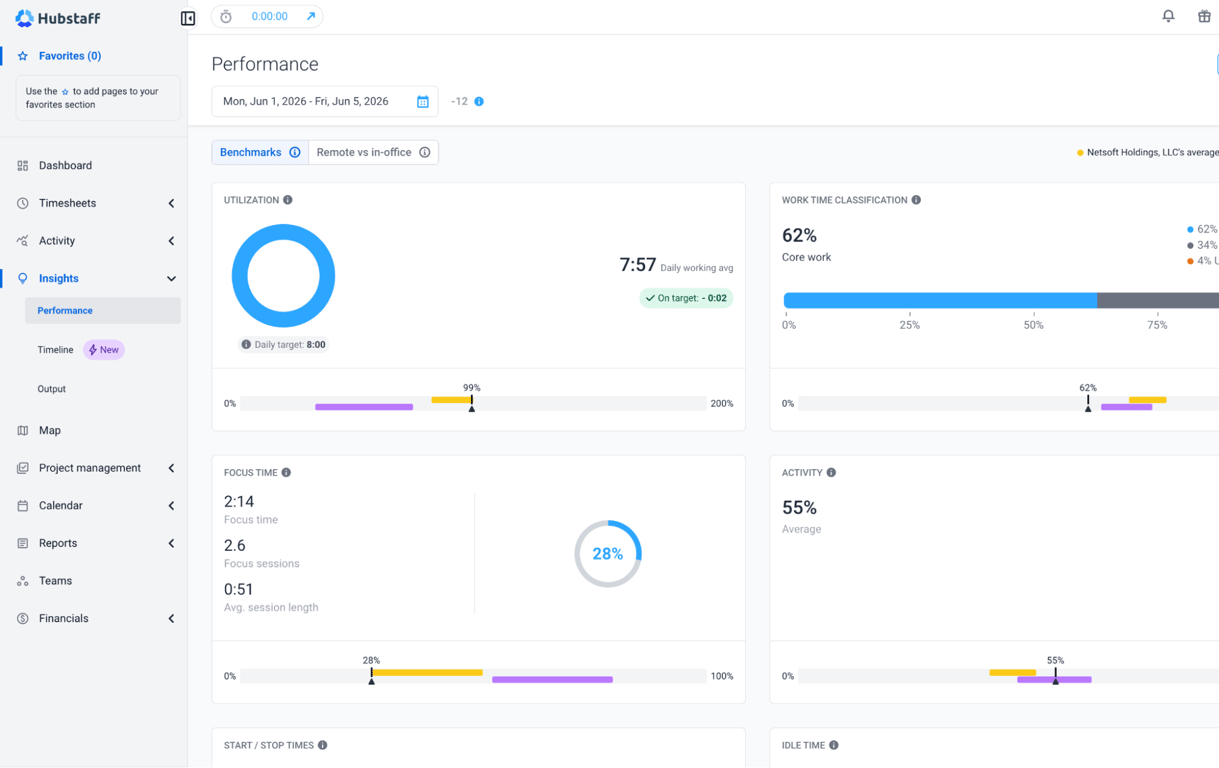
The integrations make that journey more practical. Hubstaff connects with task tools including Asana, Jira, GitHub, and Trello, and payment or payroll services such as Wise, Gusto, and Deel. With the Deel integration, approval is an actual handoff: eligible time-based contract hours move into the payment workflow after a manager approves the timesheet.
- 01TrackA person + a task
- 02ReviewBudget + timesheet
- 03ActInvoice or payment
The wider family includes Hubstaff Tasks for project organization, Insights for workforce analytics, and Locations for GPS and geofenced job sites. A mobile worker’s arrival at a configured site can trigger time tracking. Desktop and mobile collection differ: the mobile app records time and location, rather than desktop screenshots or application usage.
Hubstaff Talent opens a separate door. Launched in 2016, it is a free directory and job board for remote freelancers and agencies. Employers can find people there without a marketplace commission. The paid management software and the free hiring directory answer different questions: who can do the work, and how will that work be accounted for?
The price of a clearer workday
Hubstaff sells subscriptions by the seat, with feature tiers and add-ons. Its published Starter rate is $4.99 per seat per month with annual billing, or $7 monthly. Team is $10 with annual billing, or $12 monthly. The Team tier includes operational features such as approvals, scheduling, payroll automation, and Insights.
Published rates checked October 2, 2026. Add-ons and billing terms affect the total.
For a ten-seat Team subscription, that is $1,200 a year before optional extras or taxes. The buying question becomes concrete: will cleaner billing, fewer corrections, or better staffing decisions save that amount? A dashboard cannot answer that merely by looking handsome.
Consider communications agency SL Communications. Its Hubstaff case study says manual reporting once took up to eight hours a week. The agency now uses tracked time to check client budgets and inform staffing. The mechanism matters more than the headline saving: collect the hour when it happens, attach it to the right client, and inspect the budget before the overrun becomes permanent.
Alternatives include Clockify and Toggl Track for time-tracking workflows, Time Doctor for monitoring, and ActivTrak for workforce analytics. These categories overlap. Hubstaff’s case rests on connecting the timer to the operational work around it. A buyer who only needs a simple record of billable hours has less reason to pay for the rest.
A mouse is a poor judge of merit
The monitoring features require a little sobriety. Hubstaff can collect screenshots, app and URL usage, and keyboard-and-mouse activity levels. The company says it does not record keystroke contents or access webcams. Screenshots and other monitoring settings can be adjusted or disabled. Standard employee-controlled timers also differ from automatic tracking on company-managed devices.
Location settings deserve their own attention. Hubstaff’s mobile documentation says an “Always” configuration can record GPS positions even outside an active timer session. Managers choosing that setting are making a different decision from someone simply recording project hours.
A timer can remember an hour. A manager still has to understand it.
The editorial take
A designer reading a brief may move the mouse less than a colleague rearranging files. That is an interpretation problem, not a software bug. In its July 2026 rollout guidance, Hubstaff itself discusses resistance caused by surveillance language and vague expectations. The company recommends explaining the data, its purpose, and employees’ access before tracking begins.
The practical move is to define the decision first. Are you fixing billing errors, overloaded staff, or projects running beyond their retainers? Then choose the least intrusive information that answers it. Review puzzling numbers with the person involved. Activity percentages should invite a conversation, particularly when the work includes reading, calls, planning, or thought.
The question after the dashboard
Hubstaff lives with the arrangements it sells. Its account of a 2020 virtual retreat describes a remote team managing time zones through recorded activities, optional sessions, and shared projects. Software supplied part of the structure; people still needed reasons to gather.
By 2026, the company’s work report was drawing on anonymized records from more than 140,000 workers across 17,000 organizations. That sample describes people using Hubstaff, rather than the entire working world. Its emphasis on focus, work rhythms, and workload suggests the company is interested in what surrounds the recorded hour as well as the hour itself.
In July 2026, Hubstaff introduced a command-line tool and AI-ready API to make workforce data easier to query and automate. The interface may become faster. The managerial responsibility stays familiar: choose a question worth answering, understand the evidence, and change something useful.
LinkUp’s shorter day offers one possible destination. An agency could improve its estimates. A contractor could produce a clearer invoice. A manager could redistribute an overloaded colleague’s work. The value appears when the record becomes a decision. Otherwise, everyone has acquired one more report to read before going home.
Follow the clock
Explore the platform, meet the company, or watch it at work.