A software migration is an unlikely occasion for bendable toys. Yet that was one of the formats used for a cast of characters Flagship Creative designed for a Bay Area biotechnology company. The assignment, dating to 2008 in the studio’s account, was to help introduce Google apps to employees accustomed to Microsoft Office. Posters, shirts, emails, and little flexible figures gave the switch a face. Several faces, actually.
The project offers a useful way into Flagship, a creative studio in Roseville, California. Its work includes branding, interfaces, websites, illustration, and development. But some of its most interesting assignments live in the less glamorous corners of corporate life: locating a colleague, reserving a room, finding a building, or persuading employees to notice a new tool.
That is a worthwhile place to put creative talent. The people using workplace software have things to do. A charming character might earn their attention. A clear interface has to help them finish the job.
The revealing part of this portfolio is the attention paid to ordinary work.
Find a colleague. Book a room. Get there.
Gilead’s Touchbase project makes the brief tangible. In a case study published in February 2018, Flagship describes designing an employee-directory and room-reservations app. The team went to Gilead for a working session, gathered user requirements, and translated the discussion into wireframes. Naming and splash-screen explorations happened alongside the interface work.
That sequence matters. A directory and a booking system ask different things of a user, even if both sit behind one app icon. Looking up a person calls for useful identifying information. Choosing a room calls for an understanding of place and availability. The design problem is deciding how those tasks belong together before the finished screens make the arrangement look inevitable.
A separate project, Oversite, addressed movement around a campus. The client wanted navigation and points of interest. Flagship’s March 2018 description adds a telling constraint: the result should be conservative and business appropriate
. Here, the studio was being hired to exercise restraint.
Consider the buyer’s perspective. An internal tool carries the company’s identity, but an employee opens it with a purpose. The useful question is whether the visual decisions help that purpose. These projects suggest a place for a studio comfortable discussing both the brand and the next tap.
The brief gets bigger than a browser
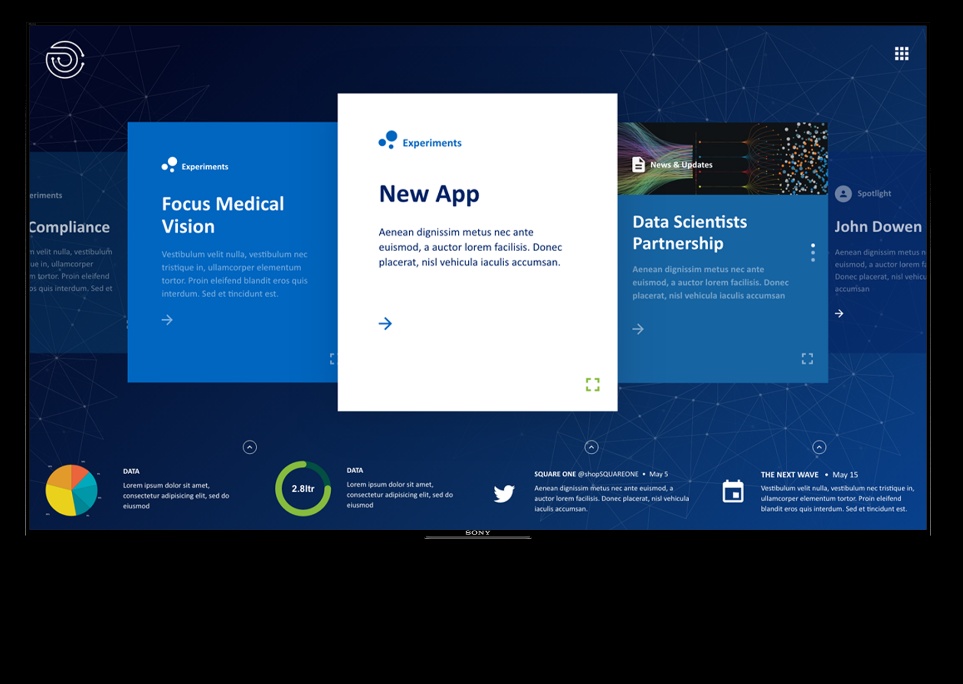
Flagship’s DH&I digital-signage project moves the interface onto an 80-inch touchscreen, with mobile access as well. The studio says it designed and developed the platform. Its portfolio mockup shows content cards arranged across a large display: a public surface that invites people to explore rather than simply walk past.
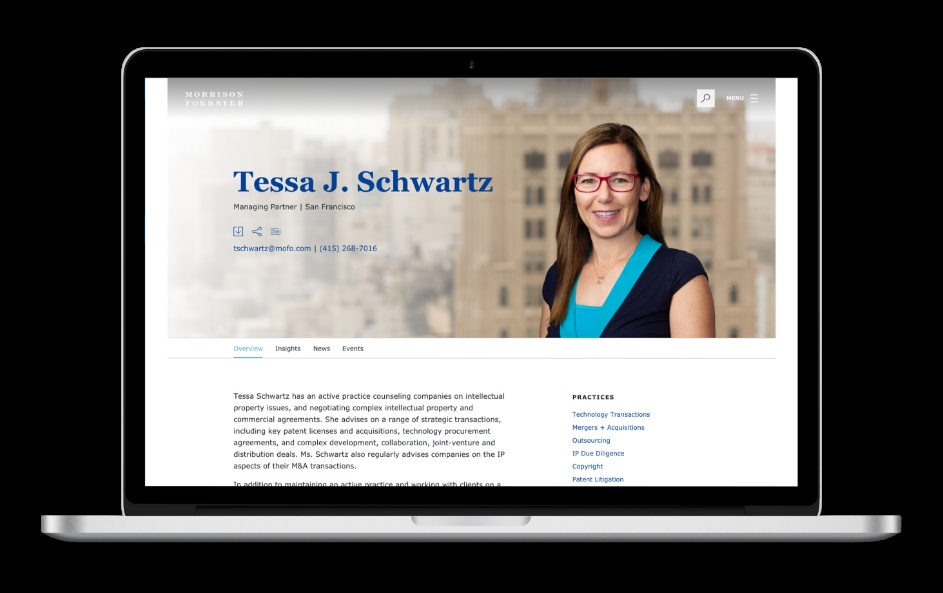
On another assignment, Flagship worked with Clickability on the responsive front-end interface for Morrison & Foerster’s global website. The studio describes a build with advanced components, parallax movement, and scroll interactions. The collaboration gives a more precise picture of its role than a client logo alone: it supplied interface implementation within a wider project.
Those are different settings for the same practical concern. Content must have an order, controls must communicate what happens next, and a layout must survive its actual display. A large shared screen and a phone held in one hand create different physical demands. Treating each as merely another rectangle would miss the assignment.
Before the colors, the questions
Flagship’s 2017 presentation describes four stages: Discover, Design, Develop, and Deploy. Its sample workflow puts requirements and user problems before wireframes, prototypes, testing, revisions, and final assets. The stated method gives discussion and correction a place before the design becomes expensive to change.
- 01Discover
- 02Design
- 03Develop
- 04Deploy
The same presentation describes a Swiss Re assignment organized around discovery and research, followed by a restrained, responsive layout and a clearer hierarchy of content. For My Brothers My Sisters, the studio supplied a refreshed identity, a simpler web experience, and a content-management system. Different organizations, different deliverables; in each account, organization is part of the design work.
The transferable lesson is straightforward: make an idea inspectable. A sketch can expose a disagreement about what belongs on a screen. A prototype can turn an abstract argument about navigation into an observable attempt to use it. A team can then ask which decision needs revisiting, instead of collecting another round of preferences about color.
For a buyer, that means making room in the brief for uncertainty. If a project begins with every screen already prescribed, a workshop has little authority to improve it. The opportunity comes when the people paying for the work are willing to revise an assumption after seeing someone struggle with the proposed experience.
“We create digital experiences.”
Flagship Creative’s public company description
Seven arrows and a different audience
Flagship allowed itself more room to play on its own website. The redesign published in April 2018 used bold colors, custom illustrations, parallax animation, and seven arrows around the page edges. Visitors could navigate through those arrows or use a menu. The studio’s stated motivation was to better express the company’s personality.
That is an unusually clear explanation of what prompted a redesign: the previous presentation did not convey the feeling the team wanted. It also makes an instructive companion to Oversite’s restrained campus interface. The studio’s website was an introduction to its imagination. A campus map was a means of getting somewhere.
A reader can borrow the distinction without borrowing the arrows. Decide what a visitor has come to accomplish and how much exploration the setting can reasonably invite. A portfolio can make discovery part of the experience. A booking screen needs to make the booking understandable. The same visual vocabulary will not necessarily serve both.
The lesson is less about a particular animation technique than about judgment. A studio needs enough range to know when a flourish earns its place, and enough discipline to remove it when it interrupts the task.
Ping-pong, autonomy, and a rusty robot
Flagship’s public personality has some pleasingly specific evidence behind it. In January 2014, the studio published a how-to-play-ping-pong infographic, calling the game its favorite pastime outside design and development. It turned an office enthusiasm into a piece of information design. The joke and the craft were sharing a table.
A February 2017 California Chamber of Commerce report offers a different glimpse. It describes Flagship’s view that micromanaging is the biggest mistake an owner or manager can make, and mentions snacks and career-training opportunities among employee perks. The management comment is the more revealing detail: creative judgment needs somewhere to operate.
There is also work readers can watch being made. In February 2018, digital-art publication 80 Level featured Flagship’s four-part guide to texturing a 3D character. The lessons move through Substance Painter, adding materials and surface detail to a robot, before exporting texture maps and setting up a render in Cinema 4D with Arnold.
A battered-looking robot is a modest but useful demonstration of expertise. Viewers can inspect the decisions that produce a finished surface. For prospective clients, such material offers a different kind of evidence from a polished project image. For designers, it offers a practical lesson they can pause and replay.
What to ask before commissioning the screen
Flagship fits the market as a custom creative and development studio. Its commercial invitation is to discuss a project and request a quote. The likely buyer is a team needing several kinds of design work to meet: product structure, interface behavior, identity, and the materials that introduce the result to its users.
The alternatives are familiar: hire a specialist studio, assemble independent practitioners, or do the work with an internal team. The useful comparison is the responsibility each option can carry. A buyer seeking only a logo has a different brief from one needing an employee app and the campaign that explains it.
Start the budget conversation with that distinction. Ask for a proposal that separates discovery, prototypes, production, and implementation, and states how revisions are handled. Ask who will maintain the content and what happens after handover. These are buying questions, not claims about Flagship’s contract terms. They make proposals easier to compare because the work being purchased is clearer.
Bring a representative task to the first conversation. Have someone explain how it works today, including awkward exceptions. Then agree what evidence would justify changing the design. Completion of a realistic task is a more useful discussion starter than whether everyone in the meeting likes the opening screen.
This approach depends on access to users, room to revise, and a workable underlying service. A clearer booking interface cannot supply a room that does not exist. An illustrated campaign cannot repair inaccurate information. The design brief has to acknowledge those dependencies if the finished work is to help.
Flagship’s portfolio is most persuasive at this everyday scale. A person needs a colleague, a room, a direction, or a reason to try unfamiliar software. There is plenty for a creative studio to do in the space between that need and the next successful action.