Dan Carroll was on hold. In his first-floor office at STRIVE Prep, the problem was a student record that had not updated in an online assessment program. The child could not get in. A teacher could not run the assessment. The school had bought technology, and acquired a little waiting room.
Carroll recalled the scene in Clever’s first blog post, published in January 2013. The principals’ objection was reasonable: why keep paying for software that students could not use? He and co-founders Tyler Bosmeny and Rafael Garcia had launched Clever the previous summer. Their opportunity lived in the distance between purchasing a learning tool and getting it to work.
- The job: connect school rosters, identities and learning apps.
- The bargain: free core access for schools; paid rostering for application partners.
- The classroom trick: a printed Badge replaces difficult typing with a webcam scan.
- The next problem: protect student accounts without asking every child to carry a phone.
The lesson failed at the roster
A roster sounds like clerical furniture. It contains the people and relationships a school application needs: this student, that teacher, this class. If the relationships are stale, an excellent assessment program becomes an excellent assessment program for somebody else. Carroll’s frustration was with the connection rather than the lesson itself.
Clever’s Secure Sync automates that connection. Data from the student information system, or SIS, supplies application rosters; changing classes and accounts can follow changes in school records. Its expertise is the translation between systems that need to agree about who belongs where. The educational content remains somebody else’s responsibility.
“software has to just work in order to get used in schools.”Dan Carroll · Clever’s first blog post, 2013
Single sign-on tackles the next obstacle. The Clever Portal gives students and staff a place to reach supported resources with their school identity. Teachers can arrange resources for their classes. The company also offers analytics to show whether digital tools are being used. Buying an application, configuring it and using it are three separate accomplishments; Clever works on the latter two.
- 01School SISStudents, teachers, classes
- 02Secure SyncRoster data reaches apps
- 03Clever PortalSchool identity opens access
- 04Learning appsThe lesson can begin

The child who could not type the password
Then came a different sort of mismatch. A password can be strong enough for an attacker and too difficult for a kindergartner. Clever’s account of classrooms before Badges described teachers printing passwords on folders, sharing credentials and putting passwords on whiteboards. Those shortcuts made sense to an adult trying to begin a lesson. They were less attractive as security policy.
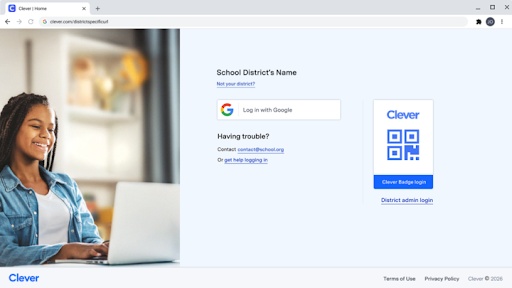
In April 2016, Clever launched Badges. A child holds a printed QR code up to a webcam and logs in. The physical routine belongs to the classroom: teachers already distribute books, pencils and paper. The computer adapts to that routine. By September, Clever said Badges were in more than 4,500 schools, and it had added a way for teachers to generate them after district approval.
The engineering team described conducting a threat model before writing the feature. It compared the Badge with the weak or printed passwords actually in use. A random credential made guessing much harder. Possession still mattered: a stolen Badge, or a detailed photograph of one, could let somebody impersonate its owner. Teachers could revoke it.
That is a useful product discipline to copy. Study the workaround people already use, then improve its weakest parts. A paper credential needs careful handling, compatible cameras and an appropriate school policy. It does not solve phishing or every problem in distributing credentials. The company’s own engineering explanation acknowledged those limits. Security design has to survive contact with the person holding the pencil.
Who pays for the free front door?
Schools are the setting; software companies are also customers. Clever charges application partners to roster through Secure Sync. An app developer pays for a connection that can spare its team repeated school-specific implementation work. The core school tools make that connection easier for districts to adopt. Each side has a reason to want the other there.
Free access is therefore a commercial design choice. It comes with a stated privacy commitment: Clever says it neither sells nor rents student data and does not permit advertising on its platform. Schools can purchase additional identity protection and services. Published US and Canadian service prices include live training from $500 per session, technical consulting at $1,200 per engagement and premium support from $4,000 annually.
Free core rostering and access.
Paid security and service options.
Paid Secure Sync integration.
Free Library integration.
ClassLink offers a close alternative: school sign-on, rostering, analytics and identity tools. Its partner integrations for SSO and rostering are free, while Roster Server comes with a ClassLink subscription. Similar functions can produce different invoices. Districts and vendors should compare the economics alongside application coverage, support and account-management requirements.
Google Workspace and Microsoft Entra are another part of this landscape. They provide identities that schools already use; Clever integrates with them. A school might maintain direct application connections and its own scripts instead. Clever’s proposition is that maintaining those relationships consumes time that someone would rather spend elsewhere.
A network large enough to buy
The investors noticed the connection. Clever raised a $30 million Series B in December 2014, led by Lightspeed Venture Partners and joined by GSV Capital, Peter Thiel and Sequoia Capital. EdSurge reported that a $10.3 million Series A the previous December, plus seed funding, took total financing above $43 million.
In May 2021, Kahoot! announced it would acquire Clever for an enterprise value of $435–500 million, including a performance-based component. Its annual report records the acquisition as effective September 1. The range was a transaction structure, not a fresh venture round or a present-day valuation. Kahoot! said Clever would retain its brand and remain an open platform.
of the largest US school districts use Clever, according to the company’s current school-solutions page.
Today, Clever reports more than 111,000 schools using its platform. Its school-solutions page lists 27.5 million monthly active students and adoption in 77% of US K–12 schools. These are company-reported measures of reach. They explain the scale of the distribution network; they do not, by themselves, demonstrate improved academic outcomes.
Clever Complete, announced in April 2025, extends the vendor proposition. It bundles rostering, sign-on and LMS connections; AnySchool supports schools outside the Clever network. LMS Connect handles connections with Google Classroom, Canvas and Schoology, including assignments and grades. The ambition is to make a vendor’s integration useful across more of its customer base.
The front door needs a lock a pupil can use
Once the portal becomes a daily habit, protecting the identities behind it becomes a natural next job. Clever IDM handles account provisioning and password management. Classroom MFA, announced in 2024, supplies a second factor through pictures or PINs without requiring another device. A phone-dependent security rule is an awkward guest in a classroom that expects phones to stay away.
An August 2026 Clever case study describes Edinburg CISD’s deployment across a roughly 32,000-student district. The district had staff MFA, but student accounts remained a concern. Other solutions had proved difficult to configure with its Chromebook fleet. Combining Clever IDM with Classroom MFA supplied account coordination and an authentication experience the district could adapt by age.
The details are more instructive than a victory slogan. Pre-K and kindergarten bypassed MFA on internal networks, while external access remained protected. Elementary students used picture-based authentication; secondary students used photographic images. The case study reports 99% enrollment by the second month and sharply fewer password-reset calls. This is a vendor-published account of one deployment, with particular policies and infrastructure.
In May 2026, Clever added device trust through Microsoft Edge for Business. On a recognized Entra-joined Windows device previously used to set up MFA, access can proceed without another prompt; an unrecognized device triggers verification. The prerequisites matter. A school needs that Microsoft environment for this particular integration.
Carroll’s original problem has grown several layers, but the test remains pleasingly concrete. Can the right child enter the right application, with the right account, at the moment the teacher needs it? Any company selling software into a busy institution can borrow that question. The grand promise can wait a moment. First, let the lesson start.
Open the classroom door
Explore the platform, inspect the integration, or watch the teacher walkthroughs.