The child had joined the school. The software had not received the news. In Piute County, Utah, new students could wait up to a month for accounts across multiple applications, according to a ClassLink-published customer story. A district of roughly 300 students had launched an online school, widening its reach while exposing a remarkably mundane obstacle: somebody still had to arrange the digital introductions.
That is a peculiar way to lose school time. Nothing is wrong with the lesson. The teacher is ready. Somewhere between the enrollment record and the learning app, however, a child has become an administrative task. ClassLink’s proposition begins here, with the gap between owning educational software and being able to use it.
- One portal opens school applications; account automation makes sure users exist in them.
- Usage reports help districts question renewals and target training.
- Schools control which roster details vendors receive.
- The next product chapter connects usage with assessment scores.
The child is enrolled. The account is not.
Piute’s response was to connect the pieces. LaunchPad supplied a single sign-on portal. Roster Server moved student information into class rosters. OneSync automated account creation and updates. The district’s story describes students gaining access from day one after the change. Treat that as a customer’s reported experience, rather than a promise that every installation will produce the same result.
The important detail is the sequence. A login shortcut is useful only after an account exists, belongs to the right person and carries the right permissions. School technology has plenty of visible products. It also has a backstage full of enrollment changes, teacher assignments and forgotten departures. ClassLink makes that backstage its business.
One click, several kinds of plumbing
Founded in 1998 by Berj Akian, ClassLink now reports serving more than 25 million students and staff in over 3,000 school systems across 42 countries. Its mission is to remove barriers between students and educational content. The company sits in education’s identity and access market: the connective infrastructure between school records, people and applications.

LaunchPad is the part a student sees. It presents a personalized collection of apps, offers more than 6,000 single sign-on connections and includes classroom and file-access features. Login options include scanning a QuickCard, useful when the user’s typing skills are still a work in progress. Passwordless passkeys and multi-factor authentication address a different audience: people who need stronger authentication without another elaborate morning ritual.

OneSync handles identity lifecycles. It imports records from student information systems, HR systems and other sources, lets administrators map and transform them, then sends account information to destinations including Google, Active Directory and Microsoft Entra ID. Departures matter as much as arrivals: deactivating a former user’s account is part of the job.
Roster Server answers a narrower question: which students belong in which classes, and which vendors should receive those records? Its use of the OneRoster standard reduces the need for a different spreadsheet arrangement for every application. ClassLink’s expertise lies in these connections, configurable rules and the support required to keep them working as schools change.
Conceptual flow. Products handle distinct tasks; a portal alone does not create a roster.
The $20,000 question
Once people can enter the apps, another question becomes possible: do they bother? In Randolph Township, New Jersey, ClassLink’s customer story describes a scattered collection of logins and resources. Centralizing access gave the district a common starting point. Analytics+ then helped identify an underused application costing $20,000 annually.
That finding is more interesting than a triumphant savings claim. An unused tool might need better training, a different audience or cancellation. The report does not choose for the district. It gives the renewal meeting something firmer than the enthusiasm of the person who bought the software.
The annual cost of one underused app identified in ClassLink’s district case study. An expense flagged for scrutiny, not documented savings.
Analytics reports activity launched through ClassLink. Analytics+ broadens the view to digital resources accessed outside the portal on school-issued devices. That distinction matters: counting only the front-door traffic can miss activity through other entrances. School leaders can use the resulting patterns to discuss purchasing, support and professional development.
“Roster Server restored my sanity”Peter Emmel, Randolph Township technology director, in ClassLink’s customer story
A roster is not an invitation
For Rowan-Salisbury Schools in North Carolina, access and data control became urgent after a cyber incident locked down critical services. Its ClassLink-published account says the district’s previous single sign-on and rostering vendor offered little help afterward. Recommendations from neighboring districts helped prompt a move to ClassLink in early 2022.
Roster Server came first. DataGuard added controls over what information left the system. Greg Keys, the district’s instructional technology coordinator, explained the attraction plainly: “DataGuard lets me tweak the data I’m sending.” An application may need to distinguish one roster entry from another without needing every identifying field in its original form.
DataGuard can mask, replace or substitute selected personal information. Its best fit is a rostered app that collects identifying data it does not actually need. That condition is crucial. Masking a field required for an application’s function can create a new problem; the work begins with understanding the vendor’s requirements.
September 2026 brought another expression of the same principle. Partner Access Windows let administrators approve temporary vendor visibility into roster data for troubleshooting. Districts control the duration and can revoke access early. A support permission acquires an expiration date, which is an excellent quality for a support permission to possess.
Who pays for the connection?
ClassLink sells subscriptions to institutions. Its current OneSync documentation says OneSync and Roster Server are included in a ClassLink subscription. Software partners pay nothing to integrate with the company’s single sign-on and rostering platforms. That arrangement makes connecting another publisher less commercially awkward.
Clever is an obvious alternative. Its core rostering service is free for schools and financed by application partners, while its current offerings also include expanded identity and security plans. Comparing the two calls for examining integration coverage, account controls, support and the full purchased scope. A free entry point and a paid suite do not answer identical procurement questions.
Two ClassLink add-ons have public unit prices: DataGuard costs $0.25 per user per year, and Analytics+ costs the same, with a $100 annual minimum and no setup fee. At 5,000 eligible users, either add-on’s arithmetic is $1,250 a year. Those numbers price the extras; the institution still needs its subscription quote.
Illustrative calculation at $0.25 per eligible user. Analytics+ applies a $100 annual minimum. Base subscription excluded; confirm licensed user counts in a quote.
The business has been around long enough to leave a paper trail. A 2005 announcement documented $3 million in equity funding led by Ascend Venture Group for expansion. In 2007, New Jersey’s economic development authority announced a separate $750,000 investment. ClassLink’s current team policies advertise a remote-friendly workplace, volunteer days, tuition reimbursement and regular gatherings.

The next argument is about learning
In 2025, ClassLink announced OneData for assessment-data movement, ThreatScan for exposed account credentials and AppTrack for software review workflows. September 2026 updates added department-specific AppTrack approval routes and IXL as a OneData source. The suite is extending into the decisions that surround application access.
Insights takes that ambition further. It pairs usage data with assessment scores, offering schools a way to explore relationships between tool use and results. The published roadmap specifies access for select districts in fall 2026, followed by general availability in winter 2027.
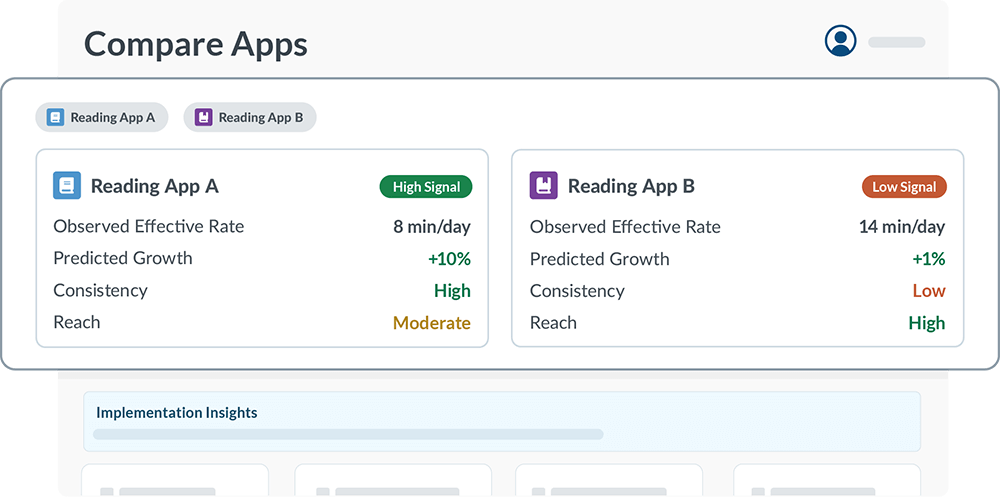
Such comparisons need judgment. Students assigned extra practice may already be struggling. A heavily used tool may accompany an excellent teacher. A relationship between usage and scores cannot, by itself, establish that the software caused the improvement. ClassLink’s announcement describes Insights as a way to start better conversations. That is a sensible ambition for a dashboard.
Start with the queue
The practical lesson is available without buying anything. Track how long a new student waits for access. Assign responsibility for removing departed users. Before a renewal, examine usage and ask the teachers what explains it. Before sharing a roster, ask which fields the vendor needs.
Automation still requires maintained source records, workable mappings and someone responsible for exceptions. Analytics+ needs deployment on managed devices to extend visibility. Schools also need devices, connectivity and sound teaching; clearing the login screen cannot supply those. ClassLink earns its place by taking an identifiable pile of recurring work off the school’s desk. The child waiting for an account provides a useful test of whether that work has actually been done.
Open the doors
Explore ClassLink, its blog, company news and the Insights roadmap.
Follow on LinkedIn, X, Instagram, Facebook or GitHub.
Watch: ClassLink in 90 seconds · LaunchPad product video · Rowan-Salisbury interview · YouTube channel.