The BOOX Note Air5 C is for the person whose reading life has become a small logistics company. A Kindle book waits in one app, a library loan in Libby, a marked-up contract in Dropbox, three academic PDFs in Drive and a half-legible project map in a paper notebook. BOOX proposes one 10.3-inch surface for all of it. The screen looks more like a printed Sunday supplement than a glowing tablet, the Pen3 makes a faint scratch as it moves, and Android 15 quietly keeps every bookstore and cloud service within reach.
That combination is the reason to care. Kindle Scribe is a reader with writing attached. reMarkable Paper Pro is a carefully fenced writing space. The Note Air5 C is an Android computer wearing an E Ink coat. It can be a notebook, reader, PDF desk, calendar, browser and second-rate video player. The last item is technically possible and spiritually questionable.
The right reader has a messy desk
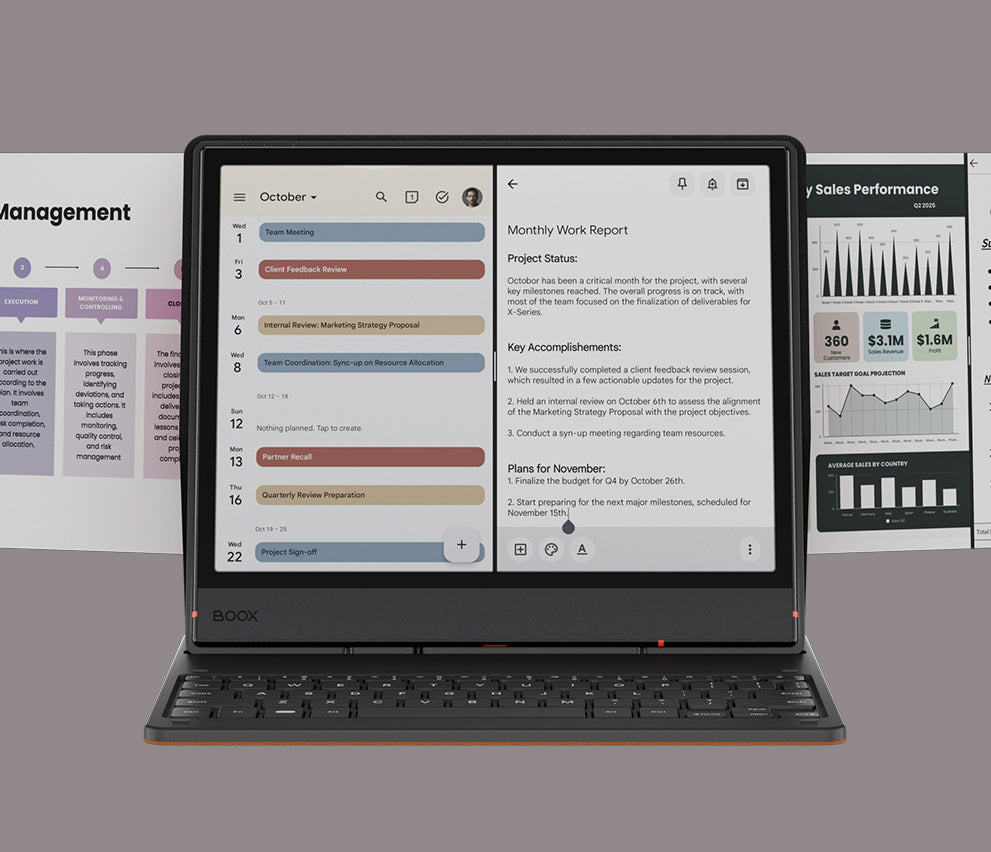
Students can keep a lecture PDF on one side and notes on the other. Researchers can underline an EPUB, search handwritten pages and move source files with BOOXDrop. Lawyers and consultants can mark contracts without printing a small forest. Writers can draft longhand, convert the result to text and, with reservations, attach the optional keyboard cover for short edits. Comic readers gain a large color page and access to whichever Android storefront they already use.
The common thread is not a love of gadgets. It is a workflow built around reading and annotation. If most of your day happens in video calls, spreadsheets with rapid scrolling, image editing or a browser full of moving dashboards, buy a conventional tablet or laptop. E Ink rewards deliberate work. It makes impatient work feel like walking through syrup.
Color that behaves like ink, not candy
The Kaleido 3 panel renders black-and-white material at 300 pixels per inch and color at 150. Text is crisp. Highlights, maps, diagrams and book covers are easy to distinguish. Reds and blues do not leap off the glass as they do on an iPad, because a color filter sits over the monochrome E Ink layer. Think newspaper ink on matte stock. That subdued palette can feel restful for a report and underwhelming for glossy art.
A warm-and-cool front light helps after sunset and can increase perceived contrast during the day. It also consumes power. BOOX Super Refresh and the newer Smooth mode make scrolling unusually fluid for E Ink, though image-heavy pages can leave ghost traces. EInkWise lets you tune refresh speed, color, contrast and DPI app by app. This is powerful after you understand it and fussy during the first week.
The body is 5.8mm thick and about 440g without its folio or pen. A wide left bezel gives the holding hand somewhere to live. The metal chassis feels solid, but prolonged one-handed reading does not. TechRadar’s reviewer found it uncomfortable beyond roughly 30 to 40 minutes and called it a two-handed device. There is no water resistance, so bath readers should keep their plot twists dry.
The pen is the convincing part
The included Pen3 supports 4,096 pressure levels and tilt. BOOX pairs it with a textured screen layer that supplies useful friction. Three spare nibs hide in the cap, an excellent little piece of stationery nerdery. In the native Notes app, marks appear quickly and brushes include ballpoint, fountain pen, pencil, marker and calligraphy options. Shapes can be cleaned up, handwriting converted to text, pages organized with outlines, and ideas connected with links and tags.
Infinite Notes expands beyond the edge for mind maps. NeoReader handles PDF markup and common ebook formats. FreeMark captures a screen so you can scribble over an app that does not permit direct ink. Handwritten search works best when the writing gives the software a fighting chance. Expert Reviews called the Notes app “absolutely great”; TechRadar described the device as offering “one of the best writing experiences I’ve had.” Those reactions match the design priority: native pen work gets the smoothest lane.
Android freedom comes with chores
Google Play changes the value of this machine. Install Kindle, Kobo, Libby, Notion, OneNote or your preferred cloud drive. Add fonts. Play an audiobook through the stereo speakers. Expand the 64GB of internal storage with a microSD card up to 2TB. Connect headphones or a keyboard over Bluetooth. A fingerprint sensor in the power button keeps unlocking quick.
Then comes the administration. An Android app designed for a 120Hz color display may animate, fade and scroll in ways E Ink cannot reproduce gracefully. BOOX offers per-app controls because per-app controls are necessary. Some users enjoy tuning the machine. Others describe a steep learning curve. One Reddit owner summarized it as a device that does “a bunch of things well,” while another returned theirs after firmware sluggishness and delayed pen input. Community reports are mixed rather than universally grim: other owners report months without trouble.
The optional keyboard cover exposes the same tension. BOOX pitches it for email, reports and spreadsheets, and its physical integration is neat. TechRadar found enough typing lag to prefer an external Bluetooth keyboard and eventually used the on-screen keyboard instead. Treat the cover as an occasional drafting tool, not evidence that the Note Air5 C can replace a laptop.
| Choice | Pick it for | Accept this |
|---|---|---|
| BOOX Note Air5 C | Android apps, several book stores, deep PDF work, expandable storage | Setup, muted color, ghosting and variable battery |
| reMarkable Paper Pro | Focused writing, simpler software and richer Gallery 3 color | A closed ecosystem and higher entry price |
| Kindle Scribe | Amazon reading, simple operation and longer battery life | Monochrome display and fewer general-purpose apps |
| BOOX Go 10.3 | Lighter monochrome handwriting and a lower price | No color and no front light |
Battery life needs an honest unit: days, not weeks
The 3,700mAh battery sits between an e-reader promise and an Android reality. A basic Kindle can disappear into a bag for weeks. The Note Air5 C uses a faster refresh system, front light, Wi-Fi and general-purpose apps. Creative Bloq measured around six hours of continuous handwriting with the light on, up to 30 hours of light-off reading and about four days of mixed use. Another owner exhausted most of a charge with four hours of comics plus four hours of notes. These figures are not contradictory; they show how sharply the workload matters.
Turning off radios, lowering the light and choosing a calmer refresh mode extends a charge. Browsing, audio, high brightness and fast refresh shorten it. Buy on the assumption that active daily use means regular charging. USB-C makes that manageable. It does not make this a weeks-long Kindle.
Buy it if...
- Your books live in multiple Android apps.
- You annotate PDFs or handwrite every day.
- Muted color is enough for charts and markup.
- You will learn per-app display settings.
Skip it if...
- You want saturated art or smooth video.
- You expect a laptop-grade keyboard.
- Charging more than weekly sounds wrong.
- You prefer a minimal, closed workflow.
What to do in the first afternoon
Update the firmware before judging performance. BOOX rolled out version 4.2 in 2026 and announced 4.2.1 with further community-requested changes. Next, install only the reading and storage apps you actually use. Open each one, pull down EInkWise and test the balanced and fast refresh modes. Increase contrast before blaming a faint font. Set the front light low enough to help rather than bleach the page.
Create one notebook with an outline, a tag and a linked page. Open a real work PDF in split screen. Try handwriting recognition on your normal scrawl. If you bought the keyboard, draft an email before assuming it can carry a 2,000-word report. Finally, protect the screen. BOOX says not to remove the factory-applied protector, and the device has no ingress rating.
The bottom line
The Note Air5 C succeeds when flexibility is worth a little friction. It gathers libraries, notebooks and documents onto a readable color surface and gives the pen serious software. Its weaker points are consequences of the same idea: Android asks more of the battery and E Ink cannot make every Android interaction feel natural.
At the official $499.99 price observed in August 2026, this is a professional tool for people who can name the documents they will mark up next week. If the plan is merely to “try E Ink,” start cheaper. If the plan is to retire a stack of paper, unify three reading apps and spend hours inside PDFs, the odd little workstation makes sense.