The Boox Go 10.3 is for the person whose reading life has become a small administrative problem. One book lives in Kindle, another came from Kobo, the library loan is in Libby, work sent a 90-page PDF, and the notes from Tuesday's meeting are hiding in a paper pad. BOOX puts those things on one quiet, black-and-white screen. It feels closer to a legal pad than an iPad, yet it can still download Android apps. That combination is the reason to care.
It is not a general-purpose tablet replacement. Video looks rough, scrolling is deliberate, and the original 2024 model cannot illuminate itself. Think of it as a reading and writing machine with an escape hatch into Android, not an Android tablet that happens to use E Ink. For students, researchers, writers, lawyers, consultants, manga readers and PDF collectors, that distinction can turn a fussy niche device into a useful daily tool.
Why this particular slab of paper exists
Onyx International launched the Go line in June 2024 with two very different products: the pocketable Go Color 7 and this pale, 10.3-inch monochrome notebook. The Go 10.3 arrived at $379.99 in the United States, stylus included, with a design that clearly knew the reMarkable 2 existed. It went thinner, lighter and sharper on paper: 4.6mm, about 375g and 300 ppi versus the reMarkable 2's 226 ppi.
The more consequential difference was software. BOOX used a streamlined version of Android 12 with the Google Play Store. You can install Kindle, Kobo, Libby, OneNote, Readwise, Dropbox or the mildly obscure reading app your workflow already depends on. A Kindle Scribe is comfortable inside Amazon's world. A reMarkable is intentionally restrained. The Go 10.3 assumes your files and subscriptions already live in several places and lets you meet them where they are.
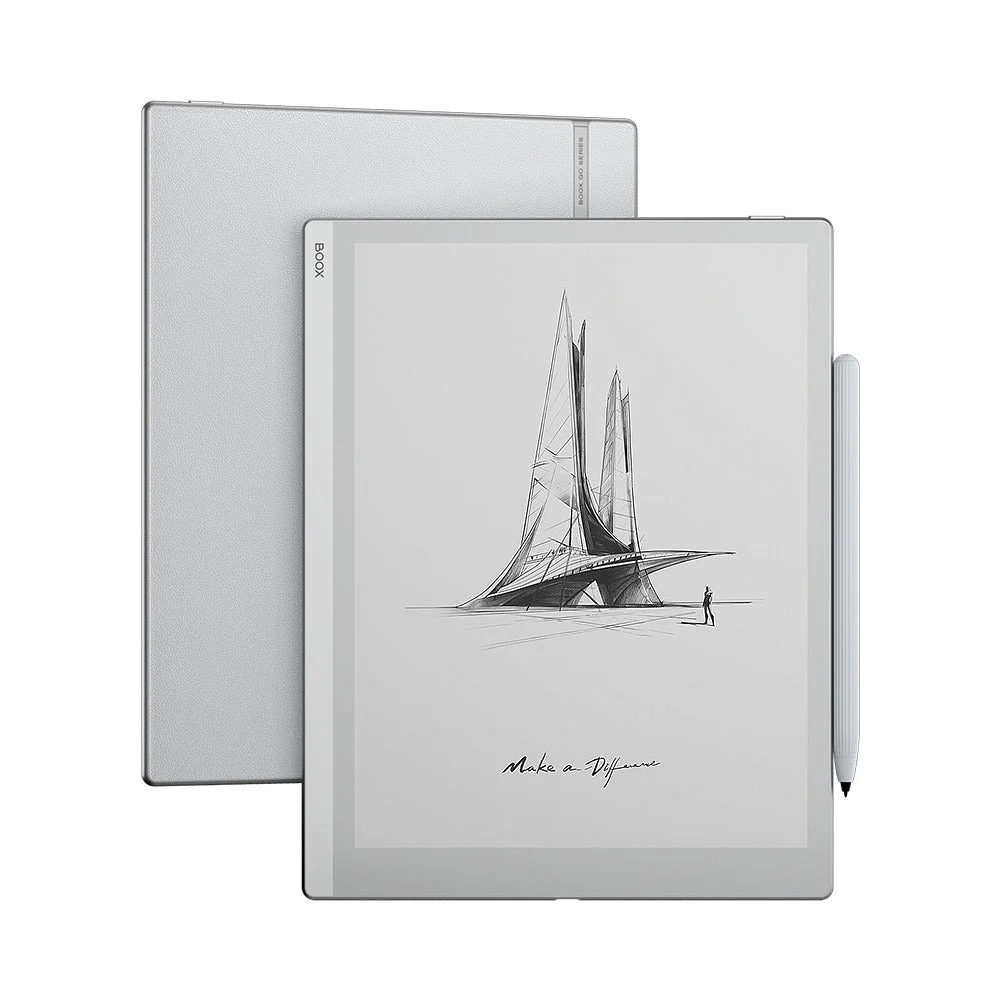
The physical design helps. A gray-white front has no buttons. The back uses a grippy leather-like texture, while the power button sits on top and USB-C, speakers and microphone line the bottom. It looks like stationery designed by someone who owns calipers. The screen is flush with the bezel, the body feels rigid, and the 300-ppi panel makes small type and manga linework noticeably clean.
“The screen clarity is the device's strongest suit.”A manga reader on Reddit, after comparing it with color E Ink devices
The no-light bargain
Here is the purchase decision in one sentence: the original Go 10.3 has no front light. In daylight or under a desk lamp, the missing light layer helps the ink look close to the surface. At night, it behaves like an actual notebook. Turn off the room and the page disappears with it.
Some owners barely notice because they write at a desk. Others discover that “I usually have a lamp nearby” was optimistic fiction. The absence of a front light is not a spec-sheet blemish to wave away. It determines where the tablet works. If you read in bed, on dark flights, beside a sleeping partner or in dim lecture halls, buy a lit alternative.
There is another quiet trade. The original lacks BOOX Super Refresh, the graphics system used to make motion smoother on some of the company's tablets. Web pages and third-party apps therefore scroll like E Ink, complete with occasional stutter and ghosting. The upside is energy use. In eWritable's test, an hour of reading used about 1% of the battery and an hour of note-taking about 3%, with Wi-Fi adding roughly another 1% per hour. Real life varies, but a week of mixed use is a credible target; lighter use can stretch farther.
Writing: lovely surface, silly magnet
The included Pen Plus uses Wacom EMR, so it needs neither charging nor Bluetooth pairing. It supports 4,096 pressure levels and works with BOOX's native Notes app, where brushes, layers, templates, lasso tools, shape correction and handwriting conversion offer more room to tinker than a paper notebook ever requested. The textured screen gives the nib a faint scratch rather than the ice-skating feel of glass. Latency in the native app is low enough to stop being the subject.
The pen has no eraser button or eraser cap. BOOX expects you to use gestures such as scribble-to-erase, which some people prefer and others will resent at this price. More annoying is the weak magnetic hold on the tablet's rounded edge. Reviewers found the pen easy to knock loose, and the detachable flap on BOOX's folio is an awkward rescue attempt. Carry the pen in a sleeve or choose a compatible Wacom EMR stylus with an eraser.
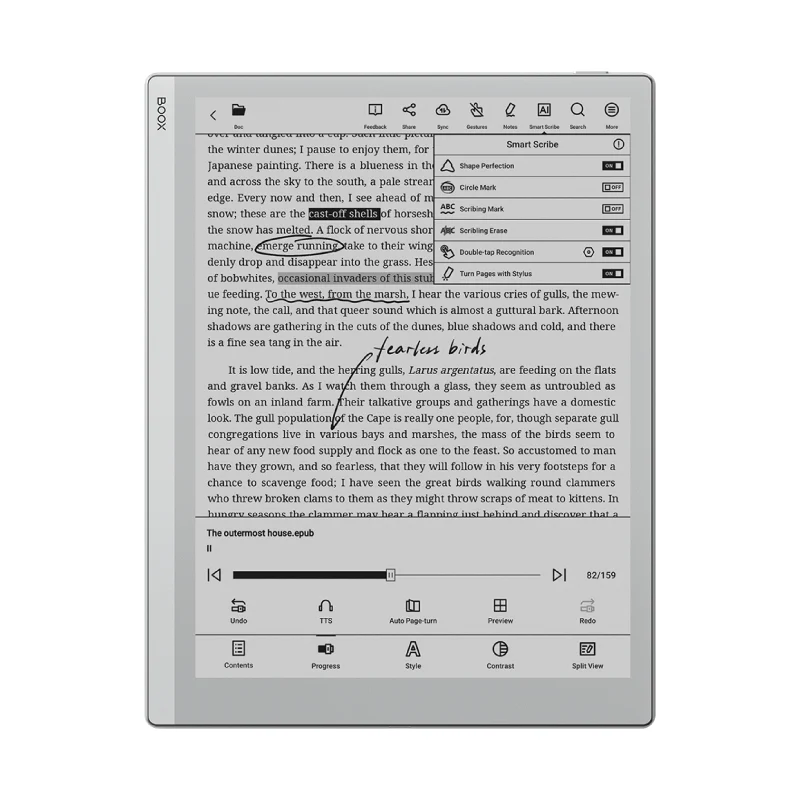
NeoReader is the other half of the proposition. It handles PDFs, EPUBs, comics, office documents and more, with crop, contrast, reflow and annotation controls. BOOX says it supports 26 formats in total. Marks can be made across compatible book types, although only PDF annotations can be embedded into the original file. The 64GB storage is generous for books and notes, but it cannot be expanded with microSD. USB-C OTG can accept external storage or a card reader when necessary.
Android freedom comes with Android homework
The Play Store is a door, not a promise. Apps built for bright, fast LCD screens may use low-contrast buttons, animated transitions or tiny touch targets that feel clumsy on E Ink. BOOX lets you tune refresh behavior and contrast per app, which helps after a little setup. Kindle and Libby are natural fits. YouTube technically runs, in the same way a shopping cart technically has wheels: movement occurs, but nobody should plan a road trip around it.
File movement can also be more complicated than plugging in a cable. BOOXDrop transfers files over a local network; Onyx Cloud includes 10GB per account; Google Drive, Dropbox and OneDrive can join the workflow. TechRadar found cable transfer awkward on a Mac and preferred cloud sync. Anyone handling confidential documents should read the relevant cloud and app policies and decide which sync route belongs in their organization.
| Device | Screen | Front light | Software character | Best fit |
|---|---|---|---|---|
| BOOX Go 10.3 | 10.3-inch, 300 ppi B&W | No | Android 12 + Play Store | Mixed libraries, PDFs and flexible apps |
| reMarkable 2 | 10.3-inch, 226 ppi B&W | No | Focused, closed environment | Minimal writing workflow |
| Kindle Scribe | 10.2-inch, 300 ppi B&W | Yes | Amazon-centered | Kindle readers who also annotate |
| Kobo Elipsa 2E | 10.3-inch, 227 ppi B&W | Yes | Kobo-centered | Kobo and library readers wanting light |
This comparison is less about declaring a winner than matching a constraint. reMarkable reduces options. Kindle and Kobo organize the world around their stores. BOOX offers more exits and more settings. Freedom is useful when you need it and distracting when you do not. A good Go 10.3 setup often involves installing only the few reading and storage apps that earn their place, then hiding the rest.
What changed after launch
BOOX kept working on the software. Firmware 4.0 brought note outlines, reading themes, file-based notes and an updated NeoReader engine. Firmware 4.1 added Infinite Notes, a customizable toolbox, a floating lasso toolbar and new pen styles. In March 2025, BOOX said the Go 10.3 had won an iF Design Award. The hardware's thin, tidy body deserved the attention; the loose pen deserved a committee meeting.
Then, in March 2026, the Go 10.3 Gen II made the original a previous-generation product. The successor moves to Android 15, keeps the 300-ppi 10.3-inch display and 64GB storage, and changes to a rechargeable InkSense Plus active stylus. It comes in an unlit $399.99 version and a $429.99 Lumi with an adjustable warm-and-cool front light. The original remained listed at $359.99 when this guide was prepared.
That changes the value calculation. A modest discount does not automatically make the old model smart. The passive Wacom pen, mature firmware and lower price can still be appealing, but the Lumi directly solves the original's defining limitation. Compare the final cart price, included case, return policy and warranty. BOOX bundles vary by seller and region.
Buy it if…
- Your books and documents live across several apps.
- You annotate PDFs or take long handwritten notes.
- You work mostly in daylight or under a desk lamp.
- You prefer a sharp monochrome page to color E Ink.
Skip it if…
- You regularly read in bed or dim rooms.
- You want video, fast scrolling or polished tablet apps.
- You need color, waterproofing or microSD expansion.
- You want the simplest possible interface.
The verdict
The Boox Go 10.3 works best as a consolidation machine. It gathers scattered reading apps, loose documents and handwritten thinking onto a page that does not glow or nag. The screen is crisp, the writing surface is convincing, battery anxiety is low, and Android prevents one retailer from owning the whole experience.
Its weaknesses are unusually easy to understand: no front light, no microSD, a forgettable pen magnet, and software that rewards patient setup. If those sound minor, the original remains a capable daylight notebook, especially at a real discount. If the first one sounds serious, stop negotiating with yourself and buy the Gen II Lumi, a Kindle Scribe, a Kobo Elipsa 2E or another lit model. The right paper tablet is the one you can actually read where you live.
Five questions before checkout
Can it run Kindle, Kobo, Libby and OneNote?
Yes. Google Play is built in, though each app's E Ink performance and pen support can differ.
Can I read it in the dark?
Not without an external light. The original and standard Gen II have no front light; the Gen II Lumi does.
Is it good for large PDFs?
Yes for typical academic and business documents. The screen is around A5 size, and NeoReader offers crop, zoom, reflow and annotation tools.
Does it accept other pens?
The original uses Wacom EMR and works with compatible passive styluses. The Gen II uses BOOX's rechargeable InkSense Plus system, so accessories are not interchangeable.
How much storage is available?
It includes 64GB with no microSD slot. USB-C OTG and cloud services provide external options.