Aider begins with a modest proposition: stay where you are. Keep the editor, terminal, repository and model account you already understand. Open a shell inside the project, tell Aider what should change, and inspect the result as ordinary files and ordinary Git commits. In a category busy inventing new panes, plans and permission dialogs, that restraint is the product.
It is aimed first at working developers, especially the sort who can read a diff before breakfast and would rather choose an LLM than inherit one. It also makes sense for a small team testing AI-assisted development without moving everyone into a proprietary editor. New programmers can use it, but Aider will not remove the need to understand Git, environment variables, test failures or the bill attached to a cloud API key. Its interface is simple. The judgment required is not.
A repo map, a patch and a paper trail
Aider's working unit is the repository, not an isolated chat window. You add files that the model may edit and files it may only read. Around those files, Aider builds a compact repository map using Tree-sitter-based symbol extraction and a ranking graph. The map gives the model names and relationships from the wider codebase without stuffing every source file into an expensive context window.
That distinction matters on mature projects. A request such as “change the authentication flow” rarely belongs to one file. Routes, types, tests and documentation may all move together. Aider can apply coordinated edits while the map supplies just enough peripheral structure to keep names straight. The project even disables repo maps for some weaker models because extra context can confuse them. This is unusually candid product behavior: more context is not automatically better context.
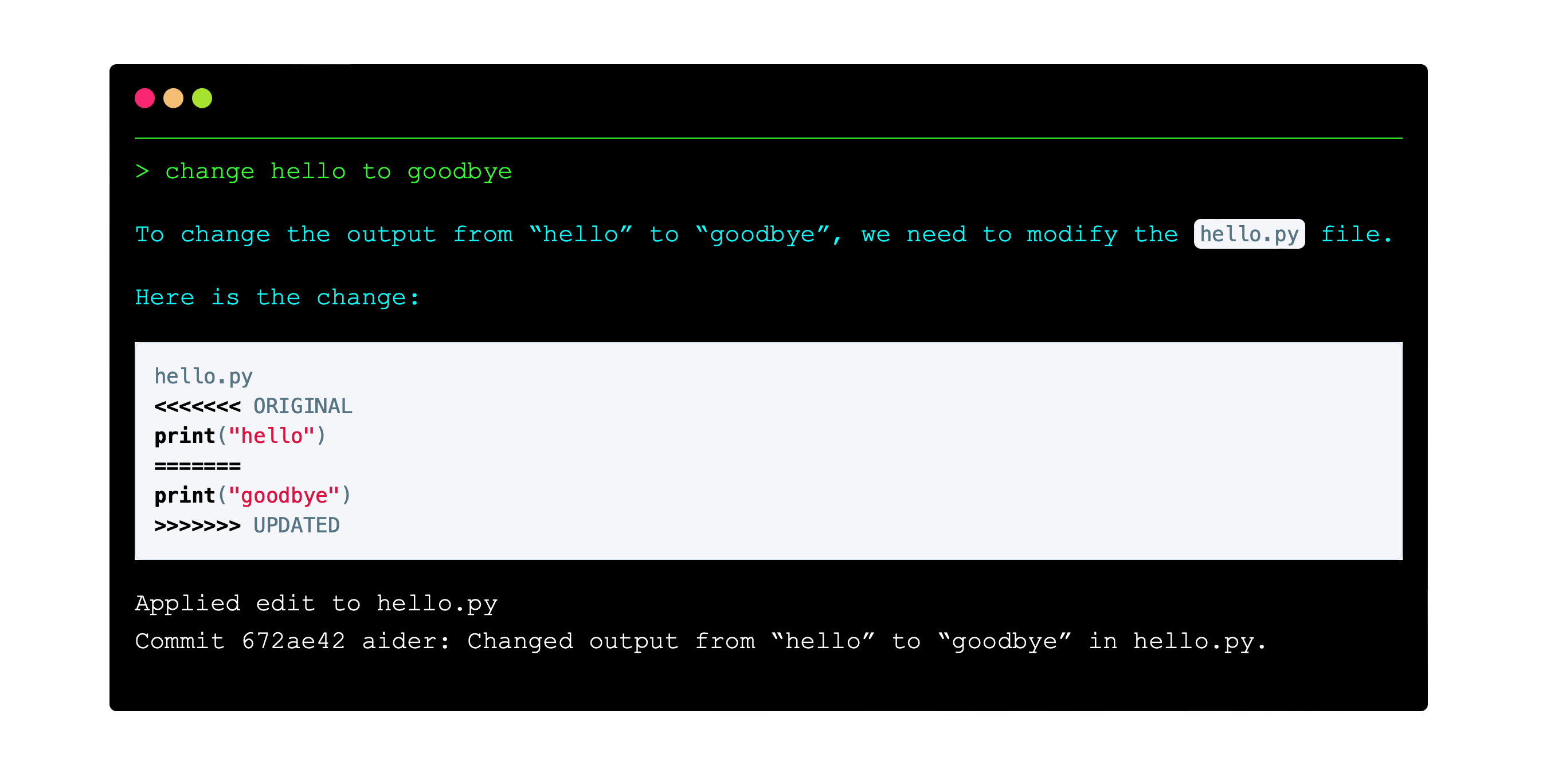
When the model replies, Aider translates its answer through an edit format suited to that model, applies the patch and can run a linter or test command. If checks fail, it can feed the error back for repair. Automatic commits serve as checkpoints, complete with generated messages. The humble commit is the confidence mechanism: review with familiar tools, revert when necessary, and separate the machine's work from your own.
“Minimal, thoughtful and capable of surgical changes.”Reilly Sweetland, quoted by the Aider projectBring your own brain
The model can change. The cockpit stays put.
Aider is not a model. It is the operating layer between a developer, a language model and a codebase. LiteLLM provides broad connections to OpenAI, Anthropic, Gemini, DeepSeek, xAI, OpenRouter and many compatible providers. Local models are possible too. The main branch now contains settings for GPT-5.4 variants, Claude 4.5 and 4.6, Gemini 3 previews and DeepSeek Reasoner, while the current PyPI package is version 0.86.2.
Model choice has practical consequences. Stronger models tend to follow edit formats and repository context more reliably, but they may cost more. Aider can assign a cheaper “weak model” to commit messages and conversation summaries. Architect mode splits the work another way: one model reasons about the solution, then an editor model converts that plan into edits. The arrangement sounds like a tiny consultancy, except one colleague is paid by the token and neither one should merge without supervision.
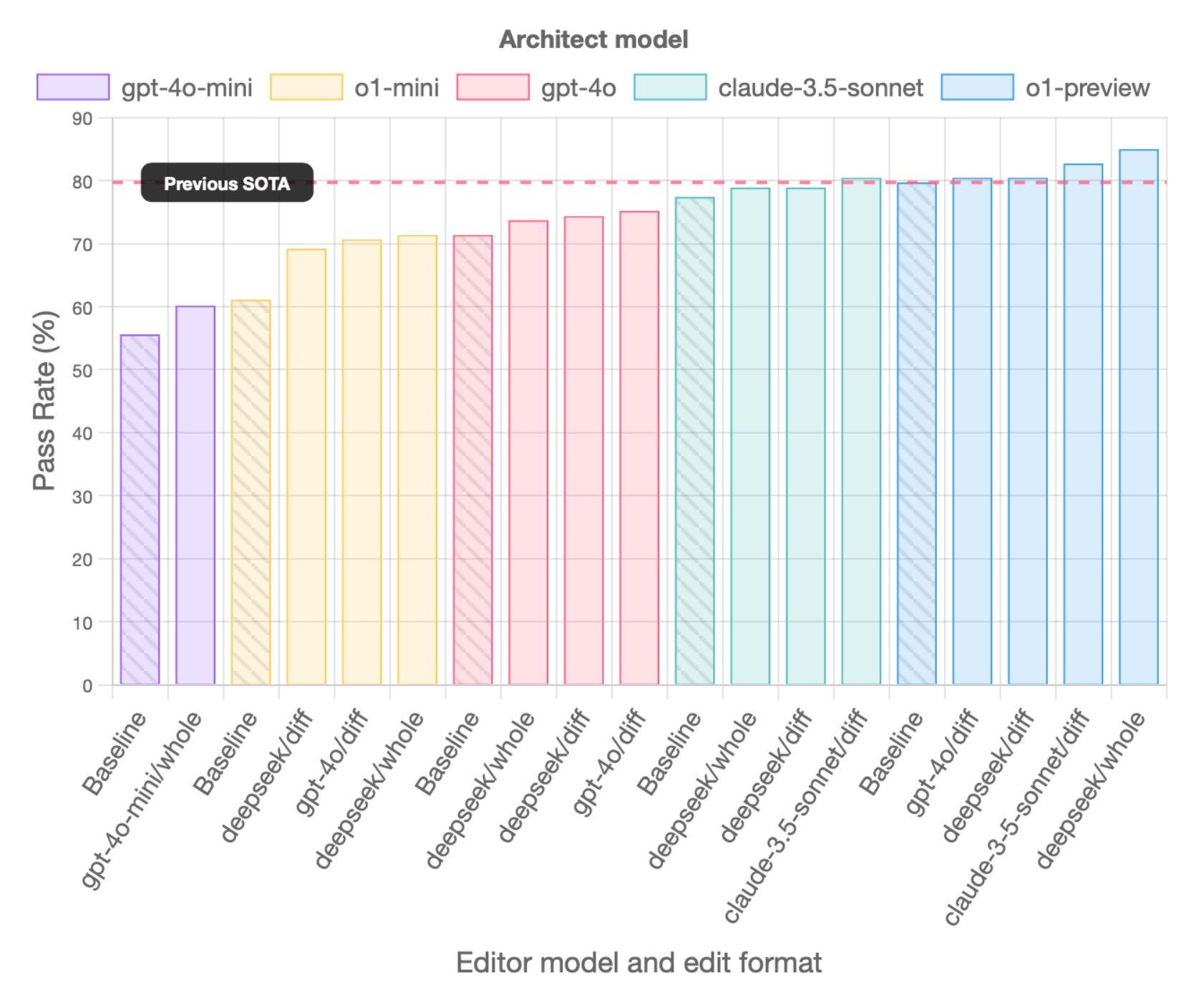
The project publishes its Polyglot benchmark, built from 225 difficult Exercism tasks across C++, Go, Java, JavaScript, Python and Rust. Treat the leaderboard as a useful lab instrument, not a promise about your payroll system. Benchmarks test defined problems. Real repositories contain stale comments, surprise dependencies and naming decisions made during a bad Tuesday in 2019.
Practical fit, from our review
Fast when you scope it. Expensive when you don't.
The happiest reports share a pattern: the developer knows which change is wanted, provides the relevant context, works in small passes and reviews each result. One Reddit user described Aider with Gemini as “unbelievably fast.” Another praised the ability to produce several versions quickly. Terminal loyalists like that it works beside Neovim, Helix or VS Code instead of replacing them. A LinkedIn user described building a database-backed prototype in minutes, then noted that the API experiment used about twelve dollars of credit. Speed and spend arrive in the same envelope.
The complaints are equally instructive. Large, cross-module requests can require many files and long conversations. That drives token consumption and creates more room for a model to misunderstand the assignment. Some developers prefer agents that discover context and operate more autonomously; others see Aider's explicit scope as the safety feature. A bad model response remains a bad model response, even when the application around it is careful.
There are rough edges. Installation expects Python 3.10 or newer and a working Git setup. Provider names, keys and model aliases can be fiddly. Local models trade invoices for hardware demands and uneven editing ability. The terminal UI is rich, but nobody will mistake it for a gentle onboarding tour. If your ideal coding assistant predicts the next line inside an editor, Copilot or an editor-native product may feel more immediate.
| Product | Natural home | Model approach | Best fit |
|---|---|---|---|
| Aider | Terminal + existing editor | Bring cloud or local model | Git-fluent developers who want explicit context and diffs |
| Claude Code | Terminal | Anthropic ecosystem | Developers seeking a more autonomous agent loop |
| Cursor | Dedicated code editor | Hosted multi-model product | Teams wanting AI woven through an IDE |
| GitHub Copilot | IDE + GitHub workflow | Hosted service | Developers prioritizing inline completion and broad IDE integration |
Start cheap, commit often, watch the meter
Aider itself has no subscription price. It is Apache-2.0 software, installed locally, and the source is public. Most users still incur provider charges because their prompts, code context and model outputs travel through a paid API. The amount depends on the model, context size, caching and the number of repair passes. A free local setup can work, but “free” then includes the computer, configuration time and patience required to find a model that edits reliably.
For a first trial, use a disposable branch in a repository you understand. Pick one contained task with an existing test. Add only the necessary files, ask Aider to explain its intended change in ask mode, then switch to code or architect mode. Keep automatic commits on. Read the diff. Run the test yourself even if Aider already ran it. Check the displayed token cost before broadening the job.
Watch mode deserves a second experiment. Launch Aider with file watching, write an AI comment in the editor, and save. It lets the terminal process instructions while you remain in VS Code, Vim, JetBrains or whatever else has already earned your muscle memory. Voice input, image context and the /web command are useful when a screenshot or documentation page explains the request better than a paragraph.
Local files do not always mean local inference
Aider runs on your machine and edits local files, but a hosted model still needs to receive the prompts and code context required to answer. Before using it on company work, check the provider's data terms, the repository's secrets policy and your employer's rules. Use .aiderignore to keep sensitive or irrelevant paths out of reach, and avoid adding credentials, production dumps or private keys to a chat. A local model changes that network boundary, though it does not make generated code accurate by decree.

The command set rewards deliberate operation. /ask discusses code without editing it. /diff shows the latest changes. /undo rolls back Aider's most recent commit, while /clear resets conversation history when an old thread has become noisy or costly. /read-only supplies background that the model may inspect but not modify. These are small controls, but together they make a sensible rhythm: inspect, constrain, change, test, review.
Teams should also decide who owns the final patch. A generated commit is evidence, not approval. Require the same review, security scanning and continuous integration checks you would use for human-written code. Aider's test loop can shorten feedback, but it only runs the checks you actually have. If the repository has no meaningful tests, the green terminal text is comfort theater.
Our verdict: a grown-up power tool
Aider is for developers who want AI to participate in an existing engineering practice, not perform over it. The repo map makes multi-file work plausible; model choice prevents lock-in; Git checkpoints make mistakes legible. It asks more of the operator than an editor autocomplete box, and that is precisely why experienced users may trust it with larger changes.
Skip it if the command line still feels hostile, your organization forbids source code from reaching third-party APIs, or you want a managed seat with centralized enterprise controls. Consider it if you already live in Git, switch models as their strengths change, or resent moving an entire workflow into this year's fashionable editor. Aider's interface may look plain, but plain tools have a habit of surviving the party.