The VITURE Luma Ultra makes the most sense when your life has too many devices and never enough screen. Plug it into a Steam Deck in a hotel bed, an iPhone on a flight, or a MacBook at a crowded cafe, and a private display appears in front of you. No television to mount. No monitor to pack. Nobody beside you reading the quarterly numbers or watching the monster movie over your shoulder. That simple trick is the reason to care.
It is for handheld gamers who wish seven inches were 152, frequent flyers tired of seat-back screens, and workers who need more canvas than a 13-inch laptop provides. It is also pitched to XR developers and enterprise users because its center RGB camera and two depth cameras can track hands and movement in six degrees of freedom. Those two identities live in the same translucent black frame, but they are not equally mature. The wearable display is immediate. The spatial computer needs the right app, device, firmware and expectations.

First, understand what you are buying
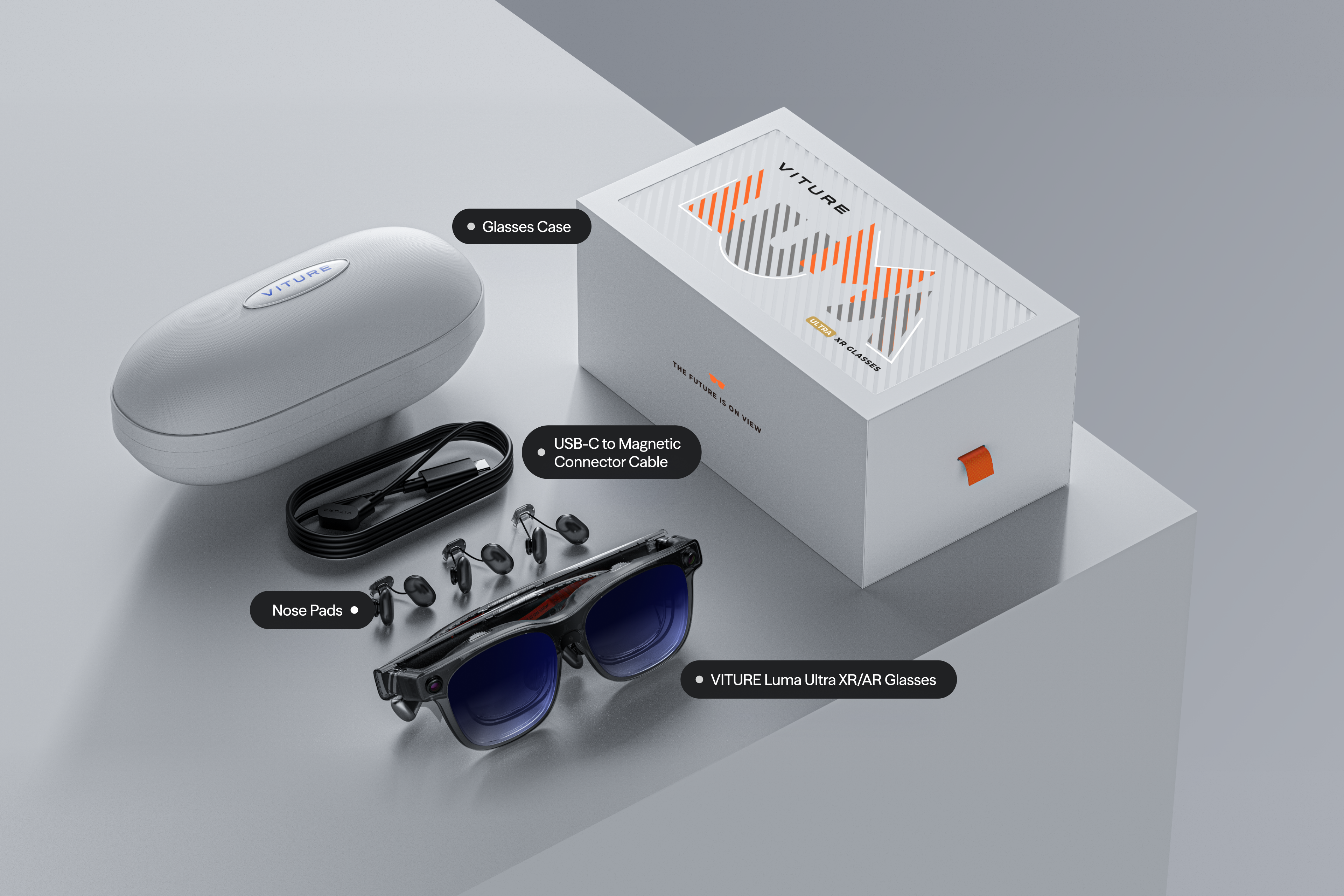
These are display glasses, not a standalone headset. There is no battery, app store or onboard operating system. A magnetic cable connects the right temple to a device that supplies both power and video. If that source supports DisplayPort Alt Mode over USB-C, the basic experience is delightfully boring: connect, mirror the screen, put on the glasses. Consoles and incompatible phones may need a VITURE dock or adapter, which changes the cost and the number of objects in your bag.
Inside are Sony micro-OLED panels showing 1920 by 1200 pixels per eye at up to 120Hz. VITURE calls the result “4K-like.” Read that as a statement about perceived clarity, not pixel count. The honest specification is 1200p per eye. It is still unusually sharp for this category, with a 52-degree field of view and claimed peak perceived brightness of 1500 nits. Small text is the test that matters for work, and owners repeatedly praise its crispness when fit is right.
The “152-inch” number also needs translation. It describes the apparent size of the image at a virtual distance of four meters. There is no rectangle occupying the room, and your perception of scale can vary. What you get is closer to a large monitor that follows your gaze. Tap the electrochromic control and the lenses darken, pushing the room behind the image toward black. It is a useful, physical feature, not a demo. On a bright plane or beside a window, that instant dimming earns its keep.
“A very clear and crisp picture giving that large screen.”A Luma Ultra owner after 24 hours, r/VITURE
The face-fit tax is real
Every wearable display has a hidden setup screen: your face. Luma Ultra is sold in a regular 58 to 70mm IPD range. Three nose pads and tilt-adjustable arms help align the image, and per-eye diopter wheels correct nearsightedness down to -4.0D. They do not correct astigmatism. People outside the adjustment range may need prescription inserts. Measure IPD before buying; VITURE itself recommends a formal eye exam.
Alignment determines whether all four corners look sharp or whether an edge clips. A different nose pad can do more than a software setting. At 83 grams, the Ultra is light beside a VR headset but heavy beside ordinary sunglasses. Pressure on the nose and temples accumulates. VITURE suggests sessions of three to four hours. Hair can also meet the exposed hardware near the arms, which explains the unusually specific hair-friendly cover in the box.
Do this before the return window closes
- Confirm the source device supports DisplayPort Alt Mode over USB-C.
- Measure your IPD and test every included nose pad.
- Read small text in all four corners, not just a movie in the center.
- Try a full 60-minute session for pressure, warmth and eye fatigue.
- Update firmware before judging head tracking or SpaceWalker stability.
Living with the cable
The absence of a battery is both relief and nuisance. There is nothing on the glasses to charge, swell or age, and the frame avoids carrying a processor that would add heat. The source device pays the energy bill instead. A phone drains faster while driving two micro-OLED panels; a handheld may need a charge-and-play adapter for a long session. The included 1.2-meter cable is long enough to reach a pocket, but its magnetic end uses VITURE's pogo-pin connection rather than a standard USB-C socket at the glasses.
That makes cable management part of comfort. Route it behind your shoulder and it mostly disappears. Let it hang across your chest and every head turn announces the tether. The magnetic joint can detach rather than yank the glasses, a welcome property in a cramped airline seat. It also means losing the cable is more inconvenient than borrowing any USB-C lead nearby.
Privacy is similarly nuanced. The virtual picture is difficult for a neighbor to read, but open-ear speakers are not private in the same way. Use headphones for confidential calls and midnight movies. The outward RGB camera is visible on the frame, while the two depth cameras sit near the corners. Luma Ultra is not designed as an always-on recording camera like some AI glasses, yet its sensor-heavy face can still attract questions in offices or public spaces. Ask before using it where cameras are restricted.
The case is substantial because these are electronics wearing a glasses costume. Fold the arms carefully, keep the lenses clean and do not treat them like cheap sunglasses at the bottom of a backpack. VITURE includes a one-year warranty and promises lifetime firmware updates, but neither promise makes a scratched optic pleasant.
The cameras promise a room. The software draws it.
Luma Ultra's differentiator is the camera trio. Six degrees of freedom means a virtual screen can stay anchored while you move left, right, up, down, forward and backward. Hand tracking can turn gestures into controls. In VITURE's current setup, those features work through SpaceWalker on Windows and macOS, or with compatible companion hardware such as the Pro Neckband or INAIR Pod. Mobile support differs, and buyers should check the live compatibility page rather than assume one platform behaves like another.
That dependency is the central caveat. One owner called 6DoF with the Pro Neckband “comparable to oculus quest” and liked using up to three virtual screens. Another MacBook user reported shifting screens, cursor trouble and frequent resets. Android Central found hand tracking mostly limited to VITURE demos and short games at the time of its review. These accounts can all be true because software versions, lighting, computers and use cases differ. A still laptop desk is kinder to tracking than a moving train.
VITURE keeps shipping updates. SpaceWalker for Windows 2.0.0.187 added a new interface and Luma Ultra gesture controls in August 2026. Progress matters, but it also proves the product is still moving under buyers' feet. Purchase for what works on your setup today. Firmware is a bonus, not a contract with the future.
Gaming, movies and work are three different tests
For games, direct connection is the clean route. Steam Deck and ROG Ally can feed the glasses over USB-C, giving fast 120Hz motion without turning a handheld into a lap-mounted television. Switch 2 support is one of VITURE's ecosystem strengths, but docks and charging arrangements matter. Cloud and remote play add network latency that the glasses cannot remove.
For movies, the Ultra is easy to recommend if open-ear audio and a wire do not bother you. HARMAN AudioEFX speakers are convenient, though fellow passengers may prefer that you use headphones. SpaceWalker can convert ordinary 2D video into stereoscopic 3D in real time. It is a playful effect, not a restoration of depth data captured on set, and one owner found it less natural than cinema 3D.
For work, sharp type and privacy are genuine wins. Multi-screen mode can spread windows around you, but virtual monitors only beat a physical display if they stay put and remain comfortable. Writers, coders and spreadsheet users should test tracking, edge clarity and keyboard visibility. The electrochromic lenses are adjustable, so you can leave enough of the world visible to find the keys.
How it compares at the $599 line
| Choice | Why choose it | Watch for |
|---|---|---|
| VITURE Luma Ultra | 1200p per eye, bright display, depth cameras, 6DoF options, strong Switch ecosystem | Tracking depends on software or companion hardware |
| XREAL One Pro | 57-degree view and onboard X1 chip for native display stabilization | 1080p per eye; camera module is a separate decision |
| VITURE Beast | Newer VITURE flagship with a wider 58-degree view and built-in 3DoF | Different emphasis: native screen control rather than Ultra's depth-camera 6DoF |
| RayNeo Air 3s Pro | Lower-priced route to a bright portable display | Less ambitious spatial toolkit |
| Rokid Max 2 | 1200p panels, 120Hz support and adjustable diopters | Spatial features depend on the wider Rokid setup |
The most important competitor may be VITURE's own Beast, now the company's newer flagship. Luma Ultra remains the interesting choice for people who specifically need depth cameras, hand tracking or 6DoF development. Buyers who mainly want a screen anchored in place should compare the Beast and XREAL One Pro, whose onboard tracking reduces dependence on desktop software. Budget shoppers who only want a cinema-sized mirror should resist paying for cameras they may rarely use.
You travel often, own compatible USB-C gear, value privacy and want VITURE's camera-led spatial tools.
You care most about stable, native head tracking. Put the Beast and XREAL One Pro on the same shortlist.
You expect a wireless standalone headset, need all-day eyewear, or dislike configuring apps and adapters.
The verdict: buy the screen you can use now
Luma Ultra's best idea is almost modest: your existing device deserves a much larger, more private display. The panels are bright, the 1200p image is crisp, the lenses darken on command, and the hardware folds into a case. For a traveler with a handheld console, that combination can turn dead time into an unusually comfortable game or film. For a laptop nomad, it can create working space where furniture cannot.
The cameras make the product more fascinating and the recommendation more conditional. Hand gestures and anchored screens are useful when the complete chain behaves, but the public record includes both delighted multi-screen users and frustrated reports of drift, jitter and crashes. The sensible purchase logic is to value Luma Ultra first as display glasses, then assign extra value to 6DoF only after confirming your exact platform.
At the regular $599 price, that is a demanding standard. At a $499 sale price, it becomes easier to accept the Ultra as a strong wearable screen with an evolving spatial laboratory attached. Either way, keep the return window on your calendar. In this category, your face, your ports and your software are part of the specification sheet.