A family tree is an odd thing to retire. Its subjects may have been dead for centuries, but the work keeps accumulating: another census entry, a corrected surname, a photograph somebody finally remembers to label. In December 2015, Ancestry announced it would retire Family Tree Maker. For people who had built their research around the desktop program, the announcement introduced a new question into the archive: what happens to the tool?
- The handover: MacKiev acquired Family Tree Maker in 2016, after years developing its Mac edition.
- The customer: a family historian with evidence to organize and relatives to involve.
- The offer: paid desktop software, optional cloud services, and ways to share the finished work.
- The lesson: build for correction, recovery and the person who comes next.
Seven weeks later, the retirement story changed. Ancestry announced that Software MacKiev would acquire the software line and publish both Mac and Windows editions. The company inheriting the job had already spent more than six years developing the Mac version. It knew a substantial part of the machinery before it received the keys.
The program that refused to retire
Founded in 1997, MacKiev had built its business around software development and publishing. Its company profile describes an initial team of eight programmers and operations in Ukraine and the United States. The catalog still carries familiar names: The Print Shop, KID PIX, Mavis Beacon, HyperStudio. These are programs for people making things or learning something, often on a home or classroom computer.
The 2010 Mac launch had already shown what Family Tree Maker customers wanted: a place to organize records and media, trace migration, cite evidence, and turn discoveries into books and charts. MacKiev’s eventual purchase put responsibility for the whole product into the hands of a company that had previously served one platform.
The awkward part came at the connection. In March 2017, the old TreeSync technology was retired in favor of FamilySync. MacKiev’s own account of the transition says getting the replacement ready took longer than originally planned. Ancestry temporarily kept connection services other than sync running while FTM 2017 was completed. The calendar and the engineering did not agree.
- DEC 2015Ancestry announces retirement
- FEB 2016MacKiev acquisition announced
- 2017FamilySync replaces TreeSync
Ownership could change quickly. The connection needed rebuilding.
That detail makes the story useful beyond genealogy. Buying a beloved application means accepting its relationships with outside systems, its old files, and its users’ expectations. A desktop program can still open while a connected feature has stopped working. Customers experience both as part of the same promise.
MacKiev president Jack Minsky was candid about the difference between knowing software and knowing its audience. In a 2016 comment on GenealogyTools, he described listening to advice, including on GEDCOM export standards. There is a sensible acquisition habit here: inherit the users’ knowledge along with the code.
“Six years as the Mac developer does not make us genealogists.”
Jack Minsky · GenealogyTools comment, February 2016
Your aunt is a feature
Today, Family Tree Maker 2024 is a Mac and Windows research workspace with online connections. Its charts and reports make a growing tree legible. Ancestry synchronization connects desktop and online work; FamilySearch integration supplies additional research hints. The customer can be a beginner entering a few relatives or an experienced genealogist managing an extensive collection of evidence.
One particularly revealing addition is Relative Hint. Invite a relative to view the tree in the free FTM Connect mobile app. That person can send a comment on a digital sticky note, which appears in the researcher’s tree through TreeVault. The historian remains at the desktop; the relative can participate on a phone or tablet.
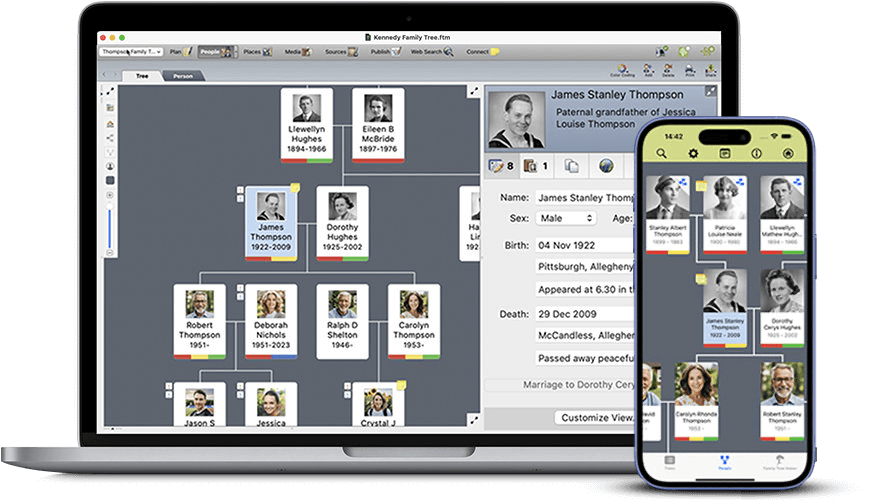
Consider the relative who recognizes a face but has never wanted to maintain a database. Asking that person to become a genealogist would be a considerable recruitment project. Asking for a correction is manageable. The design lowers the price of participation in time and effort, even though the researcher still has to evaluate what arrives.
A family recollection can also be wrong. A useful interface makes testimony easier to collect; it does not convert it into proof. The pleasure of this feature is that it gives family knowledge an address inside the workflow. It can be considered alongside the records, rather than remaining in a message somebody meant to revisit.
A photograph with something to say
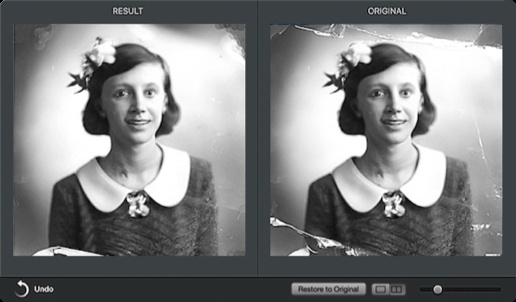
MacKiev tackles two different failures of old photographs. One is physical: fading, dust, scratches. Photo Darkroom offers repair tools, with expanded cropping and dust-and-scratch repair in FTM 2024. The original photograph is saved unchanged. That is a small design decision with a large consequence: improving the copy need not destroy the evidence.
The other failure is silence. A picture can be perfectly sharp and still tell you very little about the people in it. AlbumWALK, for iPhone and iPad, lets a narrator tap a face and record a memory about that person, then continue around the picture. Playback zooms to the people being discussed and adds a musical soundtrack. Family Tree Maker 2024 includes a player for these talking photographs.
The result is useful when the person who can explain the picture is still available. Repairing an image and recording its story belong to different clocks. Scratches can wait for an editing session. The witness may not. For a reader with a box of unlabeled photographs, the practical invitation is to make an appointment with the relative before making an appointment with the scanner.
The cloud has a succession plan
TreeVault adds recovery and continuity services around the desktop tree. Its Next of Kin feature lets the researcher designate a successor who can receive the instructions and access needed to continue, including a copy of Family Tree Maker. The media collection is included at the Media Plus subscription level. The distinction between tree data and media deserves attention before anyone assumes everything is protected.
The subscription details make the boundaries concrete. Media Plus allows up to 10 GB of tree data and media; Media Grand offers up to 200 GB. Backing up a second tree requires a separate account and subscription. If a subscription ends, the cloud tree stops updating and Emergency Restore becomes unavailable. A preservation plan needs an active plan, a suitable tier and someone willing to continue the work.
Then there is the error you make yourself. Turn Back Time, introduced with FTM 2019, expanded from a 1,000-change history to 5,000 changes in FTM 2024. It allows a return to an earlier state after a bad edit. Rollback, cloud recovery and succession solve distinct problems. Treating them separately is good archive management, whether the archive contains ancestors or accounting files.
What the continuity costs
The business combines paid software with optional recurring services and extras. At the time of research, the official USD-denominated international store lists the FTM 2024 download at $80, the DVD-and-download package at $90, and the USB-and-download package at $100. A $20 Family Pack upgrade extends one license to three computers and three users in the home. Offers, shipping and tax can change the total.
Listed USD prices, checked October 2, 2026. Optional services and subscriptions are separate.
The store offers a free year of TreeVault, with subscriptions starting at $1.99 a month afterward. It also says the trial will not charge the card unless the customer elects to subscribe. Paid access to historical record collections is another budget decision. Buying a genealogy application does not buy every archive it can help you search.
MacKiev occupies a market with credible alternatives. RootsMagic offers Ancestry TreeShare and WebHints. Reunion serves Mac and iOS genealogists. People comfortable with browser-based research can keep an online Ancestry tree. Family Tree Maker’s appeal is the combination of a desktop workspace, connected research, relative feedback, photo tools and succession services. A buyer who wants only a simple online tree may have little use for that whole collection.
The useful habit hidden in the software
There is a family resemblance across MacKiev’s portfolio. The Print Shop turns layouts into cards, calendars and labels. HyperStudio AUTHOR exports interactive projects as HTML5 web apps. Family Tree Maker turns collected records into charts, reports and books. Different customers, different outputs, but a recurring interest in helping people make something they can give to someone else.
The company also meets its genealogy audience through demonstrations and society events. Its public calendar documents a 2025 Ontario tour, and Ontario Ancestors runs Family Tree Maker learning sessions. Current support documentation describes the free 25.0.2 update with stability fixes and Connect statistics panels. Stewardship involves teaching people to use the product and continuing to repair it.
The practices worth copying are modest: invite the person who knows the story; preserve an original before improving it; distinguish synchronization from backup; name the next custodian. Software can help with all four. It cannot choose the interested niece, persuade an uncle to remember, or decide which conflicting birth date is true. A family tree gets its second life when somebody else can pick up the work.