Trevor AI is for the person whose to-do list has become a museum of good intentions. The list says “prepare proposal.” The calendar says three meetings, a dentist appointment and twenty-seven minutes beside a sandwich. Trevor’s central idea is almost embarrassingly sensible: put the list next to the calendar and make the two negotiate. For students, freelancers, founders, remote workers and solo operators, that can be more useful than another place to collect tasks.
The app’s working view is a split screen. Tasks live in a hub on the left; the day or week runs down the right. Drag a task into an open slot and it becomes a real calendar event. Move the block in Google Calendar or Outlook and Trevor follows along through two-way sync. If dragging tiny rectangles sounds like clerical work, Trevor can estimate the duration, inspect availability and suggest where the task belongs. You approve the suggestion. That final click is the product’s personality.
Many AI schedulers sell relief by taking the wheel. Trevor behaves more like a passenger with a map. Its “Plan My Day” feature can propose a day, three days, four days or a week. The scheduling queue lets you decide which pile of work deserves attention. An adaptive strategy can choose and order tasks, but the suggested blocks remain suggestions until accepted. This makes Trevor especially attractive to anyone who wants computational help without waking up to discover that an algorithm has remodeled Thursday.
“The useful question is not what should I do? It is what can honestly fit?”Our read on Trevor AI’s core argument
Who should invite Trevor into the calendar?
Start with Todoist users. Trevor’s integration turns projects, filters and loose tasks into a scheduling queue while leaving Todoist as the source of truth. Google Tasks and Microsoft To Do users receive the same basic bridge. The calendar side supports Google, Microsoft Outlook and Office 365, Apple iCloud Calendar and CalDAV. That is a compact integration menu, not a buffet, so Akiflow remains more suitable for people who ingest work from half the internet.
Trevor is also a good training ground for people who are curious about time blocking but unsure whether the habit will stick. The free plan covers personal planning with one calendar account and limited automation. Pro is listed at $5 a month when paid annually or $6 month to month. Compared with heavyweight schedulers, that is a low-cost experiment. If you use it for two weeks and keep returning, you have learned something important about how your brain prefers to plan.
Published plan and feature details as of September 2026. The company also mentions an Executive plan without listing a public price.
What the AI does, in plain English
Trevor uses a personal model trained on anonymized scheduling patterns to predict how long a task will take, which day it is likely to land on and what time may suit it. Trevor Labs says model updates happen more frequently for paid users. The company does not publish a neat model name or version number, and that is worth stating because “AI” here is a collection of functions rather than a single talking brain.
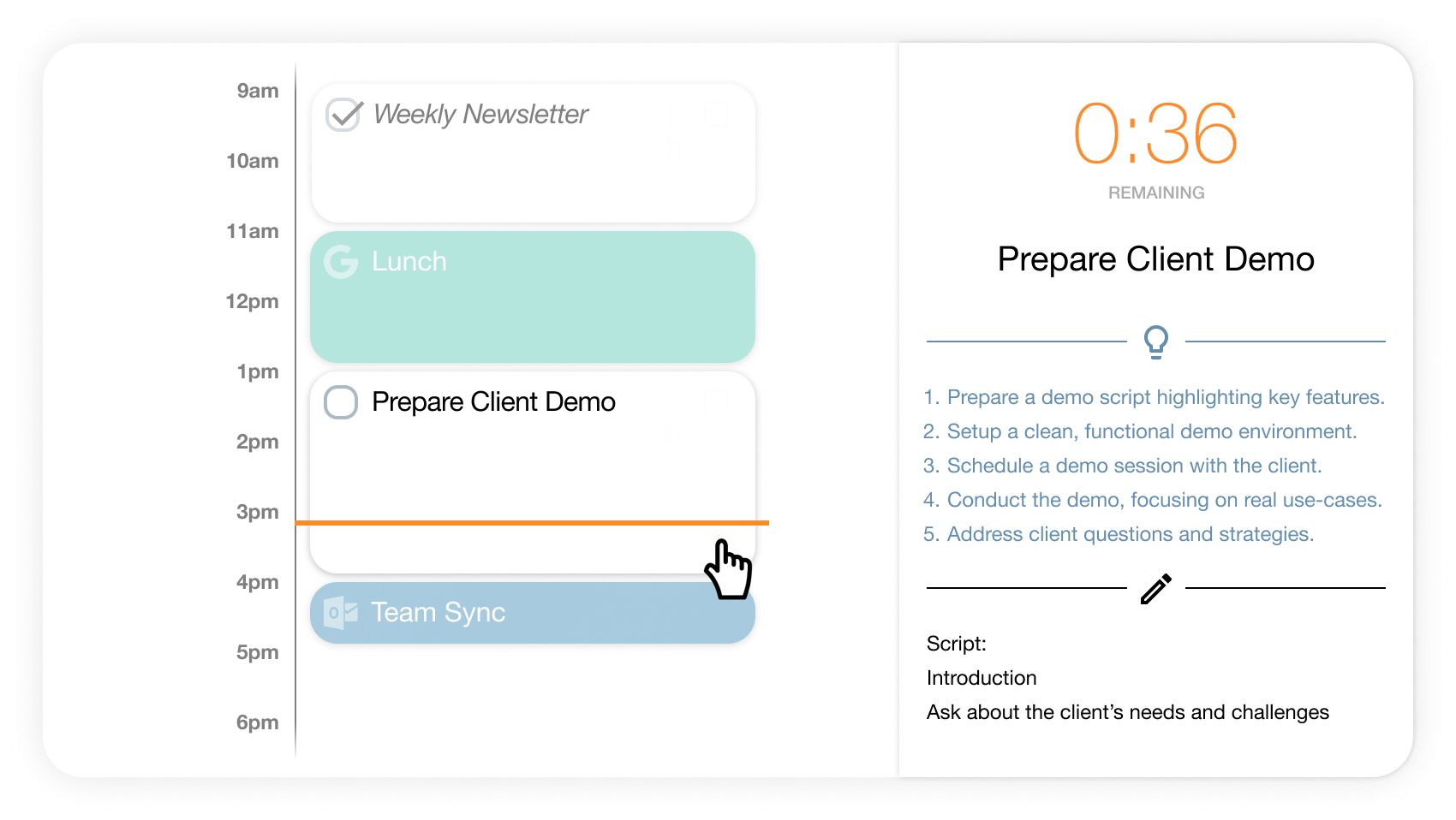
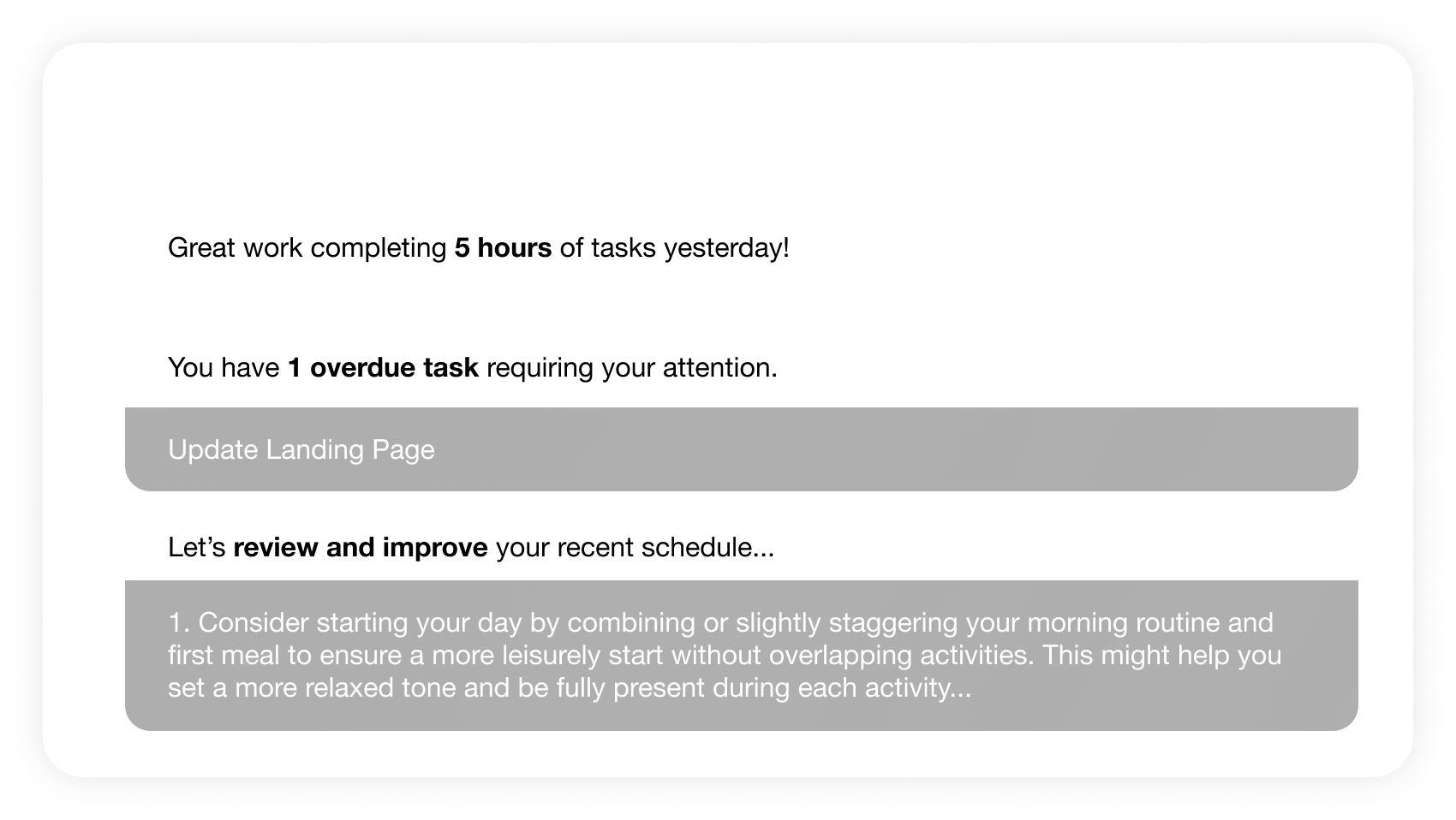
Some generative features use OpenAI models. One of them powers Focus Mode, where a scheduled task opens into a timer, a large notes field and an AI-generated five-step action plan. Another appears in the optional “Start My Day” email, which combines yesterday’s completed hours, overdue work, recurring tasks, today’s appointments and personalized planning advice. The coaching is only as useful as the behavior it observes, but the feedback loop is well chosen: plan, work, review, adjust.
The little negotiation that runs your day
tasks
suggested slots
real blocks
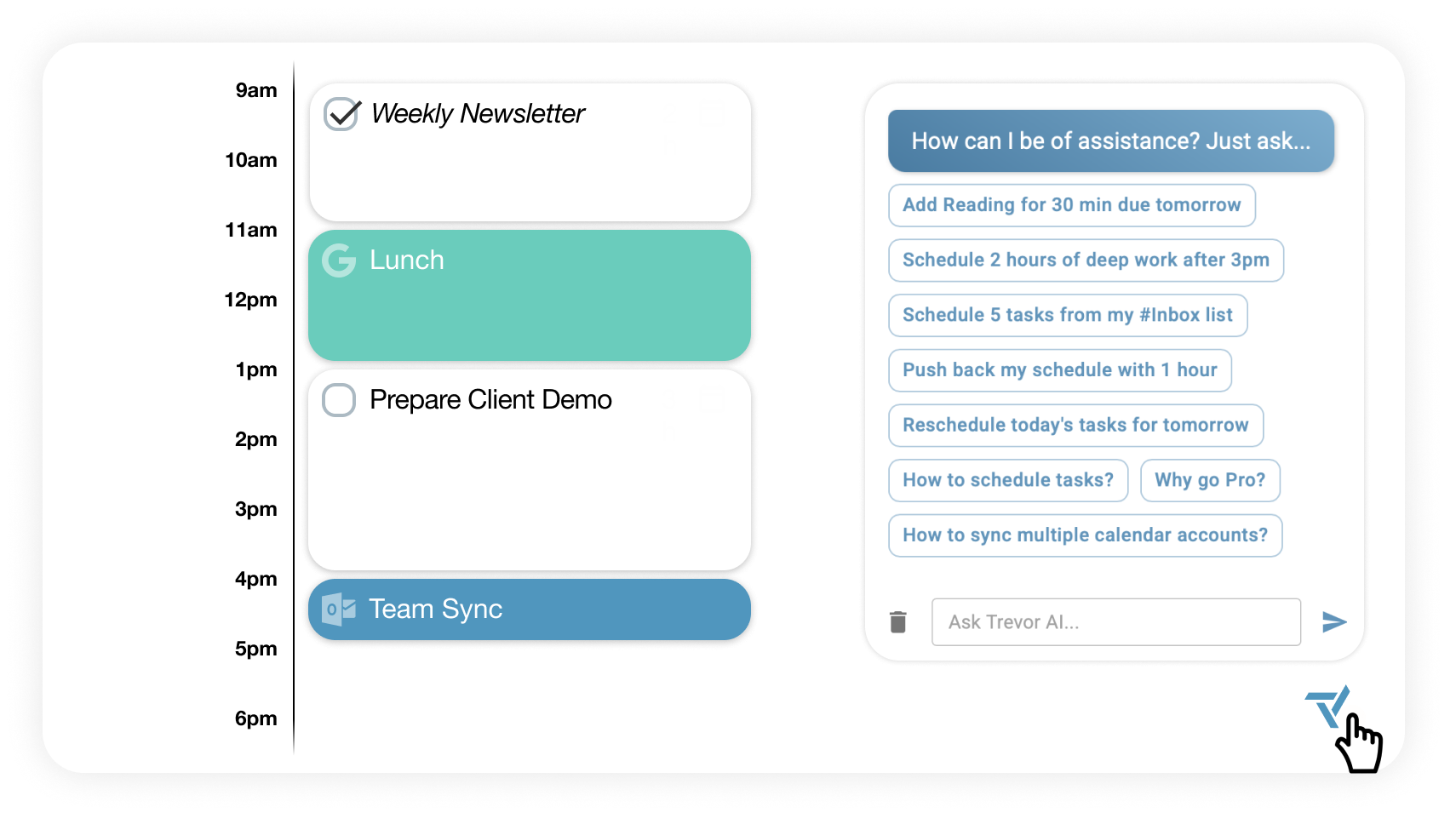
The newer conversational assistant, Ask Trevor, adds a useful command line for ordinary humans. You can type “schedule my top three tasks this afternoon,” “move my 3pm meeting to 4pm,” or ask which tasks are overdue. It can create, edit, complete, remove and search tasks; manage calendar events and lists; inspect connected integrations; and change preferences such as work hours. Trevor asks permission before accessing relevant data, then shows a preview before a proposed change is committed. That modest bit of friction is good product design when the subject is your actual day.
The pleasure and pain of a small product
Trevor Labs began in Sofia in February 2016. Founder George Petrov was joined soon after by technical co-founder Dmitry Yudakov, with support from the Founder Institute. The company’s old about page proudly counts 44,896 lines of code, the sort of number a tiny team records because every line still feels personal. Petrov reported twenty-four consecutive months of monthly recurring revenue growth in a 2025 LinkedIn update. He later wrote that he had stepped away from roles that no longer matched his strengths while making room for people better suited to the next stage.
Smallness cuts both ways. The interface is focused, setup can be quick and the price does not require a procurement ritual. Independent reviewers commonly praise the value and low onboarding burden. The ceiling is easier to find, too. Trevor does not market booking links, elaborate project management or enterprise capacity planning. A 2026 Litmus review rated ease of use and value highly while scoring features and support lower, noting that users with complex needs may eventually graduate to Motion or Reclaim.
“Really loving Trevor. It’s a daily habit for me now and my mind clutter had reduced significantly.”Denis Cutura, in a testimonial featured by Trevor AI
Reddit captures the split neatly. Some people recommend Trevor as a straightforward Todoist-and-calendar bridge. Others report that messy task data defeats the experience, or want tasks split across multiple chunks. One user described Trevor as too basic before trying it. These are not fatal blows; they describe the boundary. Trevor works cleanly when tasks are reasonably tidy, days matter more than portfolio-level forecasting, and the user still wants to judge the plan.
| Planner | Fits | Control style | Watch for |
|---|---|---|---|
| Trevor AI | Solo daily planning and time-blocking beginners | AI suggests; user confirms | Shorter integration list and lighter project tools |
| Motion | Managers and teams with project deadlines | More autonomous scheduling | Higher price and more system to learn |
| Reclaim AI | Habits, protected focus and busy calendars | Rule-driven automation | Per-task rules can feel busy at scale |
| Akiflow | People pulling tasks from many tools | Command-center workflow | More inputs, more configuration |
A five-day test before paying
Connect one task source and one calendar. Resist the urge to import every abandoned list since 2019. On day one, clean ten meaningful tasks and give each a due date only when the date is real. Let Trevor predict duration, then correct anything absurd. A task called “website” is not a task; “draft homepage copy” is. Better inputs make any scheduler look smarter.
On day two, drag the blocks yourself. This reveals whether the basic visual model clicks. On day three, load the Smart Scheduling Queue and ask Plan My Day for suggestions. Accept selectively. On day four, use Focus Mode on the block you have avoided most. On day five, read the progress report and inspect what slipped. If the missed work needs different timing, Trevor is helping. If it needs a manager, a therapist or cancellation, no calendar algorithm can provide the missing ingredient.
Before relying on sync, choose a Scheduling Calendar in settings and confirm it appears on every device. Trevor creates an internal calendar by default in some cases; blocks placed there will not show elsewhere. Privacy-conscious users can choose read-only calendar access, although that prevents Trevor from creating or editing events. Account settings also offer CSV task export, broader GDPR data export and account deletion. The company says it does not sell or share private data, uses Google and Amazon infrastructure, and processes payments through Paddle.
Mobile, language and other edges
Trevor remains fundamentally a responsive web application for desktop, tablet and mobile browsers, installable through “Add to Home Screen.” An official Android Play Store listing was updated July 10, 2026 and showed more than 500 downloads in September. The current documentation still contains an older note saying dedicated mobile apps are not available, so the Android listing is the newer evidence. We could not verify a current native iOS listing. The web app is English-only, although it can be used in most countries.
Collaboration exists, but it is supporting cast rather than the plot. Lists can be shared, tasks assigned and teammate work scheduled where permissions allow. Progress reports can chart scheduled and completed task hours by project. Pro users can add hourly rates, generate billable-hours reports and export them as PDFs, a quietly practical feature for freelancers whose calendar is also a draft invoice.
The YesPress verdict
Choose Trevor AI if your problem is the gap between listing work and making room for it. It is affordable, legible and unusually respectful of the final human decision. Skip it if you need an autonomous project governor, dozens of integrations, booking infrastructure or team-capacity forecasts. The free plan makes the decision pleasantly reversible.
One small appointment with reality
Trevor’s central trick is not predicting that an email will take twenty minutes. It is forcing a finite calendar to look an infinite list in the eye. Once the blocks fill the afternoon, “just one more thing” loses its innocent disguise. You must move something, shorten something or admit that tomorrow exists.
That is why the product is easy to recommend to a friend who keeps changing productivity systems. Trevor does not require a new philosophy, only a calendar, a task list and a willingness to be specific. The AI can do the arithmetic. You remain responsible for Tuesday.