An insurance brokerage can know a great deal about its policies and rather less about itself. Every renewal leaves a record. Every commission produces a number. Put enough of those numbers together and the business ought to become legible. Yet the records may sit in different systems, arranged around transactions rather than the questions a manager needs to answer.
- Connect existing data before asking people to use another report.
- Give insurance teams familiar measures, including renewals and retention.
- Keep permissions and discussion close to the datasets.
That gap gives PanBI Big Data Analytics its subject. The offering, now listed among PanApps’ products, combines data connections, visual analysis, and shared dashboards. Earlier ASSYST announcements give the proposition a specific setting: insurance agencies trying to extract more value from the systems they already operated. The interesting question is how an organization gets from keeping records to using them.
The records were already there
In January 2017, ASSYST described an unnamed American insurance brokerage with 30 locations and more than 500 professionals. According to the announcement, its agency management systems held substantial data, while finance examined historical premiums, revenue, and commissions. The firm wanted a more current view across clients, departments, producers, agencies, and carriers.
locations in the brokerage described by ASSYST in 2017.
A historical customer claim, not PanBI’s office count.
The announcement credits PanBI and its KPI accelerator with helping the brokerage introduce analytics into departmental work. That is a vendor account of adoption. Its useful detail is the starting point: information already existed, but managers needed a different way to examine it. The problem appeared between storage and interpretation.
By March 2017, ASSYST’s insurance webinar announcement was spelling out the friction. Policy administration, claims, billing, customer management, and emailed files could produce feeds that were out of sync. This is a recognizable organizational problem. Each system can do its own job while leaving the combined business surprisingly hard to read.

A question before a chart
PanBI’s 2016 insurance pitch offered a KPI accelerator covering premiums against revenue, new commissions, renewals, producer books, retention, cross-selling, and close ratio. It also described custom reports and connections to enterprise and external systems. The intended users extended from management to employees and business partners, subject to governance.
The appeal of that list is its familiarity. An agency does not have to invent an analytical vocabulary before beginning. Renewals already matter. Commissions already matter. The software organizes those concerns into something people can inspect. My reading is that the accelerator reduces the distance between a general-purpose analytical tool and a department’s working habits.
A useful starting point: choose the decision, then choose the view.Editorial takeaway
That is a lesson another team can copy without copying the software. Select one recurring decision. Agree which records inform it. Define the measure precisely enough that two departments calculate it the same way. Only then decide which chart deserves space on the screen. A disputed definition of retention will survive an attractive dashboard.
The unglamorous middle matters
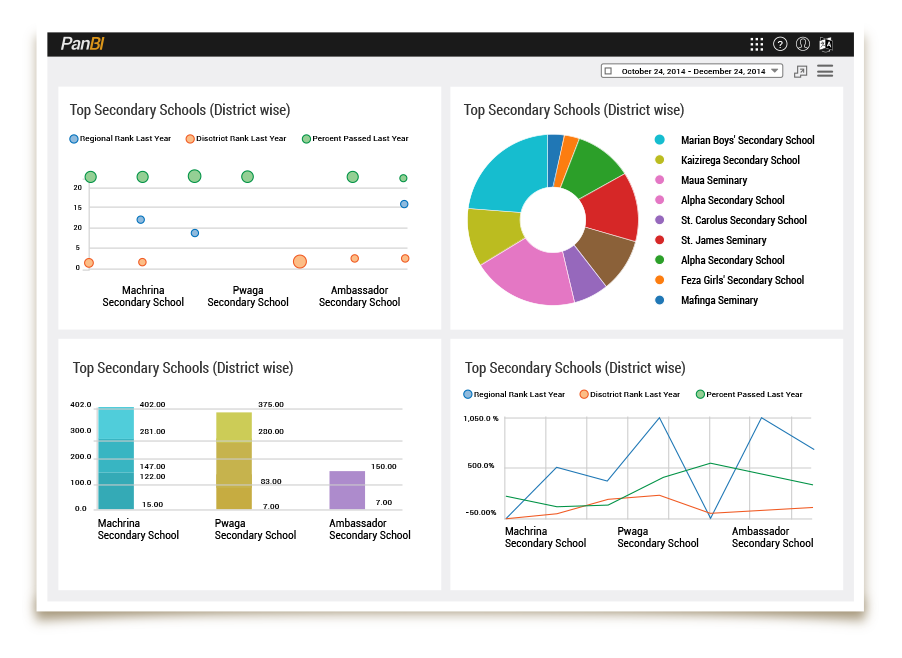
PanBI’s published workflow includes discovering data, cataloging it, analyzing it, visualizing it, and collaborating around it. Its features page describes relational databases, secured and public REST connections, and spreadsheet or text files. A schema editor supports extraction, transformation, and loading. Catalog folders can contain datasets and visual objects, with selective sharing.
Databases · APIs · files
Datasets · permissions · views
Inspect · comment · act
Those middle steps deserve attention. A chart is an output; a catalog helps people find what produced it. Access controls address who should see it. Comments keep discussion near the material under discussion. PanBI’s product design treats these as parts of one job, rather than leaving the user at the moment a visualization appears.
Its main product page also names SharePoint, MongoDB, OData, Socrata, and other connection examples. Responsive interfaces and multilingual support are part of the advertised offering. Together, these features position it for organizations with mixed information systems and varied users. A connector list, however, is the beginning of an evaluation: a buyer still needs to try the actual source.
The product comes with a conversation
PanApps places PanBI alongside enterprise products for agriculture, grants, and knowledge management. Its broader services include application modernization and digital transformation. That setting matters: the BI offering lives within an enterprise software and services portfolio, where connecting to existing operations is part of the sales conversation.
The official pricing page requests a customized quote. It says training and maintenance are included and offers reports tailored to enterprise KPIs. Historical insurance material described both as-a-service and on-premises deployment. For a buyer, the practical cost question therefore includes the scope of connections, customization, deployment, and support. A meaningful comparison needs the same scope on each proposal.
Alternatives occupy familiar territory: Power BI, Tableau, Looker, and Zoho Analytics. PanBI’s insurance accelerator provides a concrete angle for comparison. The test is whether its starting measures and implementation approach suit a buyer’s work. Counting chart types alone would miss much of that decision.
Bring a difficult question to the demo
Consider a pilot built around renewals. Bring representative records from two systems and ask the team to trace one result back to its inputs. Then change a permission and inspect the experience for another user. This is an evaluation approach suggested by PanBI’s design, not a claim about a completed customer test.
The approach depends on accessible records, agreed definitions, and people willing to act on what they see. If source data is incomplete, access is blocked, or nobody owns the decision, another dashboard has limited room to help. PanBI’s useful proposition begins with what organizations already possess. Its value must emerge when someone uses those records to make the next decision.