Legal work has always had a paper problem. The complaint arrives with exhibits, the contract folder breeds overnight, and a perfectly ordinary research question grows three jurisdictional heads. CoCounsel is built for that moment. Thomson Reuters' AI assistant can search authority, digest a record, compare clauses, prepare a deposition outline, and produce a first draft with links back to its sources. For a litigation team staring at 9,000 files, this is practical machinery. For a solo who wants an occasional clever paragraph, it can be a very expensive typewriter.
The simple way to understand the product is to ignore the chatbot theater. CoCounsel's advantage is access. It can work with Westlaw primary law, Practical Law guidance, a firm's precedents, and documents attached to a matter. That gives its answers a provenance trail that a general-purpose assistant cannot manufacture. Every useful claim can be followed back to authority. The lawyer still decides whether that authority says what the machine thinks it says.
Who should put it on retainer?
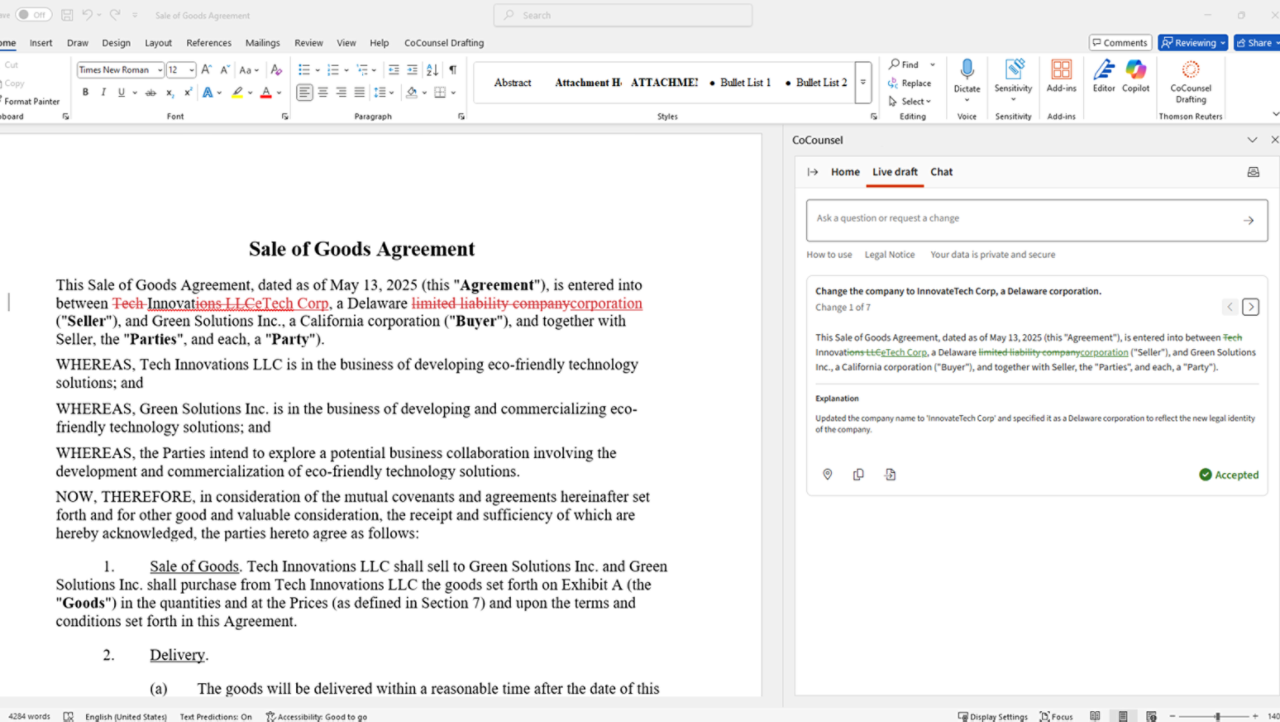
The obvious buyer is a legal team already paying for Thomson Reuters content. Litigators get research tied to Westlaw, document analysis, timelines, deposition preparation, and a guided brief-building flow. Transactional lawyers get clause work, playbooks, comparisons, due diligence tables, and Word-based drafting. In-house teams can use the same workspace for policy checks, contract review, and advice grounded in Practical Law. Government lawyers with large records fit the pattern too.
The less obvious requirement is operational discipline. A firm needs repeatable tasks, enough document volume to make automation meaningful, and someone responsible for adoption. Buying seats and sending a cheerful email is not a deployment plan. Decide which matters can enter the system, how outputs will be checked, who can connect document repositories, and what a successful month looks like. If nobody can name the workflow that will save five hours next Tuesday, keep the demo appointment and postpone the contract.
A sensible matter workflow
- Define the question and jurisdiction.
- Connect the right documents and authority.
- Let CoCounsel research, review, or draft.
- Check every material fact, quote, and citation.
The feature list, cross-examined
Deep Research is the headline act. Instead of answering a legal question in one jump, the system creates a research plan, searches Westlaw authority, works through sub-issues, and returns a linked report. The new agentic design extends that planning habit across tasks: users describe an objective in ordinary language, CoCounsel chooses steps, and its work stays visible. This reduces prompt gymnastics, though a crisp instruction still beats a foggy one.
Westlaw Brief Builder is more deliberate. It walks a litigator through intake, document analysis, argument selection, authority research, drafting, and verification. The lawyer chooses the side, jurisdiction, evidence, and arguments. Deep Research Verify checks whether cited Westlaw and Practical Law authority supports each assertion. This is the right shape for legal AI: visible checkpoints around decisions that belong to counsel.
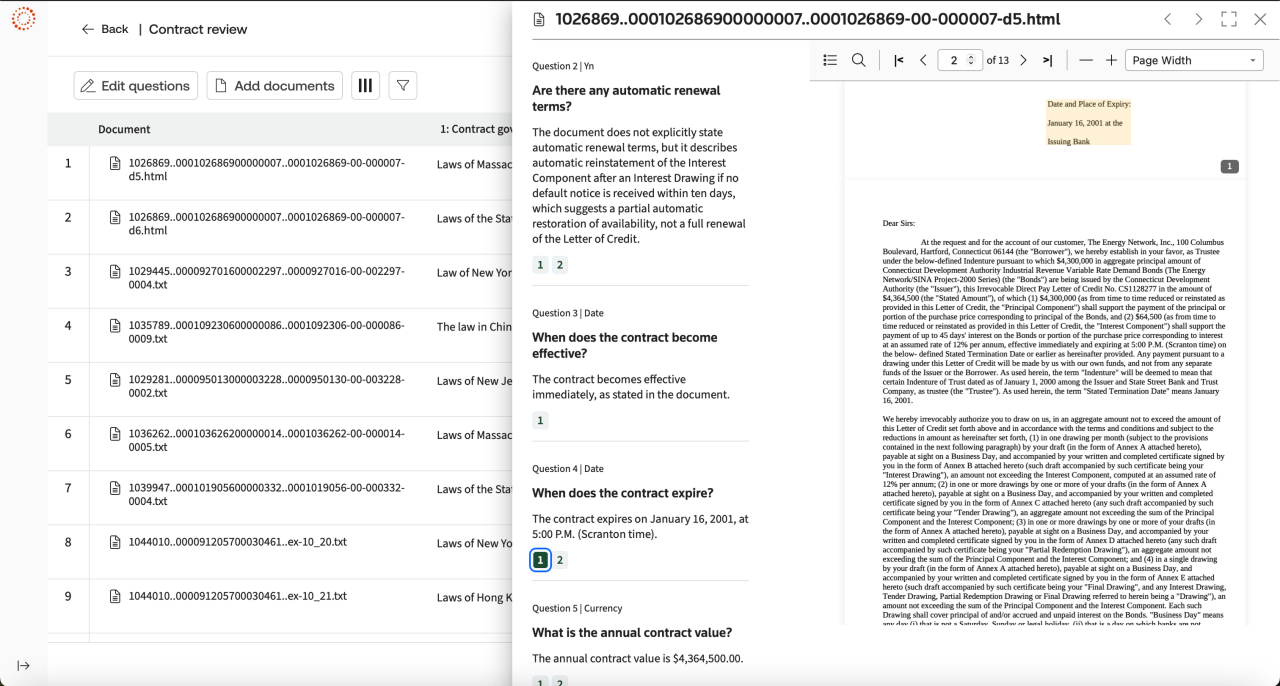
For document-heavy matters, Tabular Analysis may be the stronger daily tool. The August 2026 release handles up to 10,000 workspace documents and 100 questions per table. Results are sortable, filterable, and linked to their source pages. Think discovery triage, contract diligence, medical-record review, or a chronology whose footnotes do not live in somebody's mystery spreadsheet.
| Job | CoCounsel's move | Your move |
|---|---|---|
| Research | Plans a multi-step search and cites Westlaw or Practical Law. | Read the authorities, KeyCite them, and test the reasoning. |
| Document review | Extracts issues, compares files, builds tables and timelines. | Sample the source set and investigate omissions or ambiguous answers. |
| Drafting | Creates or revises clauses, correspondence, and briefs. | Own strategy, tone, local rules, facts, and final language. |
| Knowledge search | Searches connected firm repositories and summarizes matches. | Confirm permissions, currency, privilege, and precedent quality. |
“On any given day, I feel like I save 6 to 8 hours of attorney time.”Daniel Olson, Bassford Remele, in a Thomson Reuters customer story
A useful assistant, not a witness
Customer stories describe real time savings. Thomson Reuters says Cole, Scott & Kissane cut an eight- or nine-hour task to roughly two hours, while Bassford Remele's Daniel Olson reports saving six to eight attorney hours on some days. These are vendor-published anecdotes, useful for imagining workflows but not a promise about yours. The company also reports more than 20,000 legal teams using CoCounsel Legal and broader CoCounsel adoption of one million professionals across 107 countries and territories. That larger figure includes tax, audit, accounting, risk, compliance, and trade products, not only lawyers.
Independent experience is more sobering and more helpful. Appellate lawyer Jeffrey I. Ehrlich tested the early Casetext version for three months. He praised deposition preparation and called a transcript summary credible for getting oriented, but said it was nowhere near enough to replace reading the testimony. He canceled the $500 monthly legacy plan because the value did not clear his solo-practice bar. That review predates the Westlaw integration and today's rebuilt product, yet the lesson has aged well: price the tool against your actual matters, not its demo reel.
Recent Reddit threads supply the grumpy partner at the table. Some users praise source-limited case research and summaries of large records; others report slow responses, vague drafting, or basic extraction mistakes. Anonymous posts are not controlled tests. They are still a reminder to trial the exact files and questions your team handles. A dazzling answer to a canned negligence prompt tells you little about a badly scanned billing record at 4:40 on filing day.
Strong fit
- Heavy Westlaw and Practical Law users
- Repeat litigation or transaction workflows
- Large document sets with review staff
- Teams with clear human quality controls
Pause first
- Light or occasional research needs
- No clear owner for rollout and training
- Expectations of filing-ready autonomous work
- Budgets that cannot absorb platform pricing
The price of a shorter first pass
Public U.S. pricing for in-house teams currently starts at $1,694.90 per month for CoCounsel Legal. CoCounsel Essentials, focused on drafting and analysis without the complete Westlaw research layer, starts at $340.85 per month. A Practical Law bundle with Essentials starts at $882.30. Seat counts, jurisdiction, current subscriptions, and negotiated terms can change the bill, so compare a written quote with the work you plan to move through it.
The useful equation is dull: subscription plus training plus review time, divided by hours genuinely removed from the workflow. Include write-offs avoided, faster client replies, and matters the team can accept without another hire. Exclude hours merely shifted from an associate to a partner checking unreliable prose. Run a four-week pilot on live but suitable matters, measure from upload to approved work product, and record failure cases as carefully as wins.
The competition is really three decisions
Harvey and Legora compete for broad enterprise legal work, collaboration, drafting, and review. Lexis+ with Protégé answers the same publisher-backed question from the LexisNexis side, with Shepard's rather than KeyCite. Vincent by Clio appeals to research-led teams in the vLex or Clio orbit. Spellbook is narrower and lives close to contracts in Word. General tools such as Claude and ChatGPT are cheaper and flexible, but they do not arrive with a licensed legal corpus or your firm's governance setup.
So the buying decision has three layers. First, choose the authority and content ecosystem. Second, choose the workflow: research, mass review, Word drafting, or all three. Third, decide how much integration and administration you will pay for. CoCounsel wins a strong argument where Westlaw is already the institutional memory. It has a weaker case when the team mainly wants lightweight drafting or is already committed to a rival research stack.
| Option | Natural home | Question to ask |
|---|---|---|
| CoCounsel | Westlaw + Practical Law | Will grounded research and connected matters earn back the bundle? |
| Lexis+ with Protégé | LexisNexis + Shepard's | Does your team already live in the Lexis content stack? |
| Harvey / Legora | Large-firm AI workspace | Are collaboration and custom workflows more important than publisher ownership? |
| General AI | Flexible, non-grounded work | Can governance and source verification be handled elsewhere? |
The professional-duty clause
CoCounsel's own help material says AI responses may contain errors and must be validated for accuracy and relevance. Check the proposition, the quotation, the citation, the current status of the law, and the match to your jurisdiction. Privacy controls do not turn an answer into advice, and a linked source does not guarantee a sound inference.
Privacy, models, and the bit under the robe
The current CoCounsel architecture is deliberately multi-model. Thomson Reuters says it uses frontier models from Anthropic, OpenAI, and Google alongside proprietary AI and structured datasets. Its own Thomson model powers the 2026 Tabular Analysis. The system then adds retrieval, legal content, workflow logic, and validation around those models. “Latest model” is therefore the wrong singular question. Ask which capability uses which model, what sources it can retrieve, how outputs are tested, and when the vendor can switch providers.
On data handling, Thomson Reuters says customer content and prompts are not used to train CoCounsel or third-party models. Model-provider calls use zero retention, traffic uses TLS 1.2, and stored data uses AES-256 encryption. Retention can be configured at the organization level, with regional hosting available in several markets. Buyers should still reconcile those controls with client promises, ethical rules, legal holds, residency needs, and the permissions inherited from connected repositories.
One recent wrinkle is the official MCP connector for Claude Desktop. Eligible subscribers can ask Claude to hand research, review, comparison, chronology, or drafting work to CoCounsel, which returns results grounded in Westlaw and Practical Law. It is a neat reversal: instead of choosing one assistant forever, the general tool can call the legal specialist. Administrators will care more about authorization and audit trails than the novelty, as they should.
The verdict
CoCounsel works as an accelerator for work a legal team already knows how to supervise. It can turn a document mountain into a navigable table, give a research project a structured first pass, and keep drafts close to authority and precedent. Its source links make review faster; they do not make review optional. The product's defensible feature is not fluency. It is the route from an answer back to the material that produced it.
Book the demo if your lawyers spend their week searching Westlaw, wrangling records, and rebuilding familiar documents. Bring ugly files. Ask jurisdiction-specific questions. Time the full path to approved work. Then let the numbers decide. CoCounsel may save a day, but the buyer still has one job the machine cannot take: judgment.