At MGA, a commercial property firm in Washington, DC, six people had a perfectly respectable piece of software and an awkward problem. Each kept an individual Act! database. The team could track clients, but it lacked a common account of who was speaking to whom. Colleagues could approach the same prospect about the same deal. From the customer’s side, enthusiasm must have looked suspiciously like a company failing to introduce its employees to one another.
- Act! organizes customer history, sales opportunities and follow-ups for small and midsize businesses.
- Its Advantage cloud suite adds marketing, quotes and scheduling; richer tools depend on the plan.
- The useful lesson: give the next customer conversation an owner, and make its history visible.
MGA moved to a cloud-based version, shared a central database and divided prospects into groups. In Act!’s published account, managing principal Brian Pashkoff describes less duplicated effort and more information passing between colleagues. The interesting change was social: people could see where their knowledge would help someone else. A database had become a place to cooperate.

01 A contact manager grows up
Act! dates to 1987, when Pat Sullivan and Mike Muhney created Activity Control Technology. The original name sounds like something designed to supervise a factory floor. Its enduring subject was the relationship: the person, the conversation, the promised next step. An address book could retain a telephone number. A contact manager could retain the reason to dial it.
The software passed through several owners. Sage bought its parent, Interact Commerce, in 2001; Swiftpage acquired Act! in 2013. In May 2018, Swiftpage announced a strategic investment from SFW Capital Partners. The financial terms were undisclosed. That investment supported plans to expand the product offering for smaller businesses, and Act! introduced its Marketing Automation product in 2019.
In 2025 came Act! Advantage, a cloud suite that widened the job description again. A customer might arrive through a form, book an appointment, receive a quote and become part of a project. Act! wants those steps near the same customer record. This is an intelligible ambition for a small company, where “sales department” and “person who also sends the invoices” may refer to the same individual.
02 The customer record earns its keep
At the center sit contacts, companies, activities and opportunities. Teams can record calls and emails, retain documents, set tasks and follow deals through defined stages. Calendars and dashboards make the resulting workload visible. The practical question is whether a colleague can pick up a relationship without first conducting an archaeological dig through somebody else’s inbox.
For some businesses, a contact needs more than a generous notes field. An insurance customer can have several policies; a software customer can have several licenses. Act!’s Custom Industry Tables place spreadsheet-like records beside the relationship. They can be filtered, grouped and linked to contacts or opportunities. Industry templates cover such areas as insurance, mortgages, consulting and support. That matters when the next sales opportunity is buried in a contract’s expiry date.
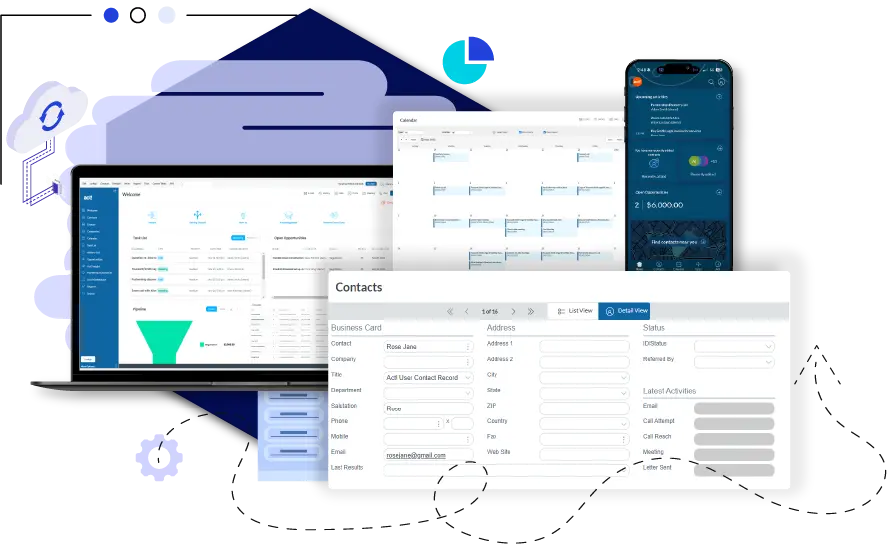
Interactive quotes let customers review and accept a proposal online. Appointment scheduling gives them a booking link and writes meetings to the Act! calendar; advanced scheduling combines team availability. Project management, included in Professional and Ultimate, ties tasks and progress to contacts and opportunities. These are distinct chores, but the customer experiences them as one relationship. Making the business remember that connection is the point.
Act! Payments extends the sequence to collection. Powered by Propelr and introduced in the April 2026 release notes, it supports payments at customer interaction points such as quotes, appointments and events. July updates added web-form payment collection, refunds and Canadian merchant support. Availability and processing terms still matter. Buying CRM seats is one financial decision; agreeing to payment processing is another.
03 Follow the click to the next call
Act!’s marketing tools start with emails and move toward response-driven workflows. A team can build a sequence, capture leads through landing pages and forms, and attach campaign results to customer records. More advanced automation scores engagement and creates follow-up activities. The appealing part is the connection between the communication and the person expected to do something about it.
- 01 / CAPTUREA prospect completes a form
- 02 / REMEMBERThe response enters the CRM
- 03 / RESPONDA configured workflow assigns follow-up
Imagine a service business sending a renewal campaign. A useful outcome is a representative seeing the response beside the relevant customer history, with a next action already assigned. That is an example of how these tools can be configured, rather than a promise that every campaign will produce a sale. Automation cannot supply an offer that customers want.
The AI additions follow the same pattern. The Writing Assistant helps with marketing content. AI History Summary, offered on Professional and Ultimate, recaps recent contact interactions before a conversation. September 2026 updates also describe an AI support assistant and guided email creation. A summary is useful preparation, provided there is a worthwhile history to summarize. The team still has to capture what happened.
04 The annual bill, in plain arithmetic
Act! charges by user, with different cloud bundles and optional extras. As checked on October 2, 2026, Advantage Standard is $30 per user per month when billed annually, Professional $45 and Ultimate $60. For six seats, the annual subscription arithmetic is $2,160, $3,240 and $4,320 respectively. These are current list-price examples before optional charges, rather than MGA’s historical bill.
The published monthly email allowances rise from 2,500 sends to 25,000 and then 50,000 across those tiers. Advanced marketing automation and the customer portal belong to Ultimate; Professional adds project management and AI features. Choosing a bundle therefore means identifying work the team will actually perform. A feature bought but never adopted makes an excellent ornament and a poor investment.
Act! also sells Premium Desktop, currently listed at $40 per user per month with annual billing. The company describes it as a deployment customers manage themselves. Cloud service shifts hosting and updates away from the buyer; desktop keeps more responsibility with the business. Before migrating, test the actual database, customizations and integrations. An agreeable demonstration is considerably easier to arrange than a working Monday morning.
05 Familiarity has a price, too
Fleetmaster, which supplies transportation compliance and safety solutions, offers a different reason for staying. Its published customer story describes more than two decades with Act!, customizing records for purchase orders, invoices and tracking information. Verne Epstein considered alternatives including HubSpot and Zoho, but found their learning demands and costs unattractive for his operation. His conclusion reflects his company’s circumstances, rather than a universal ranking.
“We’ve stayed with Act! because we know it so well.”
Verne Epstein / Fleetmaster
In Act!’s published customer story
That familiarity is part of Act!’s position in a market containing HubSpot, Zoho, Salesforce, Microsoft Dynamics and Pipedrive. Act! combines a long contact-management history, a continuing desktop option and a broader cloud front office. Buyers should compare their own workflows and total bills. Fleetmaster’s satisfaction cannot settle another company’s integration requirements or reporting needs.
There is a service layer around the software, too. Act! advertises onboarding and a dedicated account manager; its Certified Consultant network offers implementation and customization help. Connections include Outlook, Google tools and other business apps through Act! Connect. For a small team, expertise can be valuable precisely because someone still has to decide which records, fields and reminders deserve to exist.

The employer’s public culture is similarly practical: professional learning, employee recognition and birthday leave appear on its careers page. Bruce Reading, CEO since March 2023, leads the current expansion. Neither a benefits list nor a donation photograph proves how every employee experiences the business. They do show the activities Act! chooses to make visible alongside its product.
06 A useful habit to steal
The lesson to copy is modest. Choose one customer record to trust. Give a prospect an owner. Record the last conversation and date the next action. Then test one real journey through the software, from inquiry to accepted quote, rather than importing everything and hoping order will follow. Those are operating choices a team can make before buying the grander bundle.
The approach needs consistent participation. If conversations remain private, the shared database will describe only part of the business. If the job is specialized enough to require capabilities outside Act!’s tools, consolidation may add work instead of removing it. The revealing test is whether tomorrow’s colleague can continue today’s conversation without asking the customer to repeat the story. MGA’s six people needed that. Plenty of larger teams still do.
Take it for a spin
Explore the Act! website, current plans, product updates and company blog. Watch the CRM and marketing demonstration or browse training on Act!’s YouTube channel.