Landingi is for the marketer who has muttered “I could have fixed this myself” while waiting on a two-line development ticket. It puts the page, form, test, tracking and publishing controls in one browser tab. A solo operator can launch a campaign without code. An agency can reuse a pricing strip across 50 client pages. A bigger team can feed a template a CSV and get a whole family of localized pages back.
That last part matters. Plenty of tools can make one handsome landing page. Landingi becomes interesting when one page turns into ten campaigns, six markets and a calendar full of edits. The company now calls the product an “AI landing page operation system.” The phrase is a mouthful, but it points at the right job: campaign pages are not posters. They are living inventory.
Born from an agency bottleneck
The origin story is pleasingly unromantic. Błażej Abel’s interactive agency designed, coded, integrated and hosted landing pages for clients. Even a simple page could pull in three or four people. In 2011, the team started bootstrapping software to remove its own bottleneck. A Startup Weekend nod followed; Landingi became a regular company after an accelerator in 2013.
The old agency problem is still the cleanest buying test. If your campaign team routinely waits for a CMS owner, front-end developer or outside contractor, Landingi can return those small decisions to marketing. If you publish three pages a year and your website team responds before lunch, another subscription may be unnecessary.
Two ways to build, neither wearing a cape
The Classic Builder gives you free-position, pixel-level control. Start blank or choose from more than 400 templates, then place text, images, video, forms, countdowns and custom code. It feels closer to a lightweight design canvas than a rigid website grid. That freedom is why agency users praise it. It is also why mobile deserves its own appointment on your calendar.
Independent reviews repeatedly mention manual work in the mobile view. Absolute positioning does not magically become an elegant responsive stack. A desktop composition can need rearranging on the phone layout. This is not a hidden catastrophe, but it is the product’s most important practical tradeoff. Teams that prefer automatic responsive behavior may find a grid-led builder calmer.
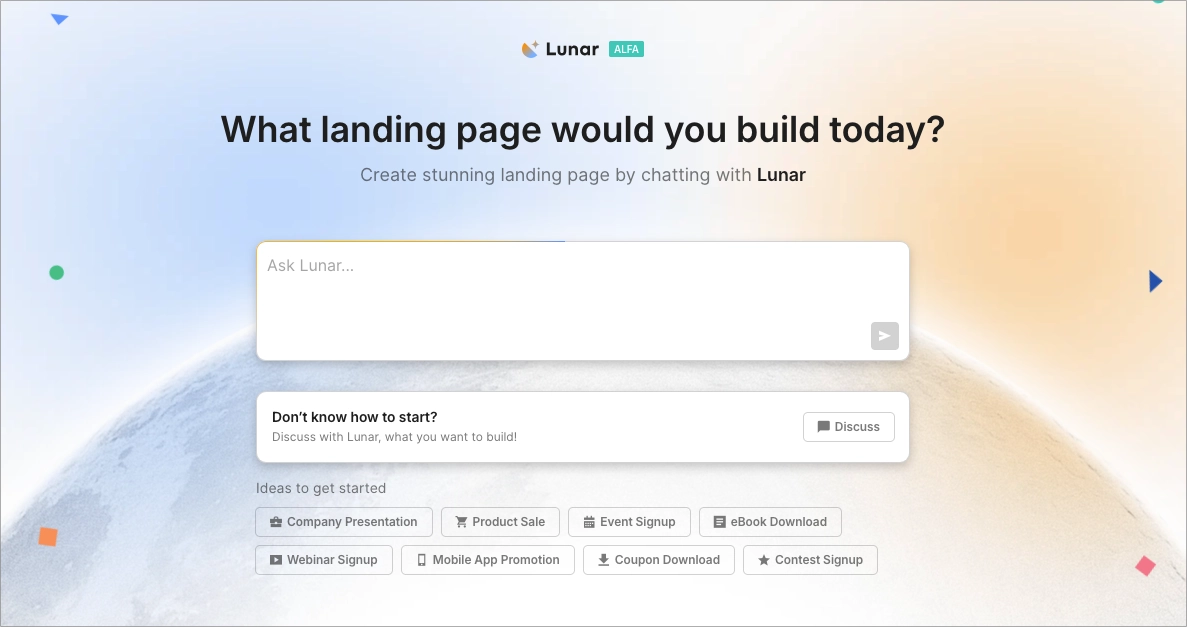
Lunar takes the other route. Launched across current plans in April 2026, it builds a complete draft from a conversation, including structure, copy, layout, visuals and form fields. The page is not assembled only from stock template blocks. You can revise it in chat, edit elements manually without spending credits, upload references and inspect the plan before generation. In August, Lunar began storing each new page’s visual rules in a DESIGN.md file and accepting screenshots that point directly at what needs changing.
“Landingi works like Photoshop, and I can place elements anywhere by pixel.”Filip K., project manager, G2 review surfaced January 2026
Smart Sections
Change one shared header, price strip or disclaimer and push the edit to every page using it. The humble feature with the biggest agency payoff.
EventTracker
Automatically records clicks, scroll depth, form activity and errors. Event and scroll maps put the behavior back on the page.
Solis
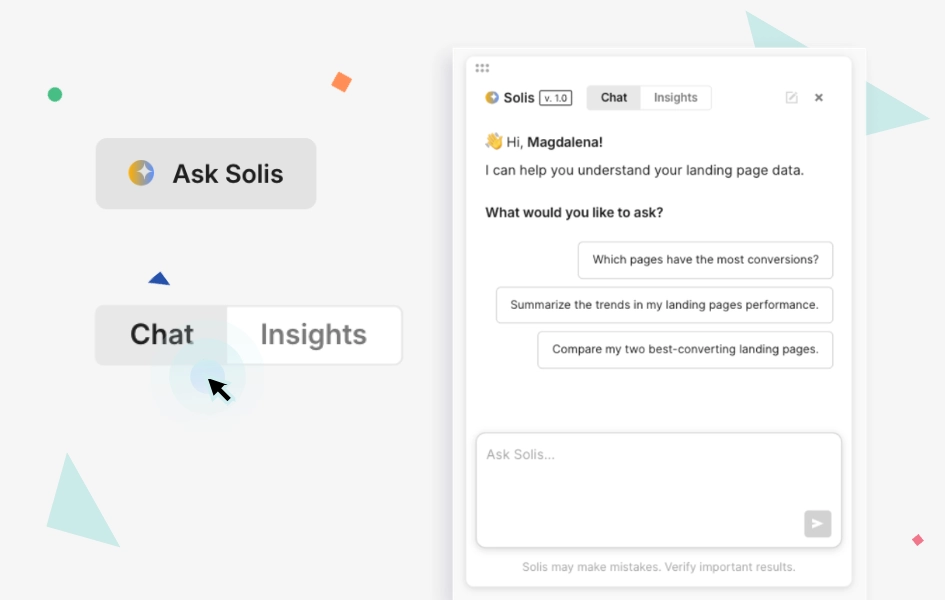
Reads EventTracker data and page context, then produces alerts and suggestions. Useful as a prompt for inquiry, not an oracle.
Programmatic pages
One layout plus CSV, API or Google Sheets data becomes a batch of targeted pages for locations, products or audience segments.
The page is only half the job
Landingi’s better idea is to connect creation with observation. EventTracker begins collecting interactions after publication without asking you to tag every button. Teams can define a conversion as one event or, since August 2026, combine existing events with AND/OR logic. That makes room for a more adult question than “did the form submit?” Did the visitor read pricing and open the FAQ? Did either of two calls to action work?
Solis then uses those behavioral records to flag oddities and suggest experiments. It moved from alpha in January to beta in April 2026. Treat the recommendations as a sharp junior analyst’s notes. They reduce the blank-page problem in optimization, but the person who knows the offer still has to decide what is worth testing.
Brief
offer + audience
Build
Lunar or Classic
Watch
events + tests
Change
sections + variants
Price the audience, not the editor
The public pricing ladder looks simple when billed annually: Build at $24 a month, Optimize at $119, Scale from $229 and Enterprise from $1,199. The consequential numbers sit beside the price. Build allows 10 active pages and 2,000 monthly visits. Optimize raises that to 100 pages and 30,000 visits. Scale offers unlimited active pages with traffic configurations from 100,000 to 500,000. Enterprise starts at one million visits.
A 14-day trial is available, with a 200-visit trial limit. Build includes Lunar, the Classic Builder, forms, integrations and basic analytics, but not the optimization package most performance teams will expect. A/B testing, EventTracker, Smart Sections, multilingual personalization and Solis begin at Optimize. Programmatic Landing Pages and agency-oriented controls arrive with Scale.
| Plan | Annual rate | Traffic / pages | Best fit |
|---|---|---|---|
| Build | $24/mo | 2,000 visits 10 active pages | One small business, a few focused campaigns |
| Optimize | $119/mo | 30,000 visits 100 active pages | Performance marketers who test and measure |
| Scale | from $229/mo | 100k-500k visits Unlimited pages | Agencies, markets and programmatic production |
| Enterprise | from $1,199/mo | 1M+ visits Unlimited pages | High-volume teams needing governance and support |
A viral campaign is a lovely problem until it forces a plan change. Forecast paid clicks, organic spillover, domains, active variants and AI credits before choosing by sticker price. Annual prices can also vary with configuration.
What customers keep saying
The review pattern is unusually consistent. G2 showed a 4.5 out of 5 rating across 387 reviews in 2026, with ease of use, setup and support prominent among the positive themes. Agency users like the design freedom and repeatable sections. A 2025 reviewer described escaping the wait for developers and launching tests independently. On Reddit, users mention fair pricing, duplication, A/B testing and programmatic pages when recommending it for PPC work.
The complaints are concrete too. Forms can feel limited for advanced needs. Some reviewers want deeper native analytics or more integrations. Pixel placement creates extra responsive work. Visitor caps may turn a successful campaign into an awkward billing conversation. Support feedback is mostly positive but not unanimous, especially for complex questions. This is useful criticism because it tells you exactly what to test during the trial.
Landingi or the other tab?
Unbounce and Instapage remain obvious specialist comparisons. Leadpages favors a more guided experience. Webflow offers broader site-building power with a steeper production system to manage. Elementor makes sense when WordPress is already home. Carrd is hard to beat for a tiny, inexpensive one-pager. Landingi sits in a specific middle: more campaign operations than a simple builder, less general-purpose ambition than a full website platform.
| If you care most about... | Start your shortlist with... | Reason |
|---|---|---|
| Many localized campaign pages | Landingi | Programmatic generation, Smart Sections and subaccount workflows |
| A full marketing website | Webflow / WordPress | Broader CMS and site architecture |
| A cheap, elegant one-pager | Carrd | Small surface area and low cost |
| Pixel-level campaign design | Landingi / Instapage | Free positioning and specialist conversion workflows |
| Automatic responsive layout | A grid-led builder | Less manual mobile rearranging |
The verdict
Buy Landingi for operational independence. The winning case is a marketing team with recurring paid campaigns, repeated page furniture, multiple audiences and a habit of learning from live behavior. Optimize is the realistic starting point for serious conversion work. Scale earns its name when spreadsheets, markets or client accounts enter the picture.
Skip it when you need one static page, expect the builder to solve responsive design unattended, or cannot predict traffic well enough to live comfortably with caps. The product is at its best when a page is not a one-off asset but a small, measurable product with an owner.
A sensible 14-day trial plan
Do not spend the trial admiring templates. Rebuild one real campaign, connect the domain and lead destination, then inspect it on two phones. Create a second variant, define a conversion goal and watch EventTracker collect actual interactions. Turn a repeated section into a Smart Section. If scale is the reason you came, generate a small batch from clean sample data. Finally, invite the person who will inherit the work. Their confusion is part of the evaluation.
You should leave the trial knowing the minutes from brief to publish, the amount of mobile cleanup, whether forms meet your needs, and which monthly traffic band is honest. That is a better buying memo than any feature checklist.