The trouble with a broken meeting room is that it waits for an audience. A cable fails, a display loses its nerve, someone says “can you see my screen?” and six salaries begin paying for the diagnosis. At HP, the old defense included a decidedly physical ritual: contractors went into rooms each week to test the equipment. The system caught faults, but only on its own schedule. Between visits, a meeting could still become the alarm bell.
- HP Workforce Experience Platform, or WXP, gives commercial IT teams one view of devices, applications, printers, collaboration spaces and employee feedback.
- HP tested the proposition on itself: more than 80,000 devices and, in one program, over 1,800 meeting rooms at 119 sites.
- The bet is simple: find patterns early, fix what can be fixed remotely, and spend less of the workday asking employees to report failures.
The meeting-room story is useful because it contains an actual before and after. HP first piloted live room monitoring with a team in Costa Rica, using Poly Lens and Zoom Device Manager. When a room went offline, the team saw an alert. The idea was almost embarrassingly plain: let the building tell IT that something had gone wrong. HP later folded deeper collaboration analytics into WXP after buying Vyopta in 2024. The platform could then show more than whether a room was alive; it could help identify the failing part of the experience.
“We quickly realized we could do things proactively.”Kshitij Joshi, HP command center operations
HP says its internal team expanded from monitoring roughly 500 rooms to more than 1,800. Its published account puts average room uptime at 95%, says about 98% of issues are now identified proactively, and says 95% are remediated proactively and remotely. Those are HP’s own numbers from its own deployment, not a promise for every customer. Still, they describe a real operational change: a technician no longer has to visit a room merely to learn that a device needs a reboot.
Figures describe HP’s own collaboration program, published May 2026.

What the dashboard is really for
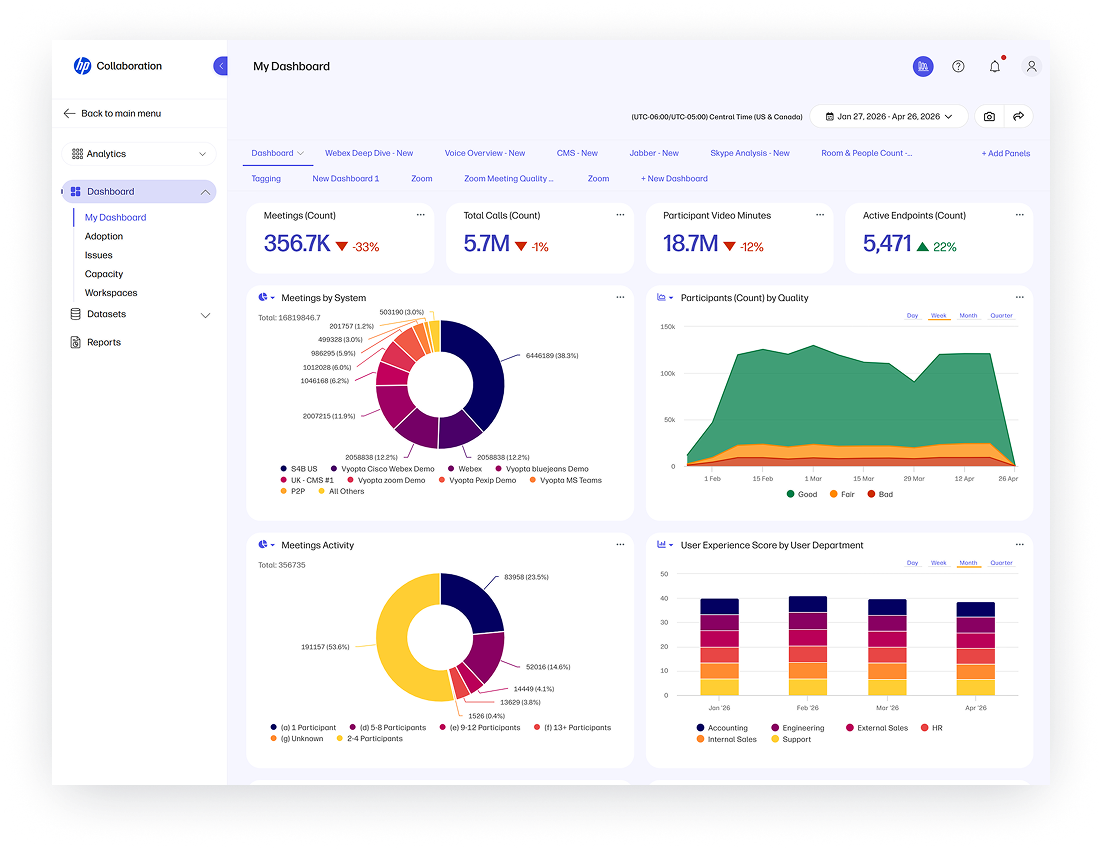
WXP is HP Inc.’s cloud software for the sprawling collection of technology that now counts as a workplace. It gathers device and application performance, system health and security signals. It can bring in employee sentiment surveys, too. IT staff get alerts, dashboards, diagnostics and automated remediation workflows. The point is not a prettier chart. It is the ability to see a battery trend before it becomes a dead laptop, a rash of application crashes before it becomes a department-wide complaint, or a printer problem before the queue forms.
The software has several faces. Fleet management helps teams monitor PCs and make refresh decisions; Fleet Explorer lets eligible subscribers ask questions of fleet data in natural language. Print tools bring multi-vendor devices into the console. WXP Collaboration adds meeting spaces and communications hardware. Remote Connect gives support staff a way into troubled machines, including an out-of-band option on qualifying Intel vPro hardware when the operating system will not start. That last distinction matters: a platform can promise remote recovery, but the machine’s firmware, network connection and license still have to cooperate.
There is a reason HP pushes beyond the laptop. A conference call fails as a single human experience, even when its cause lives in a headset, network path, room controller or PC. Traditional IT tools often divide these into separate territories. HP’s claim is that a joined view makes the cause easier to find. The platform is designed for mixed fleets, not only HP-branded machines, though individual features and data depth depend on the device, operating system, integration and subscription.
The customer is the person who gets blamed
The everyday user of WXP is an IT administrator, service desk lead or managed service provider. The beneficiary is supposed to be the employee who never has to describe a mysterious flicker to a help desk. HP’s own About Us page says its environment covers 5.2 million active devices for 3,600 customers and partners in 180 countries. One named partner, Datacom, uses WXP telemetry for fleet-health reporting in its Datacom Insights service. HP is also its own test customer, using WXP across a fleet of more than 80,000 devices.
That internal fleet supplied another unromantic example. In late 2024, as the end of Windows 10 support approached, HP found that only about a third of its 80,000-plus devices had moved to Windows 11. WXP’s readiness assessment let its team identify upgrade blockers, decide which machines needed replacement or repair, target employees with messages, and report progress. There is no theatrical AI reveal in this story. There is an inventory good enough to make a deadline manageable.
Start with a repeatable interruption, establish a baseline, then decide which signals would let IT intervene earlier. HP’s room team did that with live status alerts before expanding into richer analytics. A company can copy the sequence without copying the vendor.
The economics of knowing sooner
WXP is sold as commercial SaaS in tiers and terms, with optional add-ons. HP’s documentation names Starter, Standard, Pro and Elite, and describes WXP Pro Care Packs that attach access to eligible devices for fixed terms of three to five years. Partners can sell and manage the platform for clients. There is no single public sticker price that settles what a deployment costs: the answer depends on licenses, devices, extras and services. For a buyer, that makes a pilot’s avoided tickets, remote fixes and replacement decisions more persuasive than a general claim about productivity.
HP competes in digital employee experience with specialists such as Nexthink, 1E and Lakeside, and with the bundle of endpoint and service-management tools an enterprise already owns. Its particular advantage is breadth: HP can connect software with its PC, print, collaboration and support businesses. Breadth can also make procurement complicated. A team that needs only one narrow diagnostic may prefer a narrower tool; a team drowning in separate views may value the larger map.
The platform is still changing. HP began its broader global rollout in 2025. Its spring 2026 release added custom alerts, AI-assisted remediation and more remote-support options; the summer release added workflow improvements and benchmarking. HP also said it was named a Leader in the 2026 Gartner Magic Quadrant for DEX management tools. None of that tells us whether a particular office will have a good Tuesday. The meeting rooms make the test more concrete: when a room goes dark overnight, does someone find it before the morning meeting? That is a smaller claim than “transform work,” and a much better one.