A teacher glances at a wall of tiny laptop screens. One student has wandered onto a game. Another needs help but would rather not announce it to the room. Somewhere else in the school, a phrase typed into a chat looks troubling enough to deserve attention. classroom.cloud tries to turn all three moments into work that can be done - a nudge back to the lesson, a discreet reply, or a properly documented safeguarding review.
This is not an online course catalog and it is not a learning-management system wearing a brighter tie. classroom.cloud is the cloud-era classroom console built by NetSupport, a privately held British software company whose roots go back to 1989. The product itself was already in development before COVID-19. In 2020, NetSupport accelerated a limited pre-launch for schools and districts with the greatest need; a wider North American release followed in March 2021.
That origin matters. Remote learning created the emergency, but the durable problem was less dramatic: schools had accumulated devices, logins and specialist systems faster than they had accumulated time. Teachers needed to see and guide a class. IT teams needed to inventory and repair machines across buildings. Safeguarding leads needed to find a small number of serious signals inside a great deal of ordinary adolescent internet use.
Run the room
Broadcast. Chat. Survey. Reward. Lock. Redirect.
Read the signal
Phrase matches. Image analysis. Risk scores. Reports.
Keep it working
Inventory. Power. Policies. Scripts. Remote support.
One tab, three people with different headaches
For a teacher, the console is immediate. It can show live thumbnails of student screens, share the teacher's screen and audio, launch a site or application, restrict distracting websites, send a message, run a quick survey, award points, lock screens for attention and remotely help a student. A toolbar keeps lesson details visible and lets students ask for assistance without raising a hand.
For the technician, the same service behaves more like a light device-management layer. It records hardware and software inventory, meters application and internet use, manages power schedules, applies acceptable-use policies, runs scripts and supports remote control. The cloud architecture makes a school, a trust with several campuses and a student at home variations of the same administrative problem.
Then comes the most sensitive customer: the designated safeguarding lead. The safeguarding toolkit watches for words and phrases associated with subjects such as self-harm, bullying, exploitation, drugs and radicalisation. Its library has expanded from more than 14,000 phrases at launch in 2021 to more than 20,000 in 2026, across multiple languages and local slang. Schools can add their own terms. Newer features inspect potentially harmful images and activity involving AI tools including ChatGPT, Copilot, Gemini, Claude and Perplexity.
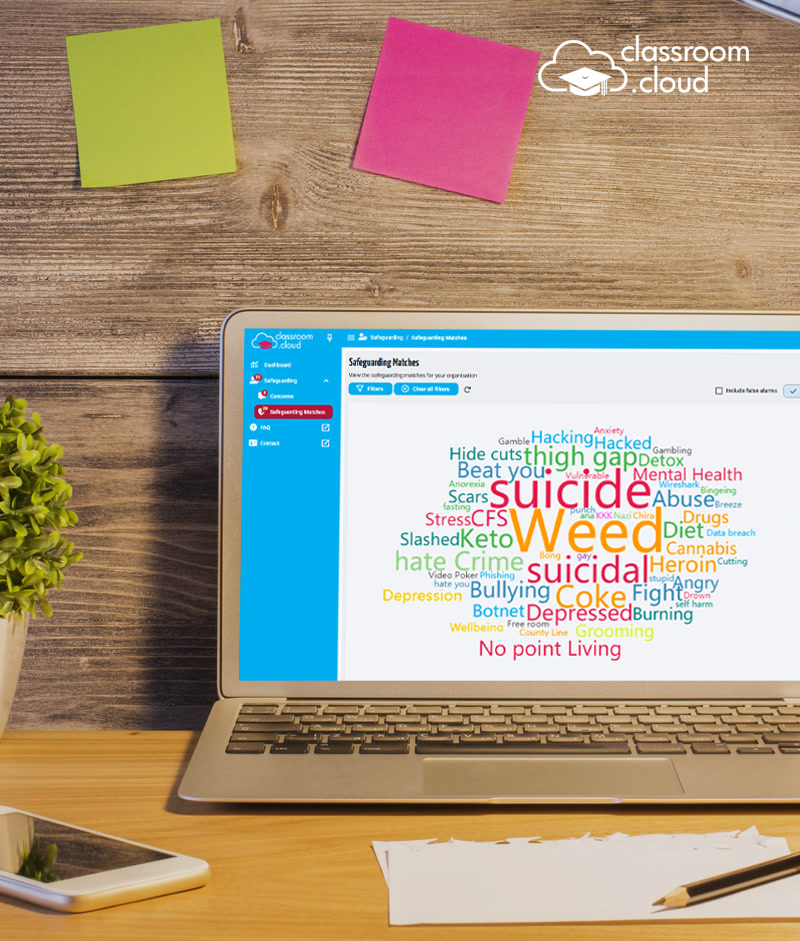
The important distinction is between capture and judgement. A typed word alone can be a joke, a quotation, homework or a cry for help. classroom.cloud's Risk Index considers context including the phrase, device, time, site, application and previous activity. Lower-priority events may leave a text log; higher-priority events can add a screenshot or screen recording. Role controls and an audit log record who reviewed, reassigned or changed an alert.
From noise to a decision
In 2026 the company acknowledged the obvious operational bottleneck: even a well-ranked alert queue needs qualified eyes. Its optional UK Assisted Monitoring service gives specialists at the South West Grid for Learning access to review alerts, label false positives or concerns, and phone and email a school when something appears to require immediate attention. It is a rare case of a software feature whose point is to admit that software is not the final actor.
“We've seen a shift in proactivity now that we can spot themes more easily.”Nova Education TrustThe buyer
The sale begins where the timetable already lives
School software can have excellent features and still die during roster import. classroom.cloud's less glamorous advantage is its set of handoffs. It pulls classes from Google Classroom, Microsoft School Data Sync, Microsoft Teams and ClassLink; in the United States, Clever adds Secure Sync and single sign-on. Safeguarding events can move into CPOMS or Tes MyConcern, where pastoral teams already manage cases. The product does not ask a school to pretend its existing systems vanished.
That makes its market position clearer. Google Classroom and Teams organize lessons, communication and rosters. Dedicated competitors such as Senso, Impero, Securly, GoGuardian Teacher, Lightspeed Classroom Management, LanSchool Air and Hāpara cover various combinations of visibility, filtering, safety and control. classroom.cloud's wager is that a single, cross-platform subscription can satisfy three budgets and three departments well enough to beat a pile of specialist tools.
Nova Education Trust offers the cleanest public test. The 15-school trust, serving more than 10,200 pupils, installed classroom.cloud on more than 5,000 Windows and Chrome OS devices. It had experienced reliability problems and conflicts between similar software and security products. After evaluating Senso, Impero and Securly, Nova said classroom.cloud was the only option that met all its needs while delivering value and service. The trial support changed its confidence in the purchase.
The billCheap enough to trial, specific enough to budget
Direct pricing is now tailored by deployment, with discounts for volume and multi-year contracts. A current UK government G-Cloud listing supplies the useful public yardstick: £2.50 to £4.50 per device per year. The annual licence follows each managed student device rather than each teacher or student account. Authorised users are unlimited. A 30-day trial requires no credit card, and standard onboarding, training, support and product updates carry no implementation fee.
30 days: free trial, no card required.
£0 setup: onboarding and training included.
Quote-based: volume and multi-year discounts may apply.
The modest unit price is strategic, not charitable. A device-based model grows with a deployment, gives procurement a countable denominator and avoids charging again each time a new teacher needs access. The trade-off is equally clear: schools still have to install and enrol the student component, assign devices to groups, connect identity systems, define monitoring windows and train the people who receive alerts.
The first failuresThe bugs were boring. That is useful.
Product histories usually sand away the awkward bits. classroom.cloud publishes detailed release notes, and its January 2021 list preserves a better account of early reality. A time-zone conflict displayed some student machines as “Out of Hours.” A setting intended to let several teachers connect to the same Windows student did not work. Opening survey results while pupils were still responding could close the results window. Multiple websites sometimes failed to launch.
- ClockSome devices appeared outside approved hours because of a time-zone conflict.
- OwnershipThe simultaneous multiple-teacher connection setting failed on Windows students.
- AssessmentChecking a survey too early could make its result window disappear.
- LaunchWeb Control could prevent several requested sites from opening together.
Those faults were fixed. Later release notes show the same pattern continuing at a more mature scale: Teams monitoring throughput was refactored in 2025, while bugs involving stale channels, individual users and intermittent phrase matches were closed. A verified G2 reviewer described initial setup as the only hiccup; once through the manuals and inside the software, the experience improved.
This answers what changed minds more convincingly than a slogan. NetSupport did not discover a magical interface principle. It put the unfinished service in front of a small number of schools, accelerated access when remote learning made the need urgent, listened to technicians and teachers, and kept folding operational feedback into the product. The expansion from classroom control into safeguarding, integrations, image analysis, AI monitoring and finally assisted human review follows the work schools were actually doing.
What to borrowA copyable playbook, with conditions attached
Pilot where the pain is sharp
A limited cohort produced specific deployment lessons before the wide release.
Integrate before replacing
Roster, identity and safeguarding links reduce double entry and adoption friction.
Price the managed object
Per-device licensing maps the bill to a count schools can audit and plan.
Publish the unpretty fixes
A granular changelog tells technical buyers that ordinary failures will be handled.
There are hard conditions. The service needs reliable connectivity, installed student software or extensions, correctly assigned devices and compatible identity data. Some abilities vary by platform: for example, remote control is not supported on Chrome OS, and certain Teams image-analysis features require a 64-bit Windows student installation. CPOMS and MyConcern cannot both be authorised at the same time. Personally owned devices require monitoring that is proportionate, clearly communicated and governed by school policy.
Most important, alerting capacity must match the monitoring ambition. A school without trained staff, ownership rules or time to review events can turn a sophisticated signal engine into another red badge nobody opens. The platform can preserve context and route concern. It cannot conduct the pastoral conversation, assess a child's circumstances or make a safeguarding decision.
That sober division of labour explains classroom.cloud better than the cloud-shaped mortarboard in its logo. Its job is to make a sprawling digital school observable and operable without asking the teacher, technician and safeguarding lead to become the same person. The 2025 Bett judges praised its multilingual phrase matching, regional support resources and friendly interface. In other words, they rewarded localization and workflow - the useful, unspectacular things that decide whether school software survives Monday morning.
There is even a mascot named Bob on the dashboard. Administrators can turn him off. It may be the smallest product decision here, but it catches the company's method neatly: add a little charm, then give the school a control.