At Thermal Ribbons Australia, the labels had become a little business of their own. Staff changed quantities, dates and ribbon types by hand. A wrong part number could leave a customer with something its point-of-sale system could not recognize. The ribbon was perfectly good. Its introduction to the world was defective.
BarTender’s account of the fix contains a wonderfully unglamorous detail: roughly 100 label templates became one reusable core template, fed by a database. Conditional printing handled customer variations. The company bought a way to stop making the same decisions over and over. That is a useful place to begin understanding BarTender by Seagull.
- BarTender turns business data into labels, barcodes and RFID tags.
- Its useful trick is connecting design, approval and printing to the systems already running the business.
- Customers range from small producers to global manufacturers and retailers.
- With Track & Trace, the identifier can become the beginning of an item’s recorded journey.
01 A barcode is an introduction
A label is where an abstract record meets a physical object. A database says what a product is; the label tells another person or machine which object deserves that description. Lose the connection and an otherwise orderly business can ship confusion with remarkable efficiency.
Seagull began in 1985. Founder Jeremy Seigel, an electrical engineer who had worked at Intel, wrote its early code and packed its early boxes, according to his company-sourced biography. A historical brochure says his first barcode product began with a friend who needed something built. It is an origin story with an unusually sensible customer acquisition strategy: somebody already had a problem.
In that brochure, Seigel argued that easy integration with the software running a customer’s operations mattered enormously to a labeling project. The observation still explains the business. A lovely layout is pleasant. A layout that receives the correct order, lot number and destination without a transcription marathon is useful.
02 Design it. Govern it. Print it.
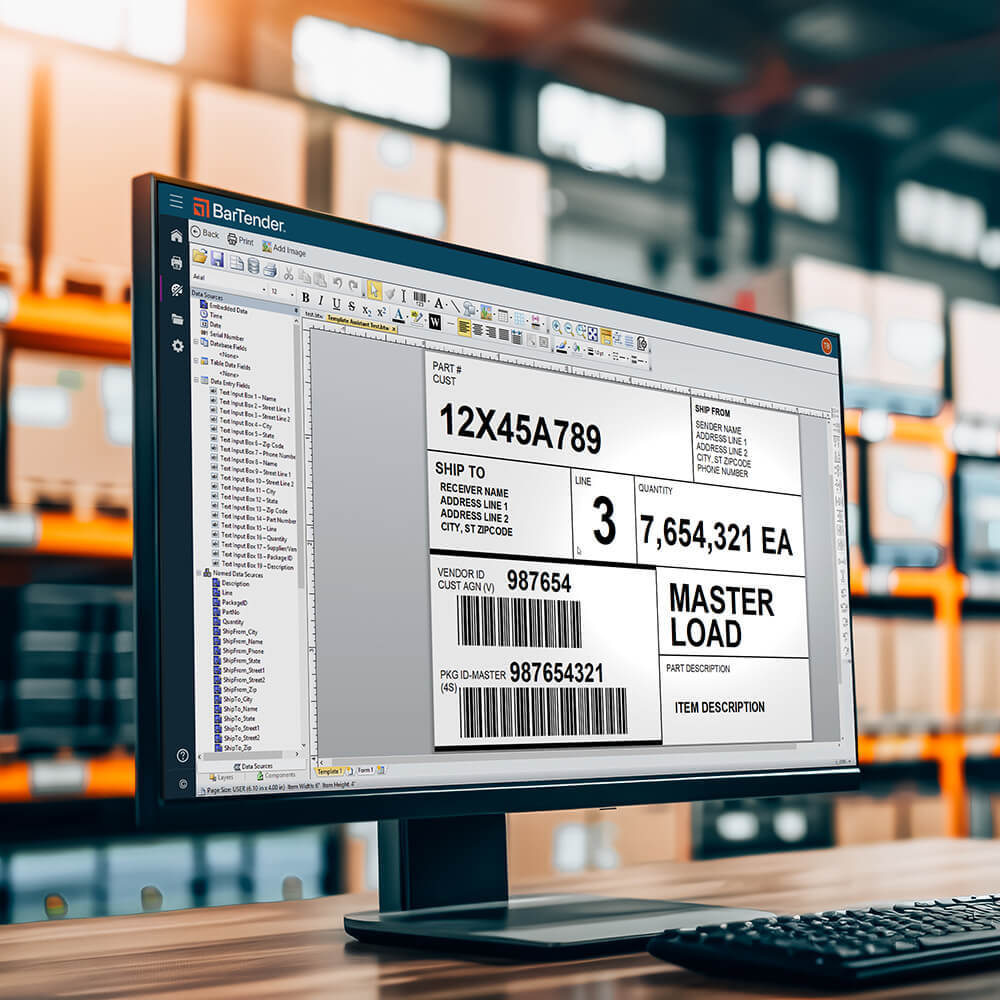
BarTender makes label design and printing software, plus the surrounding tools for automation and control. The designer handles text, graphics, barcodes and RFID information. Database connections bring variable information into a template. Integration tools let a business event trigger the print job. Higher editions add permissions, audit trails and centralized administration.
These are different jobs. Designing a label determines its appearance. Governing it determines which version may be used and who may change it. Printing it determines how an approved document and the right data reach a particular machine. Treating all three as one click conceals most of the work.
- 01Business dataOrder · product · lot
- 02Approved templateLayout · rules · version
- 03Print jobPrinter · quantity · output
- 04Item recordIdentity · scans · history
The final step uses tracking capabilities; a printed label alone does not record an item’s movements.
The customer list crosses industries because product identity crosses industries. The website displays Walmart, Sysco, H&M, Exxon, DHL, BASF and Amazon logos. Its detailed stories include smaller businesses with less famous names and very recognizable headaches. A buyer should care more about the resemblance of the workflow than the glamour of the logo.
03 Tea, with fewer spreadsheets
Madura Tea’s old workflow involved competing spreadsheets, manual date corrections and a warehouse system from the 1990s. Its modernization connected NetSuite, Cloud WMS and BarTender Cloud through implementation partner Cloud Coders. Orders selected templates; staff scanned incoming pallets and printed at the point of work.
Annual efficiency savings reported in BarTender’s customer case study for the combined systems implementation. The dollar currency is unspecified.
The case study also reports that reporting cycles fell from two weeks to minutes. Those gains belong to the connected system as a whole. The copyable idea is to remove the handoff where somebody retypes information already held elsewhere.

Thermal Ribbons Australia found a related advantage: a database-fed template could accommodate customization without rebuilding each label. The elegant part is the reduction in opportunities to improvise. Routine work becomes easier when the correct choice is already carried in the data.
04 Sometimes the bottleneck is a server
An unnamed pulp and paper manufacturer had a different complaint: shipping labels printed slowly or late. Its setup relied on several indirect SFTP CSV integrations and one unreliable server. Faster fingers would have been a rather insulting remedy.
BarTender’s Professional Services team redesigned the integration to its manufacturing execution system and deployed the software across three Amazon Web Services servers. Jobs were assigned according to server health and rerouted when a server was unresponsive. Document management was simplified through Librarian. The published account reports faster printing and improved reliability.
This is why the company also sells implementation, training and workflow services. The thing that fails first may be an integration or a machine, rather than the label editor. Identifying that dependency determines whether a new template, a new process or a different architecture will help.
A printer cannot adjudicate a quarrel between two spreadsheets.
An editorial observation
05 The price of fewer repeated decisions
Published annual starting prices run from $199 for on-premises Starter to $299 for Professional and $575 for Automation. Cloud Essentials starts at $390; Cloud Automation at $1,750. Enterprise editions require a quote. These are entry prices checked in September 2026, rather than budgets for an entire factory deployment.
On-premises licensing includes per-printer and single-workstation options. Services, hardware, integration and support choices also belong in a buyer’s calculation. Annual agreements make the software a continuing operating expense. The sensible comparison is the cost of a working process against the existing cost of errors, delays and maintenance.
Run the Windows software in your own environment. Your team manages the supporting infrastructure.
The distinction has teeth. BarTender’s on-premises suite is Windows software. Cloud offers browser-based work, but local printers may still require its Print Gateway unless supported direct cloud printing applies. Hybrid labeling connects centralized cloud coordination to local printing. Deployment is a choice about responsibilities and dependencies.
06 After the label leaves the printer
A Peak Rock Capital affiliate acquired Seagull in December 2022. In October 2024, Seagull announced its combination with Mojix, following a September partnership. Mojix brought item-level visibility technology. The strategic logic is straightforward: BarTender could create an identity, while tracking software could record what happened to the identified item.

Today, BarTender Track & Trace offers counts, location history, movement records and item-finding tools. RFID handhelds can give audible and visual locating cues reminiscent of a Geiger counter. A box that once introduced itself at a scanner can now participate in a longer history.
In May 2026, the company announced integrated labeling and tracking that registers items as labels are printed. This reduces the separate administrative step between creating an identifier and recognizing it in the tracking system. It still depends on tagging, scanning and the surrounding operational setup; printing an identifier does not confer omniscience.
07 A crowded market, a concrete test
BarTender competes in label design and enterprise label management. Loftware’s NiceLabel offerings cover managed labeling workflows; TEKLYNX CODESOFT offers barcode and RFID label design. Automation and central control are shared market concerns. BarTender’s mix of printer support, deployment choices and integrated tracking gives buyers specific things to investigate.
The practical test is a real job: an approved template, actual business data and the printer model used on the floor. Then try a correction, a reprint and an interrupted connection. This is an editorial recommendation, drawn from the dependencies the customer cases expose. It is much more revealing than admiring a sample barcode.
Start by counting manual edits. Consolidate the templates that repeat the same logic. Decide which business system owns each field. Test the output where it will be scanned, and agree who approves changes. If the underlying record is wrong, automation can distribute the mistake more quickly. Better printing needs better inputs.
08 The next improvement is still a handoff
Recent releases keep addressing those awkward joins. August 2026 brought improved cloud-to-local template synchronization and an offline mode that can read cached files when activated. Track & Trace added bulk configuration tools and history. September’s Cloud Labeling update extended direct printing to supported TSC printers and added conditional behavior to operator forms.
There is a consistent ambition beneath these technical particulars: ask fewer people to reconstruct information that the business already knows. The label may be small, but the work assembled behind it is considerable. BarTender’s case is strongest when that work becomes repeatable enough for a warehouse to stop thinking about it.
Take it to the print floor
Explore the tools and watch the workflows in action.