InVideo AI suits the person staring at a blank content calendar, not the editor polishing frame 11,842 of a feature. Give it an idea, a script, a campaign brief, some references, or a bucket of footage and it can plan, write, find or generate media, narrate, score, subtitle, and assemble a video. The old promise was one prompt in, finished clip out. The 2026 product is more ambitious and, usefully, less magical: Agent Two behaves like a persistent production desk, while the new InVideo Editor puts its assistant's work on a timeline you can actually touch.
That combination is for YouTubers who need a weekly system, marketers adapting a campaign into six formats, small teams without a dedicated editor, and filmmakers who want help with storyboards, references, rough cuts, or missing shots. It is less convincing for someone making one precious 30-second film while learning through repeated generations. InVideo charges the machine work in credits. Curiosity has a meter.
Who gets their Friday back?
The sweet spot is repetitive complexity. A creator can turn research into a script, choose a voice, pull stock, add captions, and cut a landscape story into vertical pieces without hopping across five subscriptions. A performance marketer can start with a key visual, generate variations, localize copy and currency, and reframe the work for another feed. A small film crew can keep a character sheet, location rules, and visual references attached to the project rather than re-explaining the world every morning.
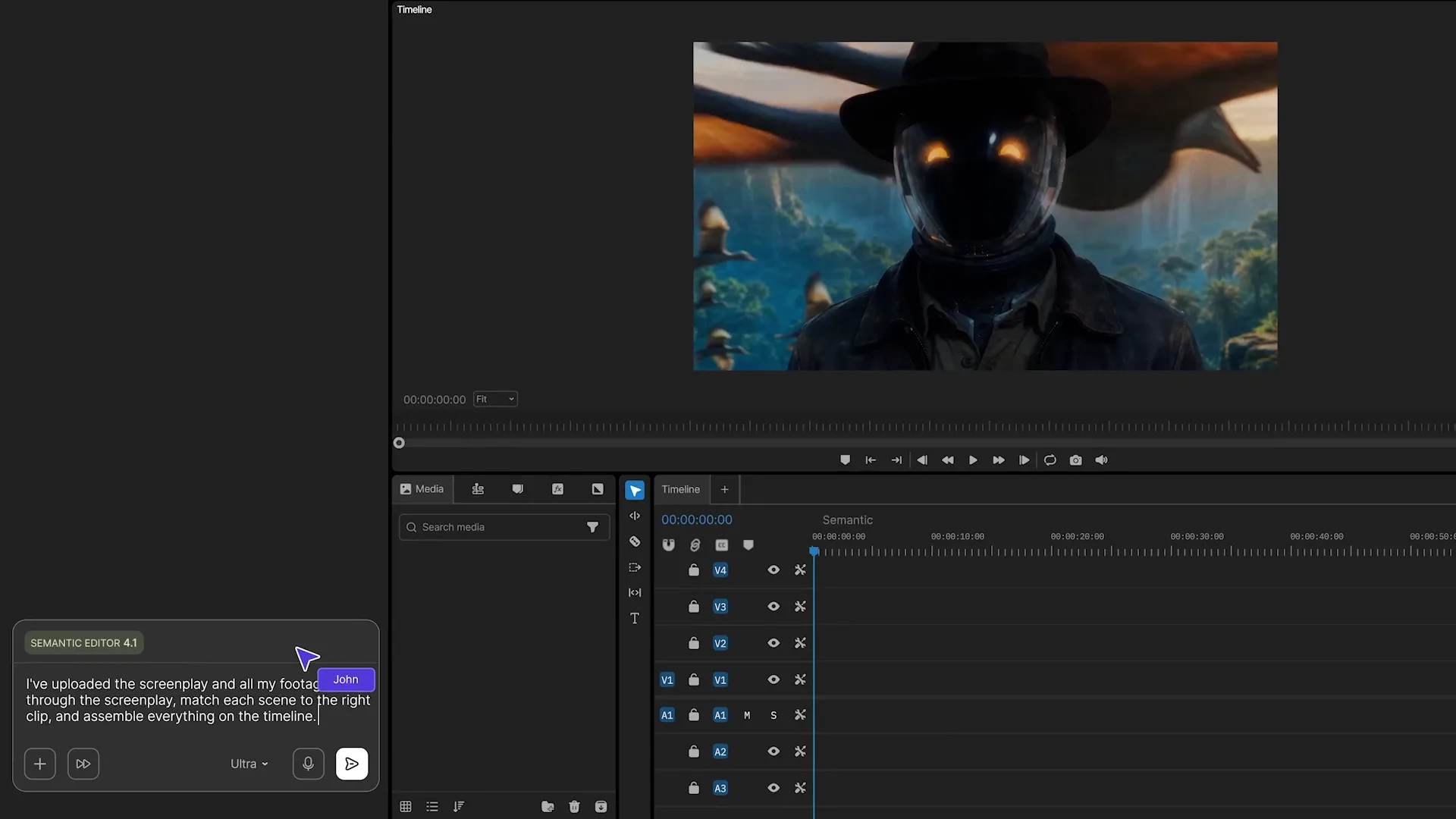
If your job begins with “we need ten versions,” InVideo's orchestration is the point. If your job ends with “this eyebrow must move two pixels,” keep the finishing software close. The September 2026 editor narrows that gap with keyframes, color tools, audio mixing, version control, multicam help, semantic footage search, and a normal multitrack timeline. Still, a browser editor and a mature desktop post-production suite carry different expectations. Test a difficult real project, including uploads and exports, before moving the team.
The first draft is the bargain. The fifth regeneration is where the invoice develops a personality.
The clever bit is memory
Video generators are good at producing a moment and famously slippery at remembering the last one. A coat changes color. A room sprouts a window. The hero returns with a different jaw. Agent Two attacks this with a hierarchy borrowed from production: a project has Context for the world, characters, tone, and visual rules; each scene, episode, or campaign film gets a Brief. References can carry instructions about what to copy and what to ignore.
Then come Expert Agents. You can assign roles such as cinematographer, storyboard artist, scriptwriter, or sound designer. They share status and project context, so the filmmaker is not reduced to carrying messages between chat windows. Guided Workflows turn common jobs into interviews: casting, production design, storyboarding, localization, campaign transfer, product-page video, key-visual variations, and reframing. The agent asks questions, presents choices, and saves the method for another run.
How the machine room is arranged
Underneath, InVideo is an air-traffic controller, not one secret cinematic brain. OpenAI described a 2025 system in which o3 planned, GPT-4.1 shaped narrative, search-augmented models researched, moderation models checked safety, gpt-image-1 made visual assets, and text-to-speech handled narration. InVideo now advertises access to more than 200 models, including Veo 3.1, Kling 3.0, Seedance 2.5, Nano Banana Pro, and ElevenLabs music. Its advantage is deciding which tool does which job and keeping the result inside one project.
What the credit page is trying to tell you
As of this review, annual billing lists Plus at $17 a month for 750 credits, Max at $85 for 3,900, Generative at $170 for 8,000, and Elite at $900 for 42,500. Paid tiers add larger storage, stock allowances, avatar and voice-clone counts, concurrency, and watermark-free exports. Unused credits do not roll over. Models cost different amounts. Top-ups exist. Prices can change.
| Choose this route | When it fits | Watch closely |
|---|---|---|
| Stock-first video | Explainers, list videos, regular social publishing | Footage relevance, repetition, factual captions |
| Generative video | Original scenes, impossible shots, stylized ads | Continuity, render time, credit cost per retry |
| Avatar or UGC | Product demos, localized presenters, ad variants | Disclosure, lip sync, voice rights, uncanny delivery |
| Agentic editor | Raw footage, multicam, first cuts, B-roll search | Upload workflow, browser performance, final polish |
Independent reviews split at the precise seam you would expect. Testers praise the conversational interface, stock selection, and speed to a usable draft. Complaints on Reddit, G2, Trustpilot, and the app stores repeatedly circle credit visibility, expensive retries, inconsistent scene choices, and support disputes. Those reports do not prove every job will be costly. They do establish the question to ask before subscribing: how many acceptable minutes does this exact workflow produce, including mistakes?
“Very quick and simple to use.”App Store reviewer, praising the workflow and stock selection
“75 credits gone without producing one usable 30-second video.”Reddit reviewer describing failed retries
The five-move test drive
- Bring a real brief. Include audience, platform, duration, claim hierarchy, visual references, forbidden choices, and a script if you have one. A vague prompt invites expensive interpretation.
- Lock the paper version. Approve the treatment, script, character sheet, and storyboard before asking pixels to move. Words are cheap to revise.
- Generate a short proof. Test one representative scene, one voice, and one transition. Note the credits before and after.
- Separate salvage from retry. A dull clip may need trimming, stock, or a cutaway rather than another full generation. Use the timeline.
- Publish nowhere unattended. Check names, numbers, logos, hands, lip sync, music rights, disclosures, captions, and the last frame. Automation has no embarrassment reflex.
Buy it for a system
Recurring channels, campaign variants, localization, branded templates, and teams sharing context give the platform room to earn its keep.
Pause for a one-off
If you need one hero film and expect many aesthetic experiments, compare the projected credit spend with a specialist tool or human editor first.
How it stacks up
VEED and CapCut are natural comparisons for fast social editing. Filmora offers a more conventional editor at a lower entry price. Pictory and Fliki court script-to-stock and faceless-video workflows. HeyGen and Synthesia lean harder into presenters and avatar-led business video. Runway and Adobe Firefly appeal when shot generation and creative control matter more than an all-in-one publishing pipeline. Canva wins when video is one tile inside a larger brand-design system.
InVideo's bet is breadth with memory: one conversation spanning research, script, references, generated shots, stock, narration, music, collaboration, localization, and edit. That breadth is convenient and occasionally overwhelming. The homepage now speaks to “serious creatives,” a long walk from the template library that founded the company in 2017 and the faceless-video wave that powered its 2023 AI relaunch.

A comeback disguised as a product
The backstory makes the current obsession with agents easier to understand. InVideo's browser editor had millions of users, yet growth plateaued around 2021. CEO Sanket Shah told Moneycontrol the company was near the edge before the separate AI product launched around August 2023. Revenue then climbed from a reported $20 million ARR in 2023 to $55 million in early 2024 and $70 million in 2025. OpenAI said the platform served more than 50 million users by July 2025.
In 2026, the company shifted its language again. Agent Two introduced long-term context, multi-input understanding, specialist crews, notebooks, shared work, stock, and structured workflows. InVideo Editor arrived on September 1 with an AI assistant that can watch footage, find moments by action or emotion, sync cameras, remove flubs, insert B-roll, and hand every choice back as an ordinary editable clip. In August, the company also announced a SOC 2 Type II attestation across all five Trust Services Criteria and said its production infrastructure runs on AWS.
The verdict is pleasantly conditional. InVideo AI can remove a substantial amount of blank-page and first-cut labor. Its defining features are not the fireworks; they are memory, routing, and keeping generated work editable. But a subscription is only cheap when you understand its meter. Arrive with decisions. Prototype the dangerous scene. Use stock when stock will do. Save regeneration for the shot that deserves it. The software can assemble a crew in seconds. You still have to direct.
Keep rolling
Official website · Current pricing · Product news · Help center · LinkedIn · X · Instagram · YouTube
Further reading: OpenAI's architecture case study, TechCrunch on the v3 launch, and TechRadar's 2026 hands-on review.