The download is free. The second thoughts are included. Open a photograph in GIMP, adjust its colors, remove a distraction or assemble an improbable scene, and there is no subscription to renew before trying again. For a student making a poster or a designer watching expenses, that remains a useful proposition. Yet the interesting question about GIMP is what happens on the other side of the download button.
There, the familiar software-company furniture is largely absent. GIMP is a community project built by contributors around the world. Some volunteer around other jobs; some seek financial support for their development work. Its full name, GNU Image Manipulation Program, describes an application that handles retouching, image composition, painting and programmable image processing. Its staying power comes from people repeatedly deciding that this work deserves another evening, another patch or another donation.
The bill behind the download
GIMP occupies the broad middle of digital image work: more involved than cropping a phone picture, accessible without buying a commercial creative suite. Photographers can correct and combine photographs. Illustrators can draw. Designers can prepare graphics, icons and interface artwork. Scientists can use its image tools and scripting capabilities. Those are different jobs, connected by the need to manipulate pixels with some precision.
The official software carries a $0 download price. Learning it, maintaining a working setup and checking output still take time. A school considering it for a classroom or a freelancer considering it for client work should count those hours. Free access removes a purchasing decision; it does not teach layer masks. The public manual and tutorials are therefore part of the practical product, even though neither arrives with a sales representative.
Official download. No recurring license bill.
Your time and the project’s labor still count.
Two students, one troublesome toolkit
GIMP began with Berkeley students Spencer Kimball and Peter Mattis. Archived messages place its announcement in November 1995, followed by version 0.54 in February 1996. The founders shipped something people could use, then learned what needed changing. One discovery came over Christmas break: Photoshop 3.0 introduced them to what Mattis called the “joy of layers.” Their next-release plans now required substantial changes.
Early trouble was less romantic. The project’s historical account describes frequent crashes and a dependency on the Motif interface toolkit that restricted distribution and discouraged would-be plug-in developers. Mattis wrote replacement tools, GTK and GDK. The transition itself was rough: older plug-ins became incompatible, features shifted, and the experimental version could be less useful than its predecessor. Repairing a foundation can briefly make a house harder to inhabit.
The episode offers a useful lesson for anyone building software. Ship enough for real people to expose the constraints. Then take the expensive constraint seriously. GIMP’s early obstacle was embedded in its architecture; another publicity campaign would not have removed it. Its users also supplied more than complaints. Tutorials, plug-ins and artwork grew around the application. Larry Ewing’s creation of the Linux penguin Tux in GIMP 0.54 supplied a particularly durable calling card.
Permission to change your mind
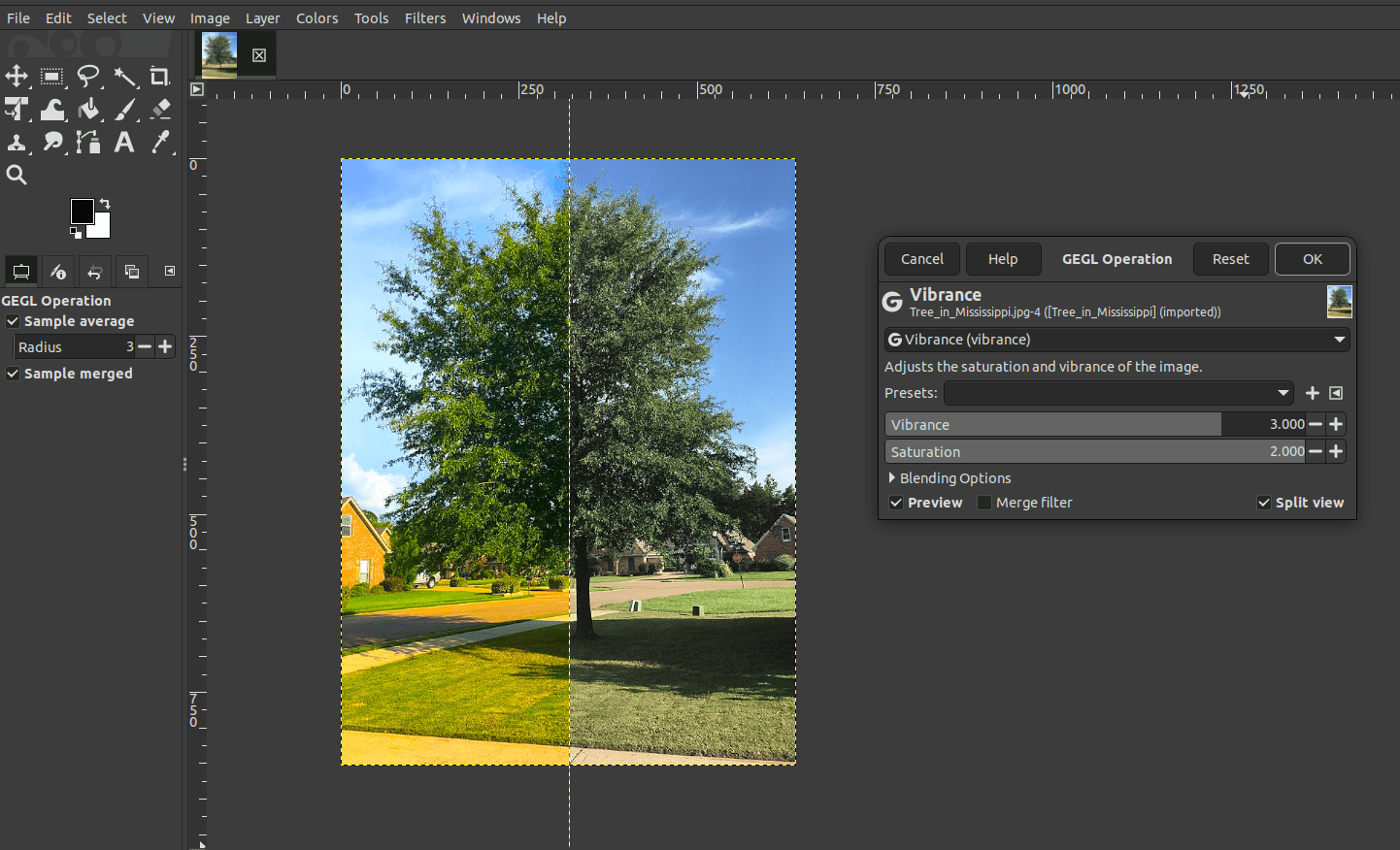
The same tension between useful features and underlying repairs shaped GIMP 3.0, released in March 2025. Its non-destructive filters gave users a less brittle way to work: effects could stay adjustable rather than being permanently applied to the layer. Change the strength, hide an effect or remove it. For anyone who has saved an enthusiastic color correction and regretted it later, the appeal requires little explanation.
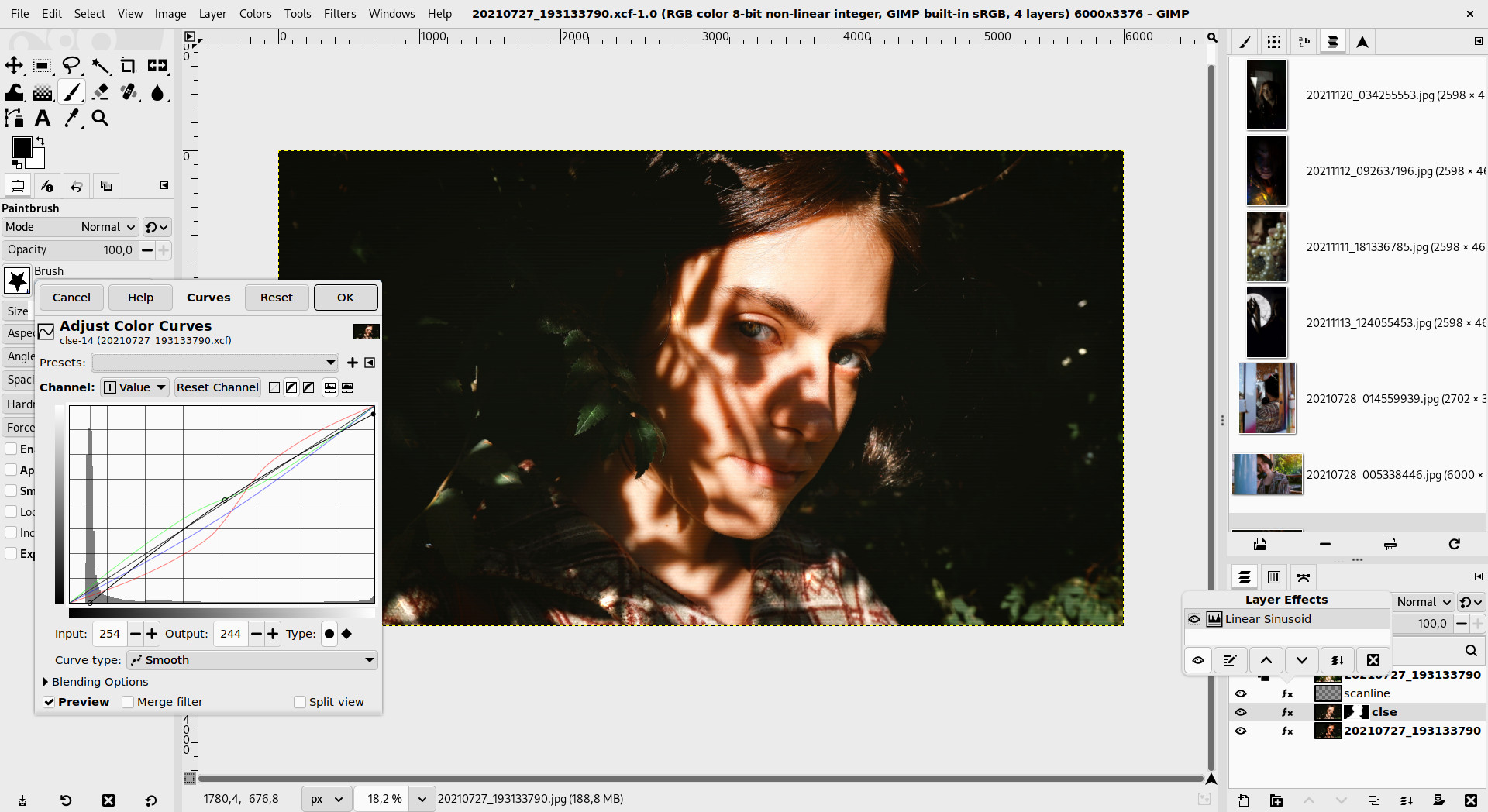
Version 3.2, released in March 2026, extended that approach. Link layers incorporate an external image and update when the source changes. Vector layers let the Path tool create shapes with adjustable fills and strokes. Imagine a composition whose source illustration is still being revised: linking it can spare the repeated ritual of importing the replacement and rebuilding the arrangement. The benefit is room for revision, a common requirement in creative work.
There are smaller pleasures in 3.2, too: updated MyPaint brush behavior, more brushes and improvements to on-canvas text editing. These changes address the repeated actions that occupy an actual session. A brush that responds properly to canvas rotation or a text editor that accepts familiar shortcuts may never sell a conference keynote. It can still save someone a succession of tiny irritations.
A marmot in the development budget
The money supporting GIMP follows several routes. GNOME Foundation acts as fiscal agent for project donations. GIMP also directs people to contributor fundraisers, including support for Øyvind Kolås’s work on GEGL, the image-processing core, and for ZeMarmot. Patreon and Liberapay help make recurring support possible. Users can obtain the application without participating, which leaves the project dependent on people choosing to contribute.
“Donating money is important: it makes GIMP sustainable.”GIMP’s donation page
ZeMarmot is the unusually revealing case. An open animation project led by artist and director Aryeom and developer Jehan, it uses GIMP in production while helping finance improvements to it. Drawing an animated film creates repeated encounters with brushes, selections, transformations and workflow friction. The person experiencing those problems works alongside someone able to alter the software. That makes the film a demanding customer, even without a conventional procurement department.
The relationship also keeps the discussion grounded. The project’s account describes work spanning stability, packaging, efficiency and broadly useful features, alongside artistic needs. Supporting a developer can therefore improve chores that would struggle to headline a fundraising pitch. A crashed application does not care whether its user is drawing a marmot or restoring a family photograph.
Other support arrives as equipment and infrastructure. The sponsors directory lists build and testing assistance from organizations including MacStadium, CircleCI and Arm, plus a worldwide network of download mirrors. Wacom’s 2026 contribution included two Art Pen 2 styli. These are concrete inputs: machines to build packages, bandwidth to deliver them, devices to test. A free application still needs a route onto someone else’s computer.
The team took the boat
For a glimpse of the working culture, consider Wilber Week 2023. Contributors gathered in Amsterdam after years without a team meeting. Their accommodation was a century-old sailing boat, which also became a place to work. Photographs show laptops spread across a wooden table under curved cabin beams. It looks like the sort of office where a discussion about image processing might pause for someone to move a cup.
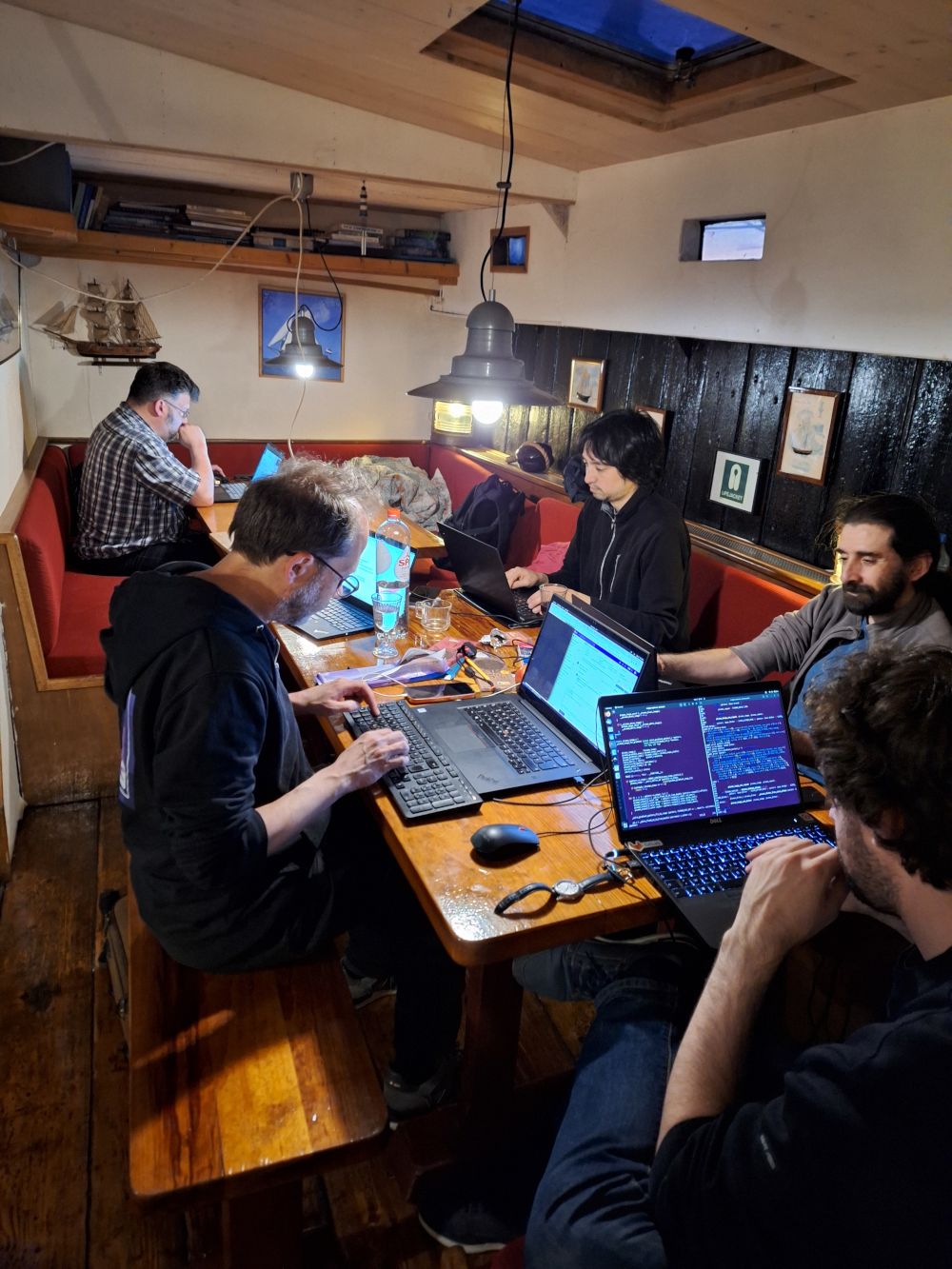
Inkscape contributors joined the gathering, and discussions at Blender’s headquarters included color management across graphics applications. Such conversations matter because a creative workflow rarely lives entirely in one program. They also show the practical value of people meeting. A distributed project can move code around the world daily and still benefit from a week in which colleagues share the same table.
Bring a real job, not a checklist
For a prospective user, the sensible trial is a real, modest assignment. Retouch a photograph, isolate an object, add text and export the result. Save the editable project in GIMP’s XCF format as well as the delivery image. Reopen it and make a revision. That exercise will reveal more about the fit than a list of tools whose names happen to match another application’s.
The alternatives have different centers of gravity. Adobe Photoshop is the familiar commercial comparison for compositing and image editing. Photopea offers editing in a browser. Krita puts painting and illustration at the center of its offering. GIMP’s distinction combines desktop image manipulation, extensibility and permission to inspect or modify the code. That matters especially when the desired workflow does not match a vendor’s assumptions.
It also has boundaries. For camera RAW processing, GIMP integrates with tools such as darktable and RawTherapee. Inkscape suits vector-first work; Scribus handles page layout. GIMP can be one component in that collection. Expecting any general image editor to replace every specialist tool invites unnecessary frustration.
Compatibility deserves an actual test. GIMP’s evolving PSD support should not be mistaken for a guarantee that every Photoshop document survives a round trip unchanged. Version 3.0’s revised API also broke compatibility with older plug-ins and scripts, requiring ports. For print work, distinguish CMYK import and export from a native CMYK editing workflow. If a client requires particular editable files, an old extension or a specific prepress process, verify those requirements before moving the job.
The work after the big release
GIMP’s developers wanted a shorter wait after 3.0: smaller feature releases delivered more often. Version 3.2 arrived just under a year later. That is a useful change in operating discipline. Users get a bounded set of improvements sooner, while other ideas can remain in development. A release becomes something the team can finish without first completing every ambition attached to the application.
The latest evidence is quieter. GIMP 3.2.6, released September 10, 2026, brought fixes, security updates, reworked macOS packaging and broader availability of its SDK for building extensions. The announcement credits 58 contributors to the codebase and reports 179 issues closed as fixed since 3.2.4. Those figures describe maintenance work, not a payroll. They are a reminder of how much activity sits behind an apparently simple update button.
For the reader, the arrangement offers an unusually direct choice. Download the editor, try a job, and keep the parts that work. If it becomes useful, contribute money, a reproducible bug report, a translation or a tutorial. The application remains free to obtain. Whether it keeps improving depends on what people are willing to put back.
Open it. Try it. Follow the work.
THE TOOL & THE PEOPLE
WATCH THE SOFTWARE AT WORK
GIMP 3.0: review & demonstrationsExplainingComputers · YouTube · interface, filters, text and PSDs ↗GIMP’s Wilber Week at Blender HQA conversation with the contributors · Blender video ↗