Buy the Framework Laptop 13 Pro if you are the person your family calls before buying a computer, the developer who would rather reinstall an operating system than accept a mystery driver, or the owner who sees a dead battery as a part order instead of a funeral. This is a premium 13.5-inch laptop built around a rare promise: years from now, the machine should still be yours to open, repair, rearrange, and upgrade.
That promise is familiar. Framework has pursued it since shipping the original Laptop 13 in 2021. The Pro is what happens when the company takes seven generations of feedback and works on the less romantic details: a flexing deck, merely adequate touchpad, and battery life that made repairability feel like a principled compromise. The result is recognizably Framework, but denser, quieter, brighter, and more assured.
It also arrives during a rotten time to buy memory. Intel models use removable LPCAMM2, an efficient, high-bandwidth format that preserves the right to replace RAM. In July 2026, Framework said its supplier cost had more than doubled. New 32GB and 64GB options shot to prices that can turn a sensible configuration into a luxury purchase. This guide is therefore about two things: whether the machine is good, and how to avoid buying it badly.
Who is this actually for?
The natural customer is a Linux developer who wants MacBook-like cohesion without Apple's sealed hardware or macOS. Ubuntu is certified and can arrive pre-installed. Framework funds or seeds hardware to communities working on Fedora, Bazzite, NixOS, CachyOS, and others. Shortly after launch, the company said Ubuntu pre-built configurations were outselling Windows versions, even without counting DIY buyers who chose no operating system. That is a niche speaking in a very loud indoor voice.
Existing Framework 13 owners may have the strongest case. The new CNC enclosure accepts every earlier Laptop 13 mainboard. Many Pro parts, including the display and new mainboard, can move into an older system, subject to companion-part requirements. An owner can buy the brighter screen now, the larger battery later, and skip a processor generation entirely. The cheapest Framework Laptop 13 Pro may be the Framework already on your desk.
The polish was the product
The graphite chassis is machined from 6063 aluminum across the top, input, and bottom covers. At 15.85mm thick and 1.4kg, it stays firmly in ultraportable territory. More important than the metallurgy is the ordinary pleasure of a computer that does not bend when you type. PC Gamer called the chassis, keyboard, and touchpad meaningful improvements and found operation impressively quiet. A CachyOS team testing an engineering sample said its rigidity and finish felt closer to a MacBook Air than earlier Framework machines.
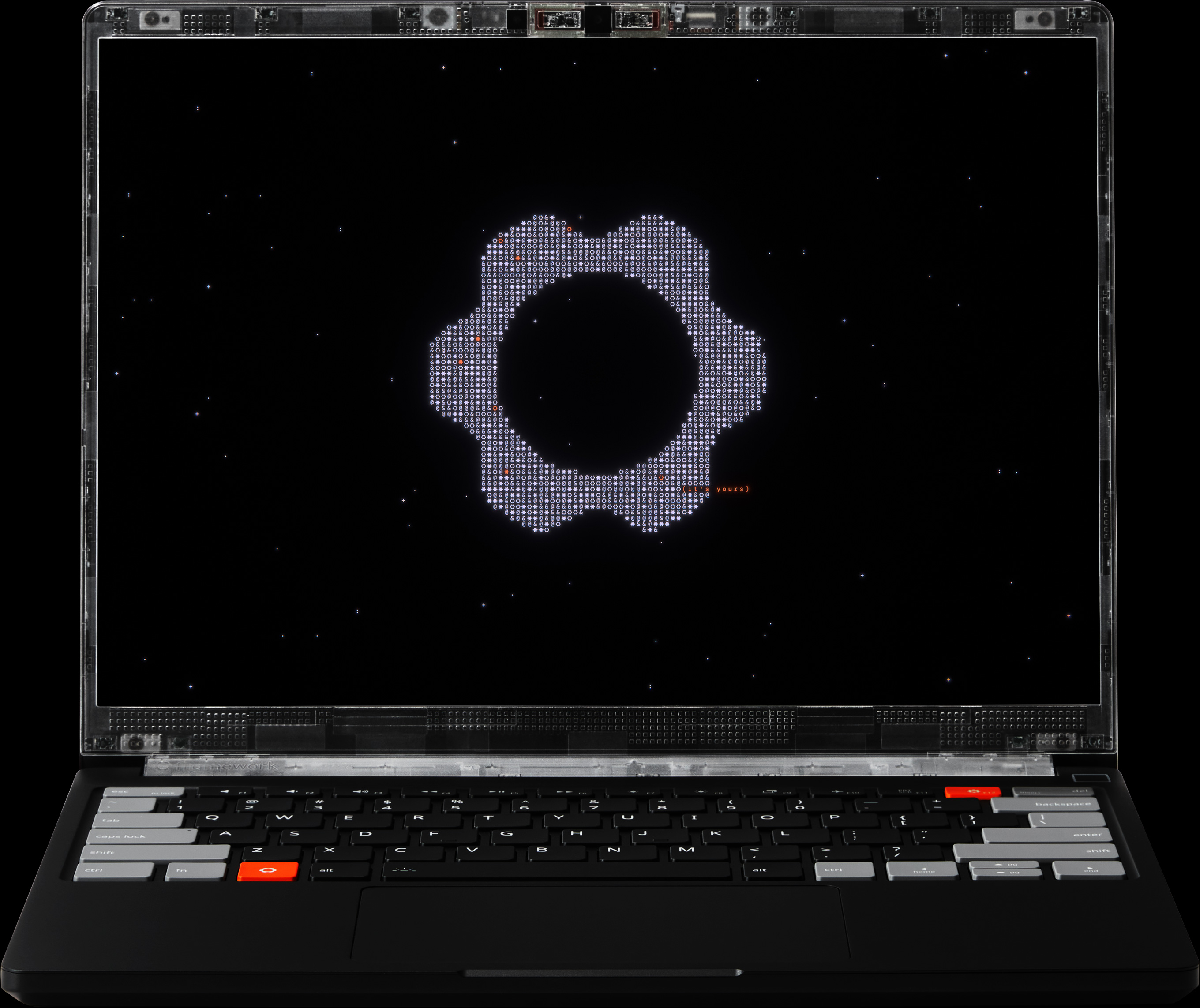
The 13.5-inch screen uses a 3:2 ratio, a friendly shape for terminals, documents, and web pages. Resolution is 2880 by 1920, refresh rate varies from 30 to 120Hz, and rated brightness reaches 700 nits beneath a matte surface. Touch is standard. It is a productive panel rather than a cinema flex: PC Gamer liked the brightness but noted visible ghosting and wished for a richer premium option. If OLED blacks matter more than vertical code space, see this screen before committing.
Below it sits a 123.7 by 76.7mm haptic touchpad driven by four piezo actuators. The click works across the whole surface and its feedback is tunable. The keyboard keeps 1.5mm of travel and gains a stiffer aluminum frame. These sound like housekeeping changes, which is precisely why they matter. Owners touch the keyboard and pad thousands of times before they replace a mainboard once.
“It finally feels like a genuinely premium Framework.”CachyOS team, after a month with an engineering sample
Battery claims meet real desks
Framework's headline is 20 hours of 4K Netflix playback. The fine print matters: Windows 11 in Best Power Efficiency mode, a 60Hz screen, 250-nit brightness, 30 percent volume, Dolby Atmos off, and wireless on. The company also lists 17 hours for active web use and 11 for video conferencing. These are controlled scenarios, not a guarantee that Docker, Slack, a dozen browser tabs, and a compile will politely sip power.
The official battery menu
The independent picture is still encouraging. Ars Technica recorded just over 11 hours from an AMD board paired with the 74Wh battery, compared with about 8.5 hours using the earlier 61Wh pack. A Platform Engineer on Reddit reported estimates of 15 to 16 hours indoors on Arch Linux, dropping to a little over seven hours while working outside on the bright screen. PC Gamer used Fedora through music, downloads, meetings, and writing for six hours and had consumed about half the battery. Different tests, same conclusion: this Framework can finally be treated as an all-day computer.
Performance without the sealed box
Intel choices span Core Ultra 5 325, Ultra X7 358H, and Ultra X9 388H. The X7 and X9 include Intel's Arc B390 integrated graphics, useful for GPU-accelerated creative work, moderate gaming, and small local models without a discrete GPU. PC Gamer found the B390 unusually capable for integrated graphics, though the compact thermal design does not let it run as freely as larger machines. This is not a gaming laptop, but it no longer needs to apologize when a game appears after work.
AMD Ryzen AI 7 350 and Ryzen AI 9 HX 370 configurations remain available in the Pro chassis. They use conventional replaceable DDR5 SO-DIMMs, support up to 96GB according to reviewed configurations, and may make more financial sense when LPCAMM2 pricing is hostile. Intel reaches up to 64GB of LPCAMM2 at 7467 MT/s and supports PCIe Gen 5 NVMe storage up to 8TB. The real choice is not red team versus blue team. It is Intel efficiency and graphics against AMD memory flexibility and current configuration cost.
| Choice | Why pick it | Watch before buying |
|---|---|---|
| Intel Core Ultra Series 3 | Strong efficiency, Arc B390 on X7/X9, Ubuntu certification, Thunderbolt-heavy workflows | LPCAMM2 pricing and capacity availability can change sharply |
| AMD Ryzen AI 300 | SO-DIMM memory, up to 96GB in listed configurations, potentially saner RAM economics | Battery and graphics behavior differ; compare the exact CPU |
| DIY Edition | Bring your own storage and OS, reuse parts, choose each module | Headline price excludes required components and four port cards |
| Pre-built | Ubuntu or Windows ready out of the box, less decision fatigue | Higher entry price and fewer opportunities to source parts elsewhere |
The four-port pocket trick
Most laptops decide your ports at a product meeting you did not attend. Framework gives you four recessed USB-C interfaces and lets Expansion Cards finish the job. Put USB-C and HDMI on the left, USB-A and microSD on the right. Swap Ethernet in at a desk. Carry a 1TB Storage Card as a separate boot volume. The modules are not free, and four slots can feel tight, but choosing location is delightful once a cable stops crossing your mouse hand.

Repair is equally plainspoken. Components carry QR codes that lead to guides, parts are sold through the Framework Marketplace, and the included screwdriver handles common jobs. Framework also publishes design files, documentation, and firmware work on GitHub. Repairability does not prevent accidents, eliminate shipping delays, or guarantee that every future part will exist. It does change the default response when something fails from “replace the laptop” to “price the part.”
The RAM bill and the ordering maze
At launch, Intel pricing began at $1,199 DIY and $1,499 pre-built. By late July, PCWorld reported a $1,599 Intel pre-built floor, while DIY still began at $1,199 before memory, storage, an OS, and Expansion Cards. It recorded LPCAMM2 prices of $239 for 16GB, $800 for 32GB, and $1,600 for 64GB. Framework said it could not absorb a supplier increase beyond double its previous cost without risking the business.
Some later pre-orders were shifted to lower memory capacities at the corresponding lower price because available module sizes did not match orders. Buyers were understandably angry, especially after earlier assurances about configurations. Framework's detailed updates are more transparent than the silence common in consumer electronics, but transparency does not restore the missing RAM. Check your batch, final component list, and refund terms. Treat every displayed price as a dated snapshot.
Buy it if...
- Linux is your daily workspace.
- You keep laptops long enough to replace parts.
- You own a Framework 13 and can reuse components.
- Port choice beats port quantity for you.
Skip it if...
- You need the cheapest 32GB or 64GB laptop today.
- OLED contrast is non-negotiable.
- You want discrete graphics.
- Configuration decisions feel like unpaid work.
How to buy one without regret
Add RAM, storage, an operating system if needed, four Expansion Cards, and a charger before comparing it with a MacBook Pro, ThinkPad, XPS, or System76 machine.
A compatible SSD, Windows license, USB-C charger, Expansion Cards, or older Framework chassis can change the equation more than a CPU benchmark.
If you need 32GB or more, compare Intel LPCAMM2 and AMD SO-DIMM totals on the day you order. Do not assume the base CPU determines value.
Upgrading an older Laptop 13 can require related brackets, cables, or enclosure parts. Build one complete cart before celebrating the reuse plan.
The final verdict is refreshingly conditional. Framework Laptop 13 Pro is the company's most coherent expression of a laptop designed around ownership. It fixes the tactile and endurance complaints without abandoning old mainboards or soldering down memory. For a developer who wants Linux, repair guides, a bright 3:2 screen, and a computer that invites maintenance, the attraction is practical rather than ideological.
But repairability is a long-term value, not a coupon. If today's complete configuration costs dramatically more than a sealed rival, you are prepaying for options you must actually use: battery replacement, a later mainboard, reused storage, or a screen upgrade. Buy the Pro because you intend to behave like an owner. Otherwise, the screwdriver is just a tiny metal souvenir.