Imagine two people reading the same specialist newsletter every week. One needs a collaborator. The other would be ideal. They admire the same writer, argue with the same ideas and might even work a few streets apart. Yet neither knows the other exists. A subscriber count conceals some remarkably good introductions.
On September 17, 2026, beehiiv added member directories, custom profile fields and community management tools to the Community product it launched in July. Email notifications and an updated mobile experience joined the release. The newsletter’s audience now has more ways to become visible to itself.
That changes the publisher’s proposition. The next issue can still be the attraction. But the person who might answer your question, hire you or share your peculiar enthusiasm can become an attraction too. The editor opens the door; the guests have something to say.
Source: September 17 release
The editor opens the door;
the guests have something to say.From this feature
A profile with somewhere to go
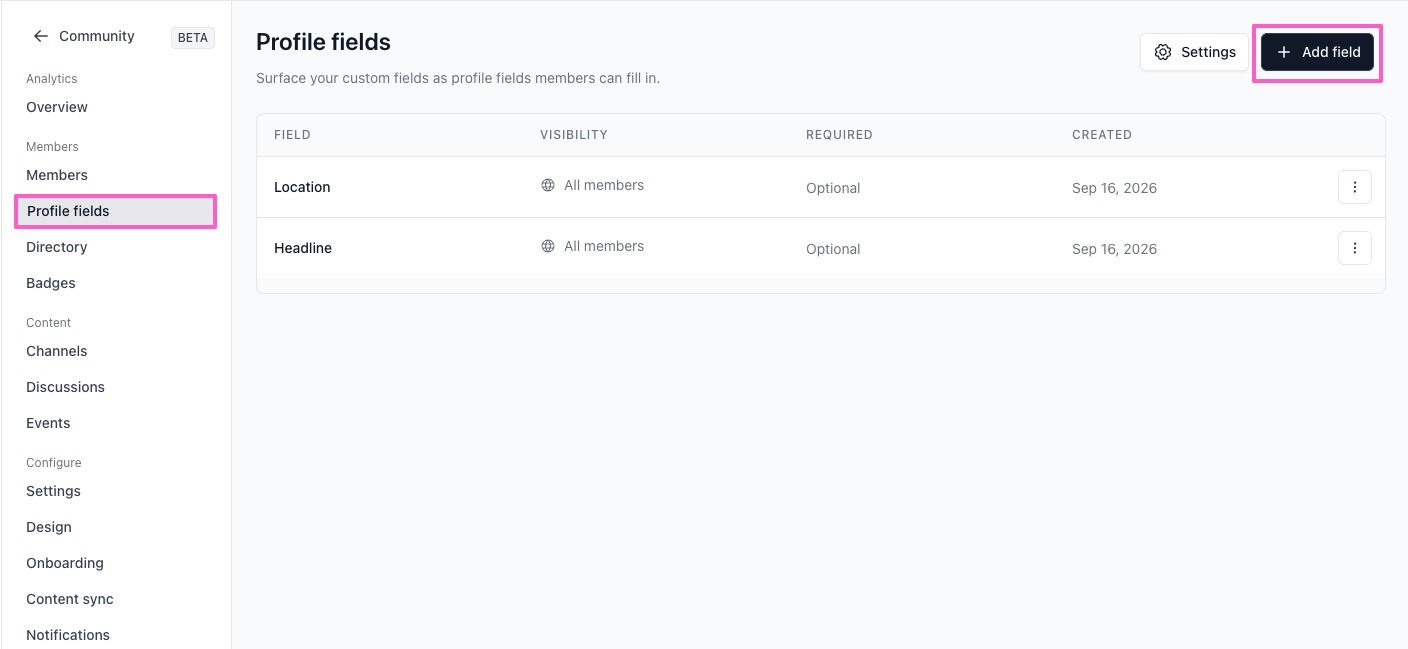
The useful detail begins with the questions. Members already provide a name, avatar, headline and location. Publishers can collect workplace information or ask what someone hopes to get from the community. Location now uses search and selection rather than free text, a practical improvement for discovering where people are based.
Custom profile fields can be required or optional, visible to all members or restricted to admins. Publishers can rearrange the questions and add fields later; existing members are prompted for new answers on their next visit. The help documentation describes mapping profile questions to subscriber custom fields.
Those answers write back to subscriber records, where they can serve segments, automations and merge tags. Consider a hypothetical architecture newsletter: a member’s city could inform a local event segment, while a stated interest in restoration could inform a relevant email journey. These are possible publisher workflows, not automatically created campaigns.
The editorial question is which answers deserve to be asked for. A workplace field has a purpose if members want professional introductions. A private ambition may help an editor serve a reader without becoming something everyone else can inspect. A good host need not distribute the guest book’s every confidence.
Source: Profile-field documentation
Illustrative workflow · configured by the publisher
Find someone, keep your discretion
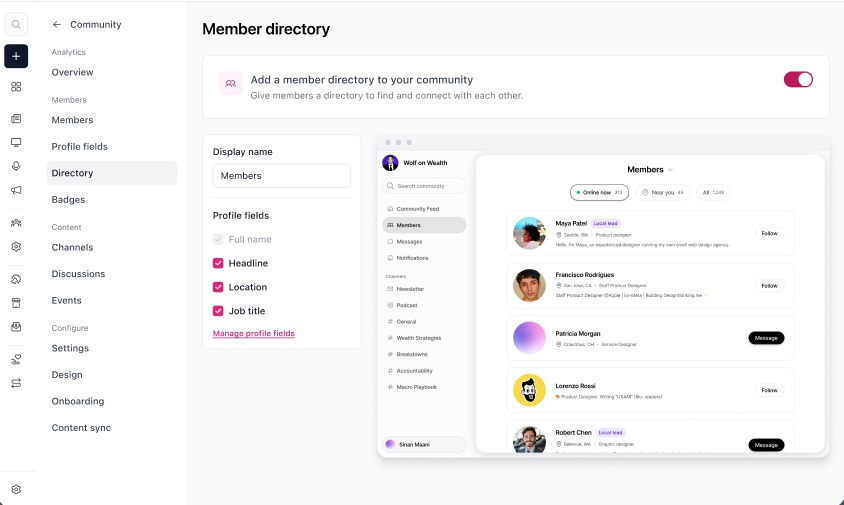
The directory makes that profile information browsable. Publishers choose which eligible fields appear on cards and can change their order or rename the directory. Admin-only answers stay off directory cards. The settings distinguish the information on a card from the information on a full profile: removing a field from a card does not remove it from the profile.
Near Me and Online Now offer two routes into discovery. One helps people find nearby members; the other helps them find members currently online. Global Search is available when someone already knows whom they want to find.
There are two essential brakes. The directory starts disabled, so the publisher decides when to enable it under Community → Directory. Members can also hide their profiles from the directory and remain in the community. Joining a conversation does not oblige anyone to advertise their presence on a roster.
For a local publication, the possibility is easy to picture: a reader might discover another member nearby before proposing a coffee. For a specialist publication, a workplace or role could supply the opening line. These examples illustrate why a directory might be useful; they are not accounts of measured results.
Source: Directory documentation · September release
Visible by choice.
Publishers enable the directory. Members can hide themselves and stay in the community.
An invitation back into the conversation
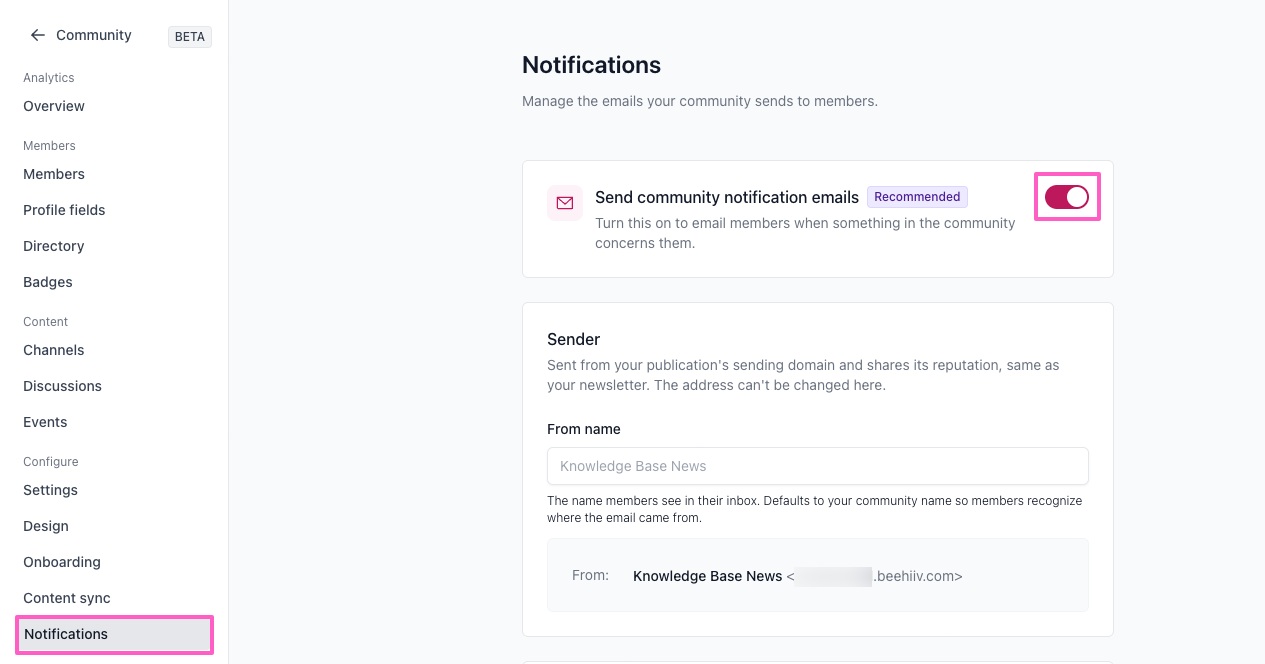
A directory can make an introduction. It cannot make everyone remember to return. Email notifications address that next step, alerting members to activity such as direct messages, comments, replies, follows and earned badges, with links back into the conversation.
Publishers enable email notifications; members choose which kinds they receive. Newsletter subscription preferences remain separate. Someone can want the weekly edition without wanting every community alert, or enjoy a conversation without treating it as another newsletter subscription.
The release says publishers need to enable their custom domain and sender name first. The help page adds that notification emails use the publication’s sending domain and share its reputation. Separate preferences therefore do not mean separate sending infrastructure.
For the publisher, the practical opportunity is a timely invitation: a reply has arrived, and there is somewhere specific to go. That is a more concrete reason to return than a general request to be more engaged. Whether the invitation produces a worthwhile visit depends on what awaits it.
Source: Notification documentation · September release
The editor can hand over the keys
More introductions can mean more work. The Community Manager role sits between Moderator and Community Admin, giving a teammate responsibility for channels, member invitations and removals, Moderator management and reported content. A Manager needs a team seat in the publication or workspace.
The September release reserves consequential powers for Admins: granting Admin access, promoting Managers and taking the community offline. Managers can ban members and Moderators, but cannot ban other Managers or Admins.
That division makes delegation specific. A publisher can assign the daily running of the room while retaining authority over who runs it. The useful promise is operational: someone can deal with the reported post while the editor finishes tomorrow’s issue. Good conversation may look effortless. Keeping it that way usually requires somebody’s effort.
A membership benefit with a job to do
beehiiv’s Community product supports gating access behind one or more paid subscription tiers. Subscribers use their existing beehiiv account. A publisher could make community access part of a premium membership, with the opportunity to meet relevant people alongside the newsletter itself. Community is available on beehiiv’s paid publisher plans, according to the September announcement; that platform requirement is distinct from charging readers to join.
The attraction needs a clear purpose. A professional circle might offer informed peer discussion. A local community might help neighbors exchange knowledge. Charging for admission is a commercial choice; the directory supplies a way to discover fellow members once inside.
The product page presents community as a route to revenue and retention. Available features establish the mechanism, not the outcome. The cited materials do not establish that this member-directory release causes a particular reduction in subscription cancellations.
A publisher testing the idea should ask whether members make useful connections, return to discussions and regard access as worth paying for. To assess retention, compare subscription renewals over a defined period and account for differences between participating and nonparticipating readers. Enthusiasts may have been likelier to renew already.
The interesting wager is modest enough to be credible: give readers a reason to know one another, and see whether the publication becomes more valuable to them. The next great discovery in a newsletter might be someone else who reads it.
Source: Community product details
Your newsletter should be an asset you own.
beehiiv is the newsletter platform built for publishers who want to grow a list, send beautiful issues, and monetise without stitching five tools together.
The practical questions
When did beehiiv add the member directory?
The member directory was announced on September 17, 2026, following the July launch of Community.
Is the directory enabled automatically?
No. It starts disabled. Publishers can enable it under Community → Directory, and members can hide themselves while remaining in the community.
Can profile answers be used in email workflows?
Yes. Answers map to subscriber custom fields that can be used in segments, automations and merge tags.
Do community alerts change newsletter preferences?
No. Members control community notification types separately from their newsletter subscription preferences.
Can community access be a paid membership benefit?
Yes. Publishers can gate community access behind one or more paid subscription tiers. This capability does not establish a guaranteed retention gain.